EasyManua.ls Logo

ION 30ACi+ - User Manual

ION 30ACi+
12 pages
Print Icon
To Next Page IconTo Next Page
Loading...
OPERATION MANUAL
Dated: 02/10/2015
Document Name: 30-35ACi+&Deluxe_OM
Page 1 of 12
30ACi+, 30ACi Deluxe,
35ACi+ and 35ACi Deluxe
Battery Backup System
Register your product at www.sumpro.com
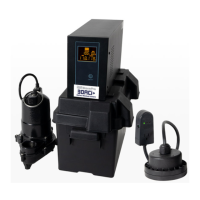
30ACi+
1. 600 va Inverter, PN: TW20313
2. Battery Box, PN: EP0----300
3. WC33M, PN: M5235033MN
4. Ion+ Switch/Alarm, PN: iNP20306
5. Ion Pipe Mount Bracket, PN: iN-SPB-1
6. Battery Leads, PN: TW20354
30ACi Deluxe
1. 600 va Inverter, PN: TW20313
2. Battery Box, PN: EP0----300
3. (2) WC33M, PN: M5235033MN
4. Ion Genesis, PN: iNG2-10-1B
5. Battery Leads, PN: TW20354
35ACi+
1. 800 va Inverter, PN: TW20315
2. Battery Box, PN: EP0----300
3. BA33M, PN: HP20180
4. Ion+ Switch/Alarm, PN: iNP20306
5. Ion Pipe Mount Bracket, PN: iN-SPB-1
6. Battery Leads, PN: TW20354
35ACi Deluxe
1. 800 va Inverter, PN: TW20315
2. Battery Box, PN: EP0----300
3. (2) BA33M, PN: HP20180
4. Ion Genesis, PN: iNG2-10-1B
5. Battery Leads, PN: TW20354
3 3
1 1
4 4
6 6
2 2
5 5
3
3
4
4
1 1
5 5
2 2
35ACi+
35ACi Deluxe
30ACi+
30ACi Deluxe

Questions and Answers

  • K
    Kevin HumphreyAug 19, 2025
    What to do if my ION UPS AC power is available but the inverter will not operate in AC mode?
    • L
      lmarshallAug 19, 2025
      First, push and hold the power button on the front of the unit for 3 to 5 seconds. Then, check all AC output connections for any looseness. Finally, check the main 15 amp circuit breaker to the wall outlet.
  • L
    lanekaylaAug 21, 2025
    What to do if the ION UPS pump runs but does not deliver water?
    • C
      Cynthia StoneAug 22, 2025
      First, check if the check valve is installed backwards; the arrow on the valve should point in the direction of flow. The discharge shut-off valve (if used) may be closed. Then, inspect the impeller or volute openings for clogs, and clean if necessary. The pump could be air-locked, so start and stop it several times by plugging and unplugging the cord, and check for a clogged vent hole in the pump case. Consider drilling a 1/8 inch hole into the PVC pipe. Also, check the inlet holes in the pump base for clogs and clean them. Finally, the vertical pumping distance may be too high; reduce the distance or change the discharge fittings of the pump.
  • W
    Warren FoleyAug 26, 2025
    Why does my ION UPS pump run and pump out the sump but not stop?
    • G
      Gloria MaldonadoAug 27, 2025
      First, unplug the pump/switch plug from the inverter. Then, plug the pump back into the switch plug and plug the switch plug into a wall outlet. If the pump does not turn on right away, and the water level is not at the On level, let the pump go through an On / Off cycle a few times to ensure that the switch is functioning properly. The basin may need to be filled with a garden hose or bucket. Plug pump/switch plug back into one outlet on the inverter and test again. If the pump turns on right away, and the water level is not at the On level, the switch may have to be replaced.
  • D
    Derek ThompsonAug 28, 2025
    How to fix an ION UPS inverter that overheats?
    • J
      Jeffrey WhiteAug 28, 2025
      Reduce the load on the inverter and allow it to cool down.
  • J
    Jillian TurnerAug 30, 2025
    What to do if my ION UPS pump runs but only delivers a small amount of water?
    • P
      Patrick BarnesAug 30, 2025
      The pump may be air-locked, so start and stop it several times by plugging and unplugging the cord. Also, check for a clogged vent hole in the pump case; consider drilling a 1/8 inch hole into the PVC pipe. The vertical pumping distance may be too high, so reduce the distance or change the discharge fitting of the pump. Inspect the inlet holes in the pump base for clogs and clean the strainer and openings. The impeller or volute openings may be fully or partially clogged, so remove the pump and clean them. The pump impeller might be partially clogged with tar or paint, causing the motor to run slow and overload, so remove the pump and clean it.
  • K
    Kevin GreeneSep 1, 2025
    Why does my ION UPS fuse blow or circuit breaker trip?
    • S
      Sarah JonesSep 1, 2025
      The pump impeller may be partially clogged with tar or paint, causing the motor to run slow and overload, so remove the pump and clean it. The motor stator may be defective. Ensure the fuse size or circuit breaker is adequate; it must be 15 amp. The impeller or volute opening may be fully or partially clogged, so remove the pump and clean it.
  • C
    Carol RileySep 3, 2025
    What causes low surge power in my ION UPS?
    • M
      Molly CooperSep 3, 2025
      Low surge power can be caused by weak batteries or battery cables that are too long. Refer to the cable and battery recommendations in this manual.
  • A
    Adrienne WardSep 5, 2025
    What to do if my ION UPS inverter is in inverter mode but has no power?
    • A
      Adam MarshSep 5, 2025
      Check the display to see if a low battery condition is present or if there is a fault condition. Remove all loads, unplug the AC power cord for 10 seconds, and plug it back in. Allow the battery to charge when the AC power resumes before running the inverter on battery again.
  • A
    Amanda AcostaSep 8, 2025
    What to do if my ION UPS motor runs for a short time then stops?
    • K
      kevinandersonSep 8, 2025
      The inlet holes in the pump base may be clogged, so remove the pump and clean the openings. The pump impeller may be partially clogged with tar or paint, causing the motor to run slow and overload, so remove the pump and clean it. The motor stator may be defective.
  • J
    John BarnesSep 9, 2025
    What to do if my ION UPS pump does not run and hums?
    • R
      Rachel BrownSep 10, 2025
      The inverter circuit breaker may be off. The water level in the sump may not have reached the turn-on level. The pump cord may not be making contact in the receptacle. The switch may not be working properly; plug the pump directly into a wall outlet without the switch plug. If the pump runs, the switch may need to be replaced. If all of the above are OK, then the motor could be malfunctioning.

Summary

30 ACi+ System

Important Safety Instructions

General Safety Precautions

Details critical warnings and precautions for safe operation and installation of the battery backup system.

Personal Precautions

Battery Requirements and Types

Installation Instructions

System Testing

Verifying Pump Operation

Details how to test the pump's functionality in both AC and DC modes to ensure proper operation.

Technical Specifications

30 ACi+;30 ACi Deluxe Specs

Lists inverter voltage, power, frequency, and pump specifications for 30ACi+ and 30ACi Deluxe models.

35 ACi+;35 ACi Deluxe Specs

Lists inverter voltage, power, frequency, and pump specifications for 35ACi+ and 35ACi Deluxe models.

Warranty Void Conditions

Troubleshooting

Fan, Power, and Display Issues

Addresses issues like constant fan operation, no power, or no display message on the inverter.

Troubleshooting: Inverter and Pump Issues

Troubleshooting: Pump Performance and Starting

3 Year Residential Warranty

ION 30ACi+ Specifications

General IconGeneral
TopologyLine Interactive
CommunicationUSB
Input Frequency50/60Hz
Output Frequency50/60 Hz
ProtectionOverload
Operating Temperature0-40°C
Humidity0% to 95% non-condensing
Typical Recharge Time6 hours to 90% capacity

Related product manuals