EasyManua.ls Logo

ION 30ACi+ - User Manual

ION 30ACi+
12 pages
Print Icon
To Next Page IconTo Next Page
Loading...
OPERATION MANUAL
Dated: 02/10/2015
Document Name: 30-35ACi+&Deluxe_OM
Page 1 of 12
30ACi+, 30ACi Deluxe,
35ACi+ and 35ACi Deluxe
Battery Backup System
Register your product at www.sumpro.com
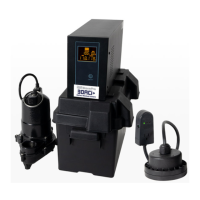
30ACi+
1. 600 va Inverter, PN: TW20313
2. Battery Box, PN: EP0----300
3. WC33M, PN: M5235033MN
4. Ion+ Switch/Alarm, PN: iNP20306
5. Ion Pipe Mount Bracket, PN: iN-SPB-1
6. Battery Leads, PN: TW20354
30ACi Deluxe
1. 600 va Inverter, PN: TW20313
2. Battery Box, PN: EP0----300
3. (2) WC33M, PN: M5235033MN
4. Ion Genesis, PN: iNG2-10-1B
5. Battery Leads, PN: TW20354
35ACi+
1. 800 va Inverter, PN: TW20315
2. Battery Box, PN: EP0----300
3. BA33M, PN: HP20180
4. Ion+ Switch/Alarm, PN: iNP20306
5. Ion Pipe Mount Bracket, PN: iN-SPB-1
6. Battery Leads, PN: TW20354
35ACi Deluxe
1. 800 va Inverter, PN: TW20315
2. Battery Box, PN: EP0----300
3. (2) BA33M, PN: HP20180
4. Ion Genesis, PN: iNG2-10-1B
5. Battery Leads, PN: TW20354
3 3
1 1
4 4
6 6
2 2
5 5
3
3
4
4
1 1
5 5
2 2
35ACi+
35ACi Deluxe
30ACi+
30ACi Deluxe

Questions and Answers

  • S
    strevinoSep 12, 2025
    Why does my ION UPS inverter trip frequently in DC mode?
    • D
      david50Sep 12, 2025
      Reduce the load and reset the inverter. The inlet holes in the pump base may be clogged, so remove the pump and clean the openings. The pump impeller may be partially clogged with tar or paint, causing the motor to run slow and overload, so remove the pump and clean it. The motor stator may be defective.
  • M
    Maria HuangSep 14, 2025
    What to do if my ION UPS inverter does not operate and there is no message on the display?
    • P
      Pamela KellerSep 14, 2025
      Push and hold the power button on the front of the unit for 3 to 5 seconds. Check the battery connections and the mains connections.
  • B
    Brittany BrooksSep 16, 2025
    Why does my ION UPS pump does not run in DC mode?
    • H
      Henry WagnerSep 16, 2025
      A possible cause is a low battery, so check the condition of the batteries and recharge them. Another possible cause is a loose or corroded battery connection, so check and clean all connections.
  • R
    reedgabrielleNov 22, 2025
    What to do if my ION UPS pump does not turn on?
    • J
      John MuellerNov 23, 2025
      To troubleshoot why the pump isn't turning on, test the pump without the Ion+ switch/alarm by plugging the pump directly into a wall outlet, without plugging it into the Ion+ switch/alarm plug. If pump still does not run, the pump may be defective. If the pump does run, test the Ion+ switch/alarm with the pump by plugging the pump into the Ion+ switch/alarm and plug the Ion+ switch/alarm plug into the wall outlet. Push up on the sensing plate through the center hole on the underside of the switch. Note that, being an electronic switch, you will not hear a clicking sound. If the pump does not turn on, the Ion+ switch/alarm may have to be replaced. If the pump does turn on, verify the range of the Ion+ switch/alarm. Your system should have been supplied with a 6” range switch. See Page 5, Fi...

Summary

30 ACi+ System

Important Safety Instructions

General Safety Precautions

Details critical warnings and precautions for safe operation and installation of the battery backup system.

Personal Precautions

Battery Requirements and Types

Installation Instructions

System Testing

Verifying Pump Operation

Details how to test the pump's functionality in both AC and DC modes to ensure proper operation.

Technical Specifications

30 ACi+;30 ACi Deluxe Specs

Lists inverter voltage, power, frequency, and pump specifications for 30ACi+ and 30ACi Deluxe models.

35 ACi+;35 ACi Deluxe Specs

Lists inverter voltage, power, frequency, and pump specifications for 35ACi+ and 35ACi Deluxe models.

Warranty Void Conditions

Troubleshooting

Fan, Power, and Display Issues

Addresses issues like constant fan operation, no power, or no display message on the inverter.

Troubleshooting: Inverter and Pump Issues

Troubleshooting: Pump Performance and Starting

3 Year Residential Warranty

ION 30ACi+ Specifications

General IconGeneral
TopologyLine Interactive
CommunicationUSB
Input Frequency50/60Hz
Output Frequency50/60 Hz
ProtectionOverload
Operating Temperature0-40°C
Humidity0% to 95% non-condensing
Typical Recharge Time6 hours to 90% capacity

Related product manuals