English (Translation of original instructions)
- 5 -
English (Translation of original instructions)
BUTTON 2 (Medium cleaning, carpet or other surfaces)
BUTTON 3 (Heavy duty cleaning, outdoors, asphalt or rough surfaces
with rubble, etc.).
NOTE: the parameters of programmes 1, 2 and 3 are factory set. To
modify any of the settings, contact the retailer’s service centre.
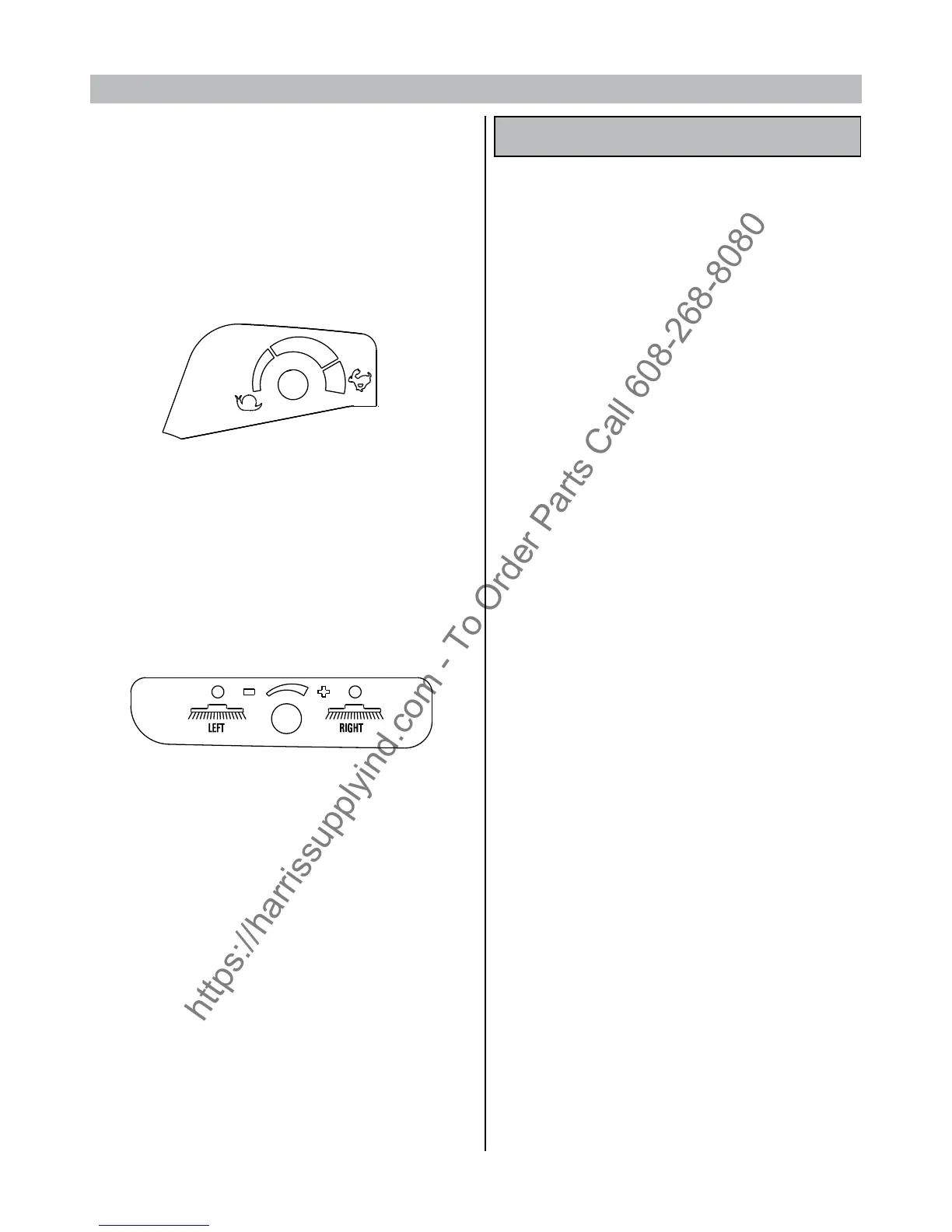
Adjust maximum forward movement speed according to the working
conditions
Lower the left and/or right side brush by pulling out and lowering
the relevant knob.
NOTE: the relevant left or right indicator light will come on.
To move the brushes back to their OFF position, pull up the knobs.
The speed of the side brushes can be changed using the adjustment
knob shown in the gure.
The machine features a red emergency stop button.
Press this button (the red warning light will come on) to bring all
machine functions, engine included, to an immediate stop. To restart
the machine, press the red button down and start up the functions
requested.
If you are using the machine on wet ground, it is essential to protect
the machine’s paper lters by turning o the aspirator motor with
the ON/OFF button.
FURTHER PERFORMANCES OF THE MACHINE FEATURING AN
ENGINE
The version featuring an engine can guarantee the same working
eciency even when the motor is o, for instance when the fuel has
run out or when working in closed environments.
The working autonomy, in this case, will depend on the capacity
(Amperes/hour) of the batteries installed, on the intensity of the work
programme chosen and on the battery charge status.
To guarantee the working life of the batteries, the machine features
some safety systems:
1- When the battery voltage drops below 20.5 Volt, all machine
functions, with the exception of the traction system, are automatically
stopped. When this situation occurs, recharge the batteries or turn
on the engine.
2- Protection against excessive battery charging
Being tted with a current generator featuring an electronic circuit,
that acts as voltage regulator, the machine can correctly charge the
battery without damaging it with an excessive charge.
In fact, when the battery has been properly charged, it will except
no further charging energy.
3- Using the machine with a battery or engine
Further to the tests effected and the results obtained from the
evaluation of the energy consumption of our hybrid system, we can
arm that Genius 1050 can work autonomously. In other words, the
machine does not have to be stopped to recharge the set of batteries
. Tests have been made with all three programmes at the user’s
disposal, namely P1, P2 and P3, on asphalted surfaces and normal
slopes, and the sweeper has worked autonomously.
However, being the machine designed also for heavy duty working
conditions (slopes of over 16%, extremely rough surfaces to clean),
the batteries may need to be recharged.
In this case, we recommend the use of an intelligent battery
charge with a IUIa charging curve and a nal proportional charge,
appropriately designed for this kind of machine and of a suitable size
for the battery installed.
After you have ended your work, disable the selected programme (1-
2-3) and turn o the engine by icking the toggle switch ‘I’ to OFF.
Before leaving the machine, make sure that the side brushes are raised
from the oor, the parking brake is engaged and that the ignition key
has been take out of the instrument board.
BUTTON 1
(Light cleaning, indoors, concrete, quartz, smooth oors,
etc.)


 To Next Page