GB
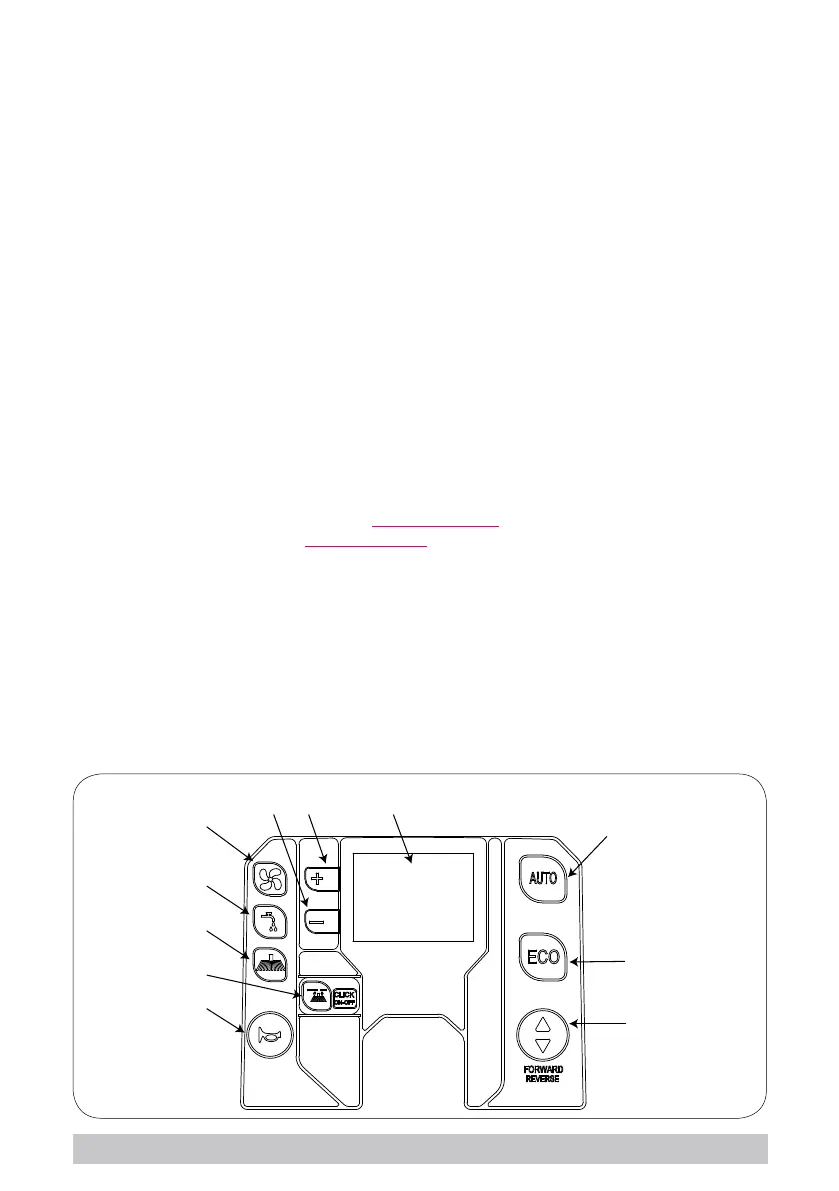
► Suction button (g. 12, ref. 1): in the AUTO and ECO programs, starts/stops the suction
motor; outside of these programs, starts the suction motor in manual mode, lowering the
squeegee.
► Water/detergent button (g. 12, ref. 2): in the AUTO and ECO programs, starts/stops
the delivery of water/detergent; outside of these programs, starts/stops delivery in manual
mode. In manual mode, pressing and holding the button (two seconds) accesses the mode
for adjusting the quantity of water/detergent delivered, using the “+” and “-”buttons; the
adjustment ranges from 1 to 5 or can be automatic, based on machine speed. Pressing
and holding the button (four seconds) accesses the mode for adjusting the quantity of de-
tergent (CHEM-DOSE accessory) using the “+” and “-”buttons; the adjustments are “OFF”
- 0.2% - 0.4% - ... - 7%, if enabled, alongside the tap symbol the vial symbol is shown to
indicate that the accessory is operating. In the AUTO or ECO program, changes to either of
these parameters will terminate the selected program and activate manual mode.
► Brush button (g. 12, ref. 3): in the AUTO and ECO programs, starts/stops the brushes;
outside of these programs, starts/stops operation of the brushes in manual mode. Press-
ing and holding the button (two seconds) accesses the mode for adjusting brush pressure,
using the “+” and “-”buttons; the adjustment ranges from 1 to 5 (VERSION WITH TWO
BRUSHES ONLY ). In the AUTO or ECO program, changes to this parameters will termi-
nate the selected program and activate manual mode.
► Attach-release brushes “CLICK-ON-OFF” (g. 12-ref. 4): used to automatically attach
and detach the brushes. Pressing the button once after starting the machine releases
the brushes, pressing it a second time activates automatic brush attachment. The button
is only enabled when all the functions are deactivated (suction motor and brushes); it
can also be used to navigate the “Technical Menu”. If the “ELECTRICAL PARAMETERS”
function is active in the “Technical Menu”, the attach/release function is disabled and the
button takes on a new meaning; pressing the button displays the brush motor current draw,
the current setting, battery voltage and internal board voltage.
6
7
8
1
9 10 11
2
3
4
5
12
21


 To Next Page