iriver intro
Using the Device
12
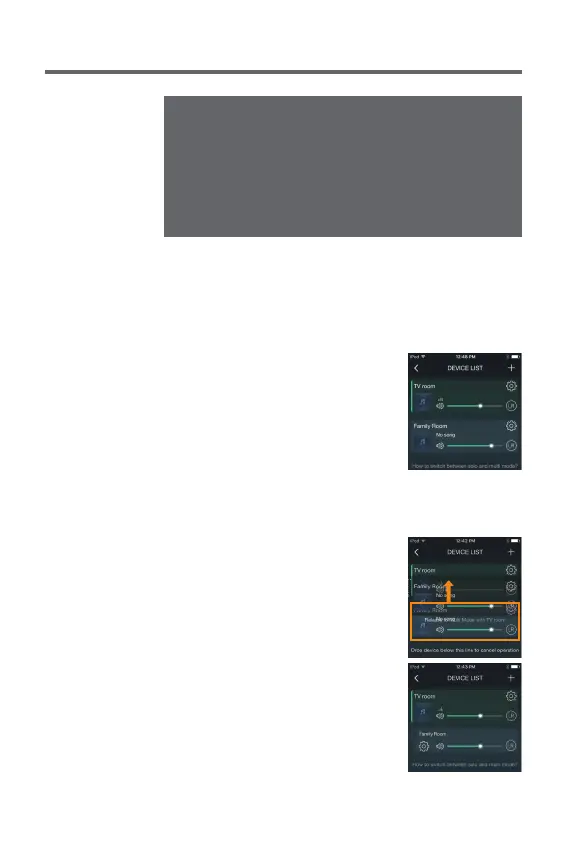
How to use Multi-room functionality
1. Device can be added automatically
through WPS or manually.
2. You can replay the same music on
different devices if you move to
other devices to which you want
to connect while pressing the
Multi-room-enabled device on
[Device List].
User Guide
How to use Multi-room functionality
You can listen to majestic stereo sound from up to 8 LS150
devices attached to the same network (Multi-mode).
1. Select [WI-Fi] by turning the
[Power/Menu] knob of the device
and connect to the Wi-Fi network.
2. Execute the [IRIVER Live Stream]
app.
iriver intro
Currently available streaming services include Spotify, TIDAL,
QQMusic, vTuner and iHeartRADIO and the list of available
streaming services may be expanded or curtailed in the future.
For devices supporting DLNA, you can select devices
indicated as [LS150_xxxxxx] on the Wi-Fi list or connect to
the same network.
Replay may not be smooth depending on device/computer
or Wi-Fi network environment.
iriver intro


 To Next Page