EasyManua.ls Logo

iRobot Roomba 800 - User Manual

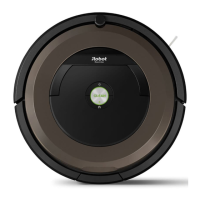
iRobot Roomba 800
26 pages
Print Icon
To Next Page IconTo Next Page
Loading...
Roomba
®
800
b
®
8
00
Owner’s Guide
Question and Answer IconNeed help?

Do you have a question about the iRobot Roomba 800 and is the answer not in the manual?

Summary

Getting Started with Your Roomba

Set up the Home Base

Place Home Base against a wall, connect to socket, and ensure clearance.

Wake up Roomba

Turn robot over, remove inserts, and place on Home Base to activate battery.

Roomba is Ready to Clean

Robot has partial charge; press CLEAN to wake and start cleaning.

Robot Anatomy Overview

Top View Components

Illustrates and labels the top view of the Roomba, including faceplate and sensors.

Bottom View Components

Illustrates and labels the bottom view, showing wheels, extractors, and cliff sensors.

Roomba Buttons and Lights

Control Panel Identification

Identifies and describes the buttons and indicator lights on the Roomba's control panel.

Using Your Roomba

Basic Operation Commands

Explains how to wake, start, pause, resume, dock, and spot clean the Roomba.

Battery and Charging Guide

Details charging, indicator lights, and battery status interpretation.

Scheduling Roomba Cleanings

Setting and Modifying Schedule

Provides instructions for setting or changing the Roomba's cleaning schedule.

Deleting a Scheduled Time

Outlines the procedure to remove a previously set cleaning schedule.

Roomba Accessories

Dual Mode Virtual Wall Barrier

Explains the function and usage of the optional Dual Mode Virtual Wall barrier.

Virtual Wall and Halo Modes

Describes Virtual Wall mode for blocking openings and Halo mode for protective zones.

Virtual Wall Lighthouse Operation

Details the Virtual Wall Lighthouse accessory functionality.

Lighthouse and Virtual Wall Modes

Explains Virtual Wall mode and Lighthouse mode for guidance.

Remote Control Operation

Explains how to use the remote control for Roomba operation and functions.

Robot Care and Maintenance

Recommended Maintenance Schedule

Provides a table for care frequency and replacement frequency of Roomba parts.

Cleaning Front Caster Wheel

Step-by-step guide to remove, clean, and reinstall the front caster wheel.

Cleaning Side Brush

Instructions for removing, cleaning, and reattaching the side brush.

Emptying and Cleaning the Bin

Instructions on removing, emptying the dustbin, and cleaning the filter.

Cleaning the Extractors

Detailed steps for removing, cleaning, and reinstalling the Roomba's extractors.

Troubleshooting Roomba Issues

Understanding Error Messages

Explains how Roomba communicates errors and how to repeat messages.

Resetting Roomba Software

Instructions to perform a software reset to clear settings and resolve issues.

Lithium Ion Battery Safety

Important safety information and regulations for shipping lithium-ion batteries.

Battery Removal Procedure

Guides for removing the Roomba's battery.

Battery Reinstallation Procedure

Guides for correctly reinstalling the Roomba's battery and securing the door.

Important Safety and Compliance Information

Appliance Usage Guidelines

Safety information for appliance use by children and general precautions.

Operation and Power Cord Warnings

Warnings about robot movement, outlets, and using approved power cords.

General Safety Instructions

Basic safety and operating instructions to retain for future reference.

Disposal and Recycling Information

Guidelines for proper disposal and recycling of electrical appliances and batteries.

Robot Usage Warnings

Warnings about indoor use, supervision, and avoiding certain substances.

Battery and Charging Safety

Safety guidelines for charging, battery handling, and disposal.

Roomba Use Restrictions

Restrictions on using Roomba in dry environments and avoiding liquids.

Summary

Getting Started with Your Roomba

Set up the Home Base

Place Home Base against a wall, connect to socket, and ensure clearance.

Wake up Roomba

Turn robot over, remove inserts, and place on Home Base to activate battery.

Roomba is Ready to Clean

Robot has partial charge; press CLEAN to wake and start cleaning.

Robot Anatomy Overview

Top View Components

Illustrates and labels the top view of the Roomba, including faceplate and sensors.

Bottom View Components

Illustrates and labels the bottom view, showing wheels, extractors, and cliff sensors.

Roomba Buttons and Lights

Control Panel Identification

Identifies and describes the buttons and indicator lights on the Roomba's control panel.

Using Your Roomba

Basic Operation Commands

Explains how to wake, start, pause, resume, dock, and spot clean the Roomba.

Battery and Charging Guide

Details charging, indicator lights, and battery status interpretation.

Scheduling Roomba Cleanings

Setting and Modifying Schedule

Provides instructions for setting or changing the Roomba's cleaning schedule.

Deleting a Scheduled Time

Outlines the procedure to remove a previously set cleaning schedule.

Roomba Accessories

Dual Mode Virtual Wall Barrier

Explains the function and usage of the optional Dual Mode Virtual Wall barrier.

Virtual Wall and Halo Modes

Describes Virtual Wall mode for blocking openings and Halo mode for protective zones.

Virtual Wall Lighthouse Operation

Details the Virtual Wall Lighthouse accessory functionality.

Lighthouse and Virtual Wall Modes

Explains Virtual Wall mode and Lighthouse mode for guidance.

Remote Control Operation

Explains how to use the remote control for Roomba operation and functions.

Robot Care and Maintenance

Recommended Maintenance Schedule

Provides a table for care frequency and replacement frequency of Roomba parts.

Cleaning Front Caster Wheel

Step-by-step guide to remove, clean, and reinstall the front caster wheel.

Cleaning Side Brush

Instructions for removing, cleaning, and reattaching the side brush.

Emptying and Cleaning the Bin

Instructions on removing, emptying the dustbin, and cleaning the filter.

Cleaning the Extractors

Detailed steps for removing, cleaning, and reinstalling the Roomba's extractors.

Troubleshooting Roomba Issues

Understanding Error Messages

Explains how Roomba communicates errors and how to repeat messages.

Resetting Roomba Software

Instructions to perform a software reset to clear settings and resolve issues.

Lithium Ion Battery Safety

Important safety information and regulations for shipping lithium-ion batteries.

Battery Removal Procedure

Guides for removing the Roomba's battery.

Battery Reinstallation Procedure

Guides for correctly reinstalling the Roomba's battery and securing the door.

Important Safety and Compliance Information

Appliance Usage Guidelines

Safety information for appliance use by children and general precautions.

Operation and Power Cord Warnings

Warnings about robot movement, outlets, and using approved power cords.

General Safety Instructions

Basic safety and operating instructions to retain for future reference.

Disposal and Recycling Information

Guidelines for proper disposal and recycling of electrical appliances and batteries.

Robot Usage Warnings

Warnings about indoor use, supervision, and avoiding certain substances.

Battery and Charging Safety

Safety guidelines for charging, battery handling, and disposal.

Roomba Use Restrictions

Restrictions on using Roomba in dry environments and avoiding liquids.

Overview

This document is the owner's guide for the iRobot Roomba 800 Series, a robotic vacuum cleaner designed for automated floor cleaning.

Function Description:

The iRobot Roomba 800 Series is a robotic vacuum cleaner that autonomously navigates and cleans floors. It is designed to clean once per day, up to seven times per week, and can be scheduled to operate at specific times. The robot is equipped with various sensors to detect dirt, navigate around obstacles, and avoid stairs. It features an AeroForce™ cleaning system with extractors for efficient debris pickup. The Roomba automatically returns to its Home Base® charging station when its battery is low or after completing a cleaning cycle.

Important Technical Specifications:

While specific technical specifications like battery capacity (mAh), motor power (W), or bin volume (L) are not explicitly listed with numerical values in this guide, the document highlights several key features:

  • Battery: The Roomba uses an iRobot Lithium Ion Battery. The guide advises using only this specific battery for optimal performance and provides instructions for safe handling and shipping of the battery, including removal and taping of contacts. It mentions a 16-hour refresh charge.
  • Charging: The robot charges on a Home Base® charging station, which connects to a standard wall socket. The Home Base should be placed against a wall on a hard, level surface, at least four feet (1.2 meters) from stairs, with a clear path for Roomba.
  • Navigation: The Roomba utilizes RCON sensors, Cliff Sensors, and Home Base® Contact Points for navigation and docking.
  • Cleaning System: It features AeroForce™ Extractors and a Spinning Side Brush for cleaning.
  • Bin Capacity: The robot includes a High-Capacity Powered Bin.
  • Virtual Wall/Lighthouse (Optional Accessories):
    • Dual Mode Virtual Wall Barrier: Can block openings up to 10 feet (3 meters) in Virtual Wall Mode or create a protective halo zone of approximately 24 inches (60 centimeters) in Halo Mode. Batteries last 8-10 months under normal use.
    • Virtual Wall Lighthouse: Can act as a Virtual Wall (blocking up to 8 feet/2.4 meters) or a Lighthouse, guiding Roomba through multiple rooms.

Usage Features:

  • Getting Started:
    1. Set up the Home Base® against a wall and plug it in.
    2. Wake up Roomba by removing the yellow bin insert and battery pull tab, then place it on the Home Base to activate the battery.
    3. Press CLEAN to wake up Roomba, then press CLEAN again to start cleaning.
  • Operation:
    • Press CLEAN to start or pause a cleaning cycle.
    • Press DOCK to send Roomba back to the Home Base.
    • Press SPOT for spot cleaning localized debris.
  • Scheduling: Roomba can be scheduled to clean once per day, up to seven times a week.
    1. Press SCHEDULE.
    2. Use HOUR and MINUTE buttons to set the schedule.
    3. Press OK to confirm.
    • To delete a scheduled time: Press SCHEDULE, use DAY to cycle, hold DAY for five seconds when the desired time is displayed, then press OK.
    • The clock can be viewed in 12-hour (AM/PM) or 24-hour format by holding CLOCK for 5 seconds.
  • Language Settings: Roomba can be set to 16 different languages (refer to global.irobot.com for more information).
  • Remote Control (Optional): Allows users to turn Roomba on/off, steer it, and access SPOT, CLEAN/Power, and DOCK commands remotely. Requires a direct line of sight to Roomba and will not work near a Virtual Wall.
  • Safety Guidelines:
    • For indoor use only; not a toy.
    • Supervise small children and pets during operation.
    • Operate in room temperature environments.
    • Clean with a water-dampened cloth only; do not spray or pour liquids.
    • Do not pick up burning/smoking items, spills of bleach, paint, chemicals, or wet substances.
    • Remove clutter (clothing, toys, cords) and fragile objects before cleaning.
    • Use a physical barrier if cleaning near a balcony.
    • Do not place anything on top of the robot.
    • Be aware of the robot's autonomous movement.
    • Do not operate in areas with exposed electrical outlets on the floor.
    • Use only the region-approved power supply cord provided.

Maintenance Features:

The guide provides a recommended robot care schedule to ensure peak performance:

  • After each use: Empty the bin.
  • Once per week (twice per week in homes with pets): Clean the filter.
    • To clean the filter: Remove the bin, grasp the yellow tab to remove the filter, tap it against a trash container to shake off debris, then reinsert it with the yellow tab facing up. The bin door will not close without a filter.
  • Once every 2 weeks: Clean Full Bin Sensors.
  • Once per month: Clean Front Caster Wheel, Side Brush, Cliff Sensors, and Charging Contacts.
    • Cleaning the Front Caster Wheel: Pull firmly to remove, remove debris from the cavity, spin the wheel (if restricted, remove from housing and clear axle), then reinstall.
    • Cleaning the Side Brush: Use a coin or small screwdriver to remove the screw, remove the brush, clean the brush and post, then reinstall.
  • Once every 4 months (once every 3 months in homes with pets): Clean the Extractors.
    • Cleaning the Extractors: Pinch yellow extractor frame release tabs, lift the frame, and remove obstructions. Remove extractors and yellow extractor caps, clear hair/debris from underneath caps and around metal axles. Clear hair/debris from square and hexagonal plastic pegs. Reinstall caps and extractors, matching colors and shapes of pegs/icons.
  • Battery Care:
    • Charge using the Home Base® only.
    • Use only iRobot-approved rechargeable battery packs.
    • Charge and remove the battery before long-term storage.
    • Charge indoors only.
    • Do not use a Home Base with a damaged cord or plug.
    • Disconnect Roomba from Home Base before cleaning/maintaining.
    • Ensure Home Base voltage rating matches socket voltage.
    • Dispose of used battery packs safely in a sealed plastic bag according to local regulations.
    • If a battery leaks, avoid skin/eye contact; wash affected area and seek medical advice.
    • Do not crush, dismantle, heat, incinerate, short-circuit, or immerse battery packs.
  • Troubleshooting: Roomba provides audible error messages and a blinking troubleshooting indicator (A). Press CLEAN to repeat the message. To reset Roomba's software (clearing schedules, resetting clock, resolving software issues), hold CLEAN for 10 seconds.
  • Replacement Frequency (for parts):
    • Filter: Every 2 months.
    • Extractors: Every 6-12 months.
    • The guide advises contacting iRobot Customer Care for replacement parts.

iRobot Roomba 800 Specifications

General IconGeneral
BrandiRobot
ModelRoomba 800
CategoryBattery Charger
LanguageEnglish

Videos

How To Fix iRobot Roomba 800 Not Charging

How To Charge Battery | Roomba® 800 series

Related product manuals