Page 9
MANUAL
iRoom‘s iDock / miniDock
1
2
3
4
5
1
2
3
54
English
iOS App Store & App ″iRoom‘s iDock″
• Open iOS App store and search for App "iRoom‘s iDock"
• Install App "iRoom‘s iDock"
• Open App "iRoom‘s iDock"
• Dock the iPad into iRoom‘s iDock
• Verify status "online"
• perform Firmware update if indicated.
For additional details on the iRoom‘s iDock App, please refer to the
"in App Help" and the "in App FAQ" area. As we perform frequent
iOS-App-updates the visual appearance might change.
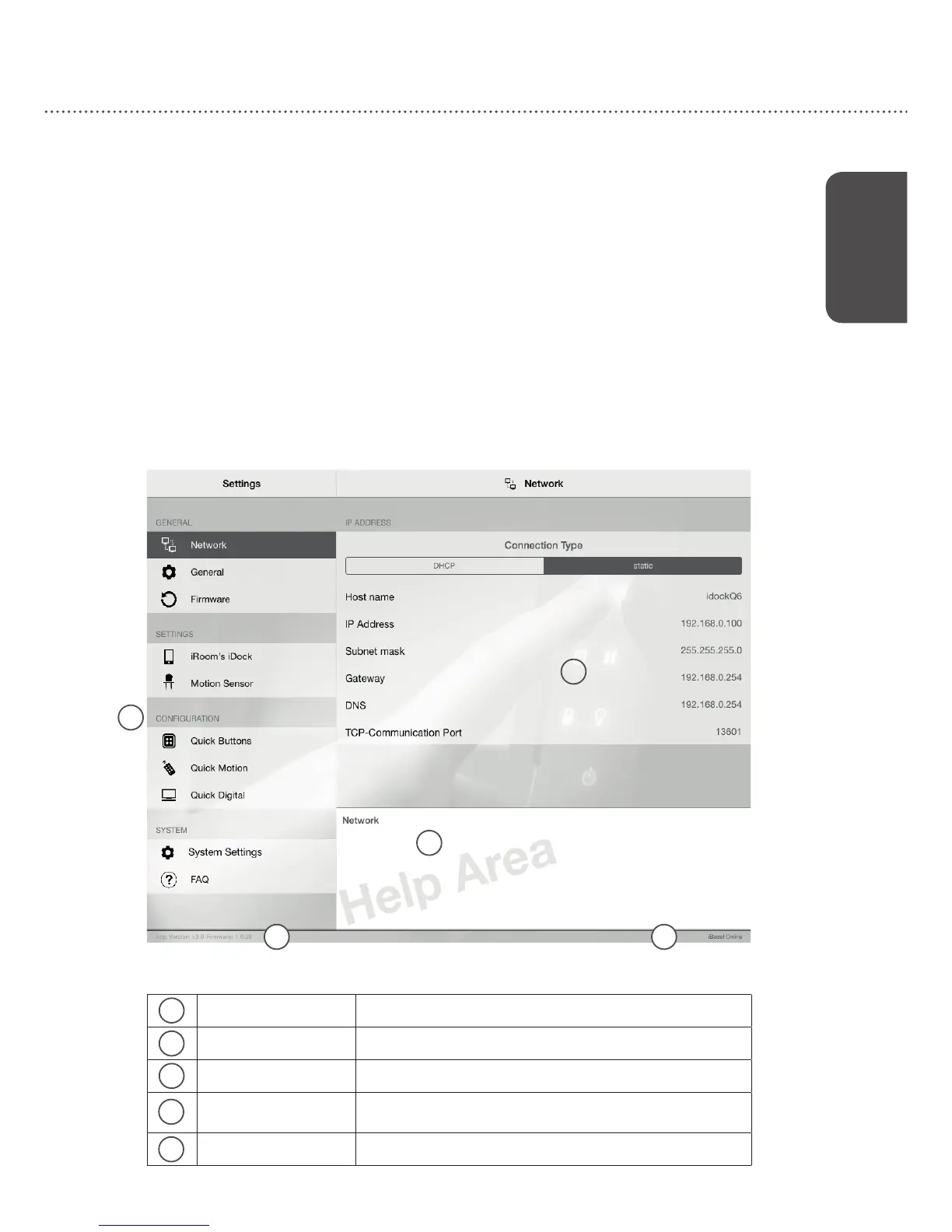
MAIN MENU Main Function Selection Area
SUB MENU Setting Adjustment and Con guration Area
inApp HELP AREA Touching text in Sub-Menu shows af liated help
App & Firmware
Version
Displays App Version number and Firmware Version installed
at your iDock (if comm. status is online)
Communication Status Displays iDock Communication status (online/of ine)


 To Next Page