Page 5
MANUAL
iRoom‘s iDock / miniDock
English
Installation Requirements
The following products and tools are mandatory for proper installation:
• installed iRoom‘s ush-mounted box (mandatory)
●
operation without iRoom‘s ush-mounted box voids warranty!
• prepared wiring
• screwdriver
• wire stripper and cutter
• latest iOS App
NOTICE
Further documents regarding the product/installation/operation can be found under:
www.iroomsidock.com
WARNING:
TO AVOID FIRE, SHOCK OR DEATH:
Turn off power at the circuit breaker
or fuse before installation.
IMPORTANT:
All installa tion work needs to be
executed by a qualied electrician
in accordance with national electrical
codes and regulations.
Electrical security:
An easily accessible, all-pole
disconnecting device is required in the
power supply circuit. Recommended
overcurrent protective device in the
mains power circuit: 6 A
NOTE:
Wiring colors may be different from
the illustration. Be sure to verify the
wiring before continuing.
CLEANING:
The product has a smooth and shiny
surface which is prone to scratches.
Handle with care.
iPad:
Please follow charging and operating
instructions of the iPad Manual.
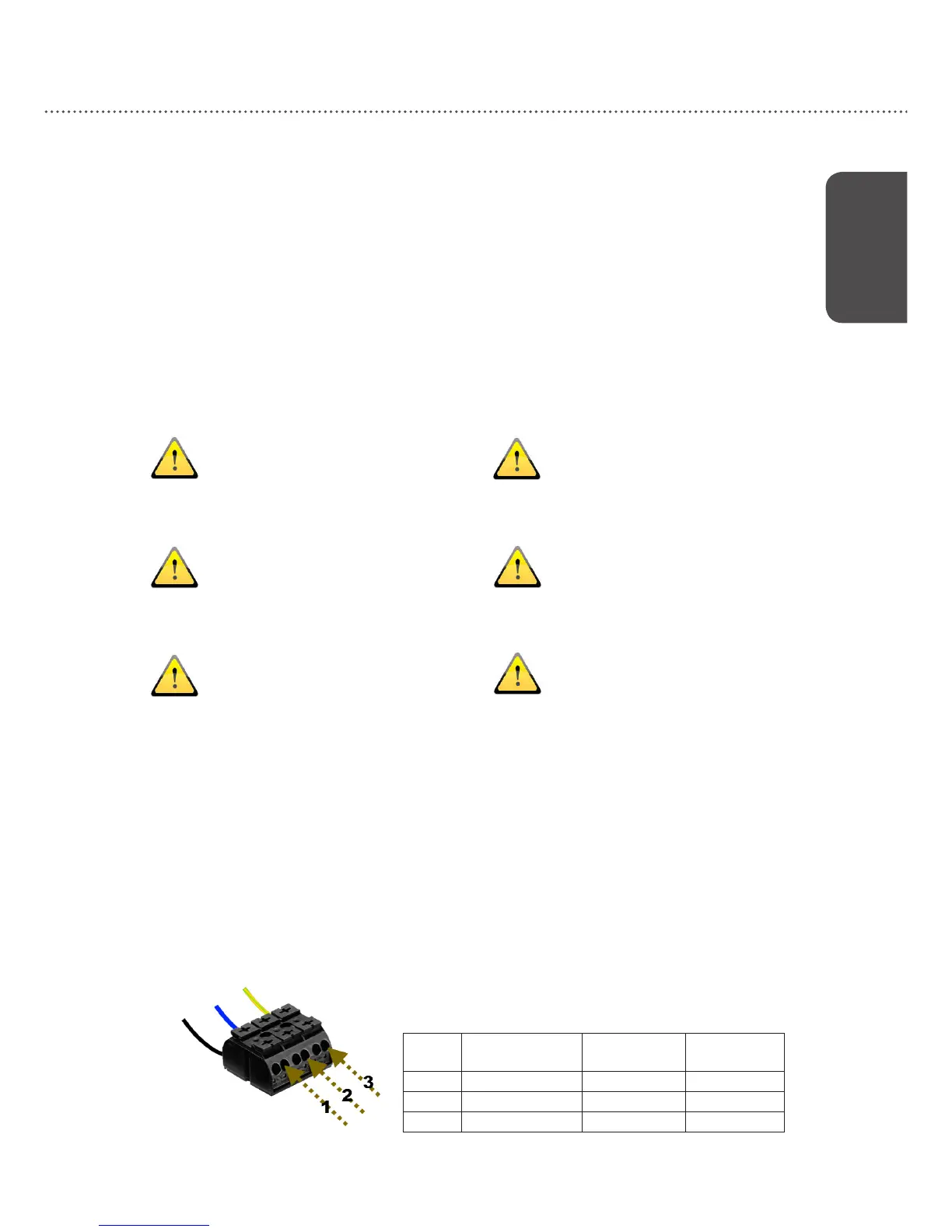
Connecting 110-240VAC
Connect the wires to the connector according to color-code:
cable coloring:
number
european standard
colour code
us standard
colour code
designation
1 black black hot (L)
2 blue white neutral (N)
3 yellow/green green ground (PE)
This information is supplied without liability.
Please proceed with setting up your miniDock using the iOS App
″iRoom‘s iDock″


 To Next Page