27 2020-05
TORNADO
EN 428000747237
Use and maintenance manual
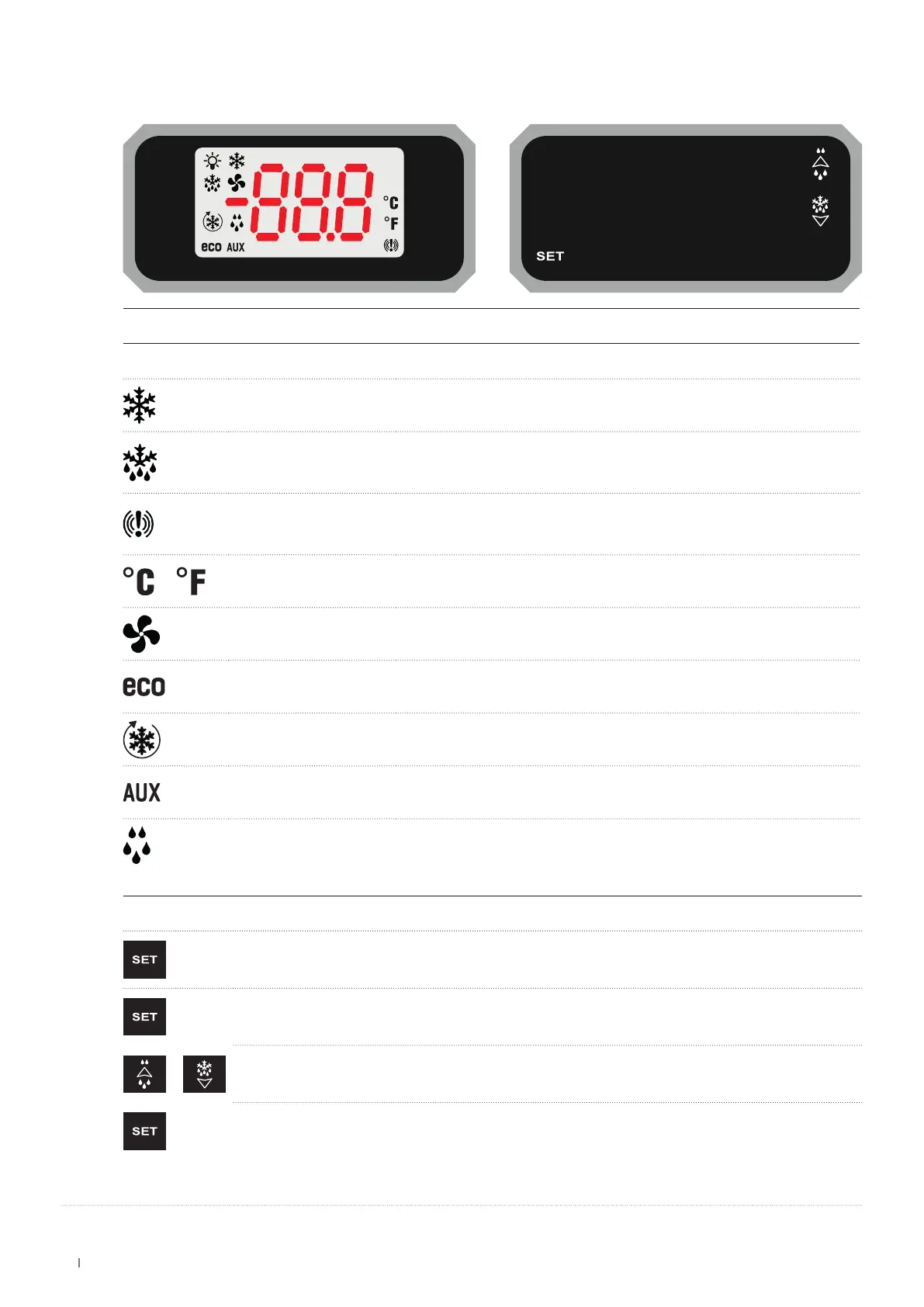
17.1 USER INTERFACE
LED
ON FLASHING
Output active
• Programming.
• Delay against close start-ups.
Defrosting in progress
• Programming.
• Dripping in progress.
• Delayed fan start-up in progress.
Temperature alarm /
Unit of measurement Programming
Fans active Delayed activation in progress
Energy saving in progress /
Continuous cycle in progress /
Auxiliary relay active /
/ Fans stopped by key
SET-POINT
DISPLAY
Press and release the key: the set-point will be displayed immediately; to go back to the temperature, wait 5
seconds or press the key again.
CHANGE
Press the key for at least 2 seconds; the set-point will be displayed and the °C LED will start to ash.
To change the value, use
the UP and DOWN ARROW KEYS.
To save the new
set-point
, press the SET
button
, or wait 15 seconds to quit programming mode.


 To Next Page