14
part of the Priority Zone, set the sensitivity
as high; otherwise, set it as low.
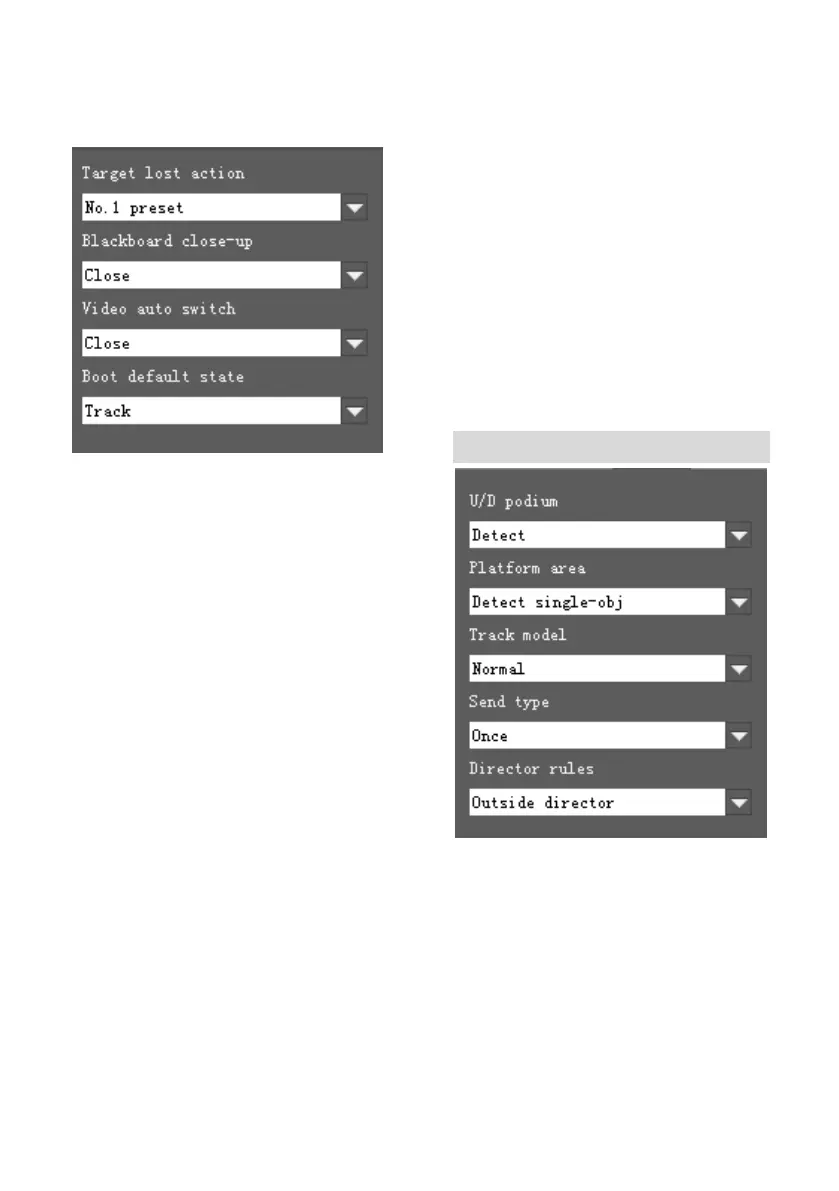
Target Lost Action: Used to define the
action to be performed if the camera loses
the tracked object for a period of time
Blackboard Close-up: Used to define the
action to be performed when Blackboard
writing sensor is triggered. When Preset 2 is
selected, the camera will go to preset 2.
When Lecturer Tracking is selected, the
camera will move to preset 2 and starts
tracking there.
Video Auto Switch: camera supports to
automatically switch between video’s, when
auto is selected as “full view camera” /
“tracking camera” channel and the
movement of step onto / walk down the
podium was selected as not detecting, the
network stream will automatically switch &
output between full view camera video and
tracking camera video according to object’s
showing up or disappearing. When the
movement of step onto / walk down the
podium was selected as detecting, network
stream will auto switch & output between
the full view camera video and tracking
camera video based on the object’s
movement of step onto / walk down podium.
Select “off”, network stream always outputs
non switchable fixed view video.
Boot default state: The action to be
performed when the camera is powered on.
Senior Parameters Setting
U/D podium: Decide whether to detect the
action of step on / step down the podium;
Platform area: Decide whether to detect
only single object or multi-object on the
platform;
Tracking mode: “Normal lock tracking
mode” means that the tracking camera
always follows the object, and does not


 To Next Page