4
1-3 Front Panel
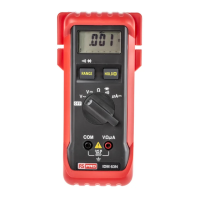
Refer to Figure 1 and to the following numbered steps to familiarize yourself with the meter's front panel controls
and connectors.
1. Digital Display — The digital display has a 3200 counts LCD readout with 65 segments analog bar graph, auto
polarity, decimal point,
, AC, DC, RANGE, >, <, , µA, MΩ or KΩ or Ω and Unit annunciators.
2. Function Switch — Select the function and range desired.
3. COM Input Terminal — Ground input connector.
4. V-Ω µA Input Terminal — Positive input connector for Volts, Ohms and Diode and currents.
5. Range Switch (Manual Range) — The "RANGE" switch is pressed to select manual ranging and to change
ranges. When the "RANGE" switch is pressed once, "RANGE" annunciator appears on the LCD. Press the
"RANGE" switch to select the appropriate range to be used. Press the "RANGE" switch and hold for 2 seconds
to return to Auto-ranging. In ",
<" function this key is used to select the or < function.
6. Hold
> Switch — This switch is used to hold measured values for all functions. Press the Hold switch until the
"
>" annunciator is displayed. Conversions are made but the display is not updated.


 To Next Page