Need help?
Do you have a question about the iTechworld ITECH100S and is the answer not in the manual?
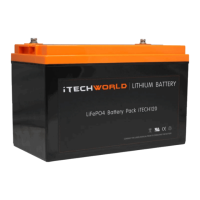
Features a pre-installed Redback Operating System for advanced control.
Includes a pre-installed Battery Management System for safety and performance.
Equipped with pre-installed cell balancing for optimal battery health.
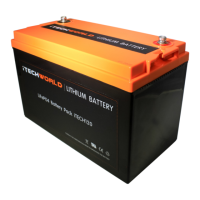
Constructed with a heavy-duty ABS casing for robustness.
Supports unlimited parallel connections for increased capacity.
Can be connected in series to form a 48-volt system.
Delivers a maximum discharge current of 250A.
Features heavy-duty, removable M8 bolt battery terminals.
Designed to be maintenance-free for user convenience.
Utilizes Lithium LiFePO4 Prismatic Cells for longevity and safety.
Includes a fitted lifting handle for secure and safe handling.
Equipped with over-discharge protection to prevent damage.
Features Australian design, development, and lithium sourcing.
Includes built-in protection against short circuits.
Covers voltage, C20 rating, charge/discharge currents, and voltages.
Details optimal operating and BMS operational temperature ranges.
Expected life cycles at 65% and 55% depth of discharge.
Lists relevant certifications like UL, CE, RoHS, UN38.3, ISO.
Includes dimensions, weight, terminal type, and case material.
Strictly prohibited to disassemble the battery; failure to comply can cause it to fail.
Electrolytes are skin/eye irritants; handle spills with soap/water or seek medical attention.
Avoid polarity reversal, direct mains connection, opening casing, physical damage, and short circuits.
Keep away from children/animals, store dry, avoid sunlight, handle carefully during transport.
Maintain optimal voltage, follow parallel connection rules, respect charging limits, ensure compatibility.
Act immediately on anomalies like shape change or liquid seeping; exercise caution with corroded terminals.
Split load connections for multi-battery banks: Pos to 1, Neg to last battery.
Connect the charging system to the battery bank in the same manner as load connections.
Recommended charge settings: Bulk 14.40V, Float 13.50V, Max current 100A, Equalization Disabled.
Study the discharge curve for a better understanding of performance compared to lead-acid.
Table detailing battery voltage at various states of charge under 0.1C load.
Safe mode protects the battery from over-discharge, short circuits, or excessive current draw.
Methods to exit safe mode include jumper cables, jump starter, charger, or bypass cable.
Photos show iTECH120X but methods apply to all iTechworld lithium batteries.
Connect the red jumper lead from the safe mode battery's positive terminal to another 12V battery's positive terminal.
Connect black lead to negative terminals, wait 60s, disconnect carefully. BMS resets around 10.8V.
Link provided to purchase the iTECH2000A jump starter.
Connect jump starter clamps and press/hold the button to start the countdown timer.
Within 60s countdown, connect positive, then negative clamps to the battery terminals.
The battery can be reset using the iTechworld battery charger.
Connect charger clamps to battery terminals and turn on charger. Note initial indicator state.
Momentarily remove and reconnect the negative clamp while charger is on; it will then start charging.
Link provided to purchase the lithium battery bypass switch.
Install bypass switch connecting positive terminals of both batteries, ensuring same negative ground.
Press and hold the bypass switch button for a few seconds to reset the BMS.
Store in a dry, ventilated environment below 25°C. Avoid prolonged high temperatures (over 40°C).
For storage over 50 days, maintain 70-80% charge (13.2V). Check and charge every 30 days.
Handle carefully, avoid throwing or placing heavy objects on top to prevent casing warp.
The battery is robustly designed to withstand off-road bumps.
Secure battery, avoid flammable/sharp items. Inspect for damage upon delivery and report issues immediately.
The battery comes with a 3-year warranty for automotive and non-cycling applications.
Australian Consumer Law guarantees replacement/refund for major failures or repair for minor issues.
This limited warranty program outlines all iTechworld responsibilities; other warranties are excluded.
Warranty excludes use in residential 'Tariff Adjustment Programs'.
Warranty does not cover normal end-of-life degradation occurring before the warranty period expires.
Warranty denied if battery reaches its normal end-of-life cycles/amp-hours, regardless of warranty period.
The warranty period starts from the date of purchase with the original receipt.
Defective batteries will be replaced free of charge; return to iTechworld at PO BOX 223 BURSWOOD WA 6100.
Replaced batteries carry the remainder of the original warranty period.
Warranty excludes Aviation, lifesaving, export, and 'Tariff Adjustment Program' applications.
User must maintain charge; failure to check/charge every 30 days voids warranty for early failure.
Warranty void if battery is damaged due to wilful abuse, misuse, neglect, or removed decorative cover.
Warranty void for damage from natural forces, fire, collision, vandalism, theft, or case opening.
Battery must be installed upright; upside down or side placement voids warranty.
Warranty void for over/undercharging, reverse polarity, deep discharge, or using terminals for lifting.
Using incompatible chargers/alternators (outside specified voltage ranges) voids warranty.
Incorrect battery installation will void the warranty.
Unauthorized repair attempts by non-iTechworld personnel void the warranty.
Normal or accelerated electrical quality deterioration due to usage is not covered.
Warranty void if used for applications exceeding design specs or for unintended purposes.
Warranty void if prolonged storage causes irreversible damage due to no charge or parasitic load.
Battery with OCV <= 10.0V is considered over-discharged; warranty void due to misuse.
Warning: Using specified cleaning agents will cause permanent damage and void the warranty.
Contact customer service first. Defective units returned within 30 days of purchase are replaced free of charge.
Units returned between 30 days and 3 years will be repaired or replaced free of charge, with remainder of warranty.
Customers are responsible for shipping charges on all returned items to iTechworld.
Excludes damage from normal wear, accidents, shipping, unauthorized use/repair, neglect, misuse, acts of god.
 General
| Brand | iTechworld |
|---|---|
| Model | ITECH100S |
| Type | Solar Panel |
| Maximum Power Output | 100W |
| Voltage | 18V |
| Short Circuit Current | 5.56A |
| Open Circuit Voltage | 21.6V |
| Cell Type | Monocrystalline |
| Foldable | Yes |
| Weight | 4.2kg |
| Color | Black |
| Compatibility | 12V batteries |
| Material | ETFE |

 To Next Page