10
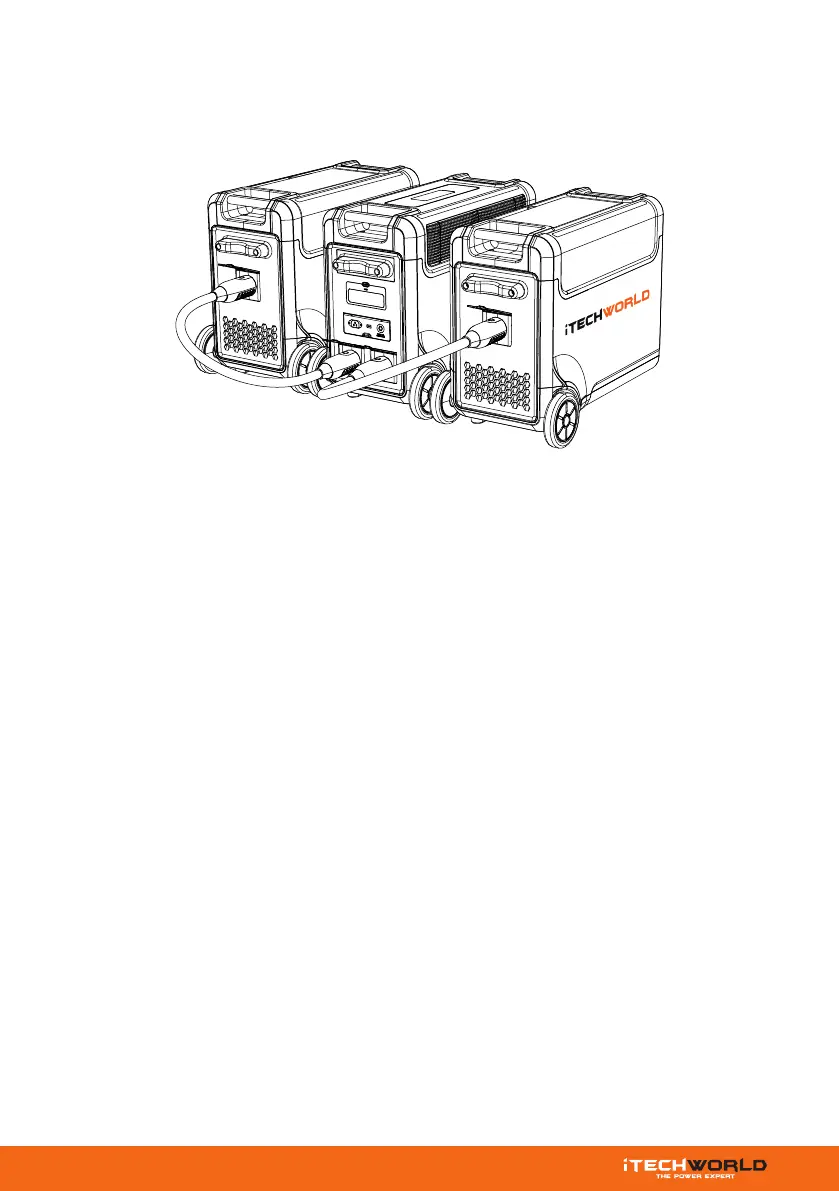
EB3840 CONNECTION:
You can connect the PS3600 PRO to a maximum of two EB3840s (sold separately),
with a maximum capacity of 11,520Wh, using parallel cables. Ensure that both the
PS3600 PRO and the EB3840’s are powered off before making the connection.
Once the connection is complete, you will see “S1” and “S2” displayed on the screen.
After successful parallel connection, the PS3600 PRO can commence charging or
discharging. Keep in mind, the PS3600 PRO will charge at a slower rate when it's
almost full and will release power faster when used. If there's no incoming charge,
the unit with a higher state of charge will charge the unit with a lower state of
charge. The display will show the current power status.
Make sure not to connect or disconnect the parallel cable while the PS3600 PRO is
operational. Only connect or disconnect the cable when the product is powered off
to avoid any potential electrical hazards or malfunctions.
WARNING:
Do not connect or disconnect the PS3600 PRO to an EB3840 whilst switched ON.


 To Next Page