The ITM Refrigerant Dryers, models TM357-035 and TM357-074, are industrial-grade chilling machines designed to dry compressed air. They operate on a direct expansion principle with a dry evaporator. The primary function is to condense water vapor present in compressed air, collecting the condensate in a separator for discharge via a steam trap. These dryers are intended for industrial use only and should not be operated in environments with a risk of fire or explosion, or where hazardous substances are released. Improper, incorrect, or unreasonable use voids the manufacturer's responsibility for any resulting damage.
Important Technical Specifications:
The manual provides detailed technical data for both models, including dimensions (L, W, H), weight, and electrical specifications.
For model TM357-035:
- Dimensions (L x W x H): 352 x 430 x 445 mm
- Weight: 30 Kg
- Inlet/Outlet: G3/4"
- Electrical: 230V50Hz
- Freon (Refrigerant): R134A, 200 gr
- Nominal Power: 222 W
- Max Power: 355 W
- Max Pressure: 13 bar
For model TM357-074:
- Dimensions (L x W x H): 550 x 370 x 704 mm
- Weight: 34 Kg
- Inlet/Outlet: G3/4"
- Electrical: 230V50Hz
- Freon (Refrigerant): R134A, 250 gr
- Nominal Power: 364 W
- Max Power: 453 W
- Max Pressure: 13 bar
Common limit conditions for both models include:
- Max. ambient temperature: <=45°C
- Min. ambient temperature: >=5°C
- Max. inlet air temperature: 60°C
- Max. working pressure: 13 bar
The refrigeration system components include a refrigerant compressor, condenser, motor fan, evaporator, condensate drain, refrigerant filter, expansion valve, and a high-pressure switch. The refrigerant used is R134A.
Usage Features:
The dryer's operation is managed by a PDP controller, which displays the power status, fan status, lock status, and temperature.
- Starting: Before starting, users must verify the correct connection to compressed air piping (ensuring caps are removed), the condensate drainage system, and the power supply. The dryer should be started before the air compressor and stopped after it. A crucial safety warning advises waiting at least 5 minutes after switching off the dryer before restarting to allow pressure balancing.
- PDP Controller: The controller indicates the dryer's operational status. "On" for the power symbol means the dryer is powered, while "Off" means it's stopped. The fan symbol indicates fan operation ("On" for work, "Flashing" for delay, "Off" for stop). A lock symbol indicates if the controller is locked or unlocked. The temperature display shows the current operating temperature.
- Alarms: The PDP controller also features alarm indicators for various issues:
- H1 (Flashing Alarm): Indicates a fan control probe failure. Remedy: Replace the probe.
- LA1 (Flashing Alarm): Indicates a fan control probe failure. Remedy: Replace the probe.
- H2 (Flashing Alarm): Indicates refrigerant leak, low flow rate, or temperature exceeding the limit. Remedy: Check for leaks and recharge refrigerant, or address flow/temperature issues.
- LA2 (Flashing Alarm): Indicates an expansion valve out of order or ambient temperature lower than limits. Remedy: Address the expansion valve or ambient temperature.
- Slove Alarm: Pressing any key can eliminate the buzzer alarm sound, but the alarm indicator light will remain until the release of the alarm condition.
Maintenance Features:
Routine maintenance is essential for the safe and efficient operation of the dryer.
- Safety First: Before any maintenance work, the machine must be disconnected from the electrical power supply and the compressor air distribution network. There should be no internal residual pressure. All maintenance must be carried out by authorized and professionally skilled personnel.
- Maintenance Intervals: These intervals are recommended for environments that are not dusty and are well ventilated. For particularly dusty environments, the frequency of controls should be doubled.
- Routine Checklist (If abnormal phenomena are noticed):
- No air or Freon leaks.
- No alarm triggered in PDP controller.
- Water comes out from condensate drain.
- No loud noisy or smoky operation.
- Each Week: Clean the filter of the steam trap and perform a condensate drain.
- Each Month: Clean the condenser fins to remove eventual dust. This involves switching off the machine, removing panels, cleaning fins with compressed air (DO NOT USE WATER OR SOLVENTS), and closing the panels.
- Drain System: The dryer uses a Time Drain, model MIC-A, with a built-in timed electronic circuit and an assisted drive solenoid valve. This valve opens at pre-established intervals for approximately 1 second to minimize compressed air waste.
- Time Setting (MIC-A):
- Switch on power (voltage must match coil specifications).
- MIC-A starts with pre-set 0.5 min OFF and 1 sec ON time.
- ON time can be adjusted from 0.5-10 seconds by rotating the black knob.
- OFF time (drainage interval) can be adjusted from 0.5-5 minutes by rotating the black knob.
- Troubleshooting: The manual provides a comprehensive troubleshooting guide for common issues:
- Condenser temperature too high or too low: Check fan/fan motor, ambient temperature, and for external clogging of the condenser.
- Compressor stops or does not start: Check electric power supply, thermal protection trip, rapid restart (wait 5 minutes), and high-pressure switch reset.
- Condensate drain remains inoperative: Check for clogged drain system or out-of-order drain system.
- Evaporator pressure too high or too low at unload: Indicates shortage of refrigerant; circuit needs to be checked for leaks and recharged.
The manufacturer reserves the right to make improvements and modifications to the design without prior notice. The manual emphasizes the importance of contacting an approved technical assistance center for repairs and insisting on original spare parts to ensure safety.

 Need help?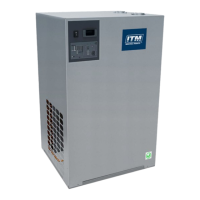

 To Next Page
 General