Resetting time
Date TimeYear
1
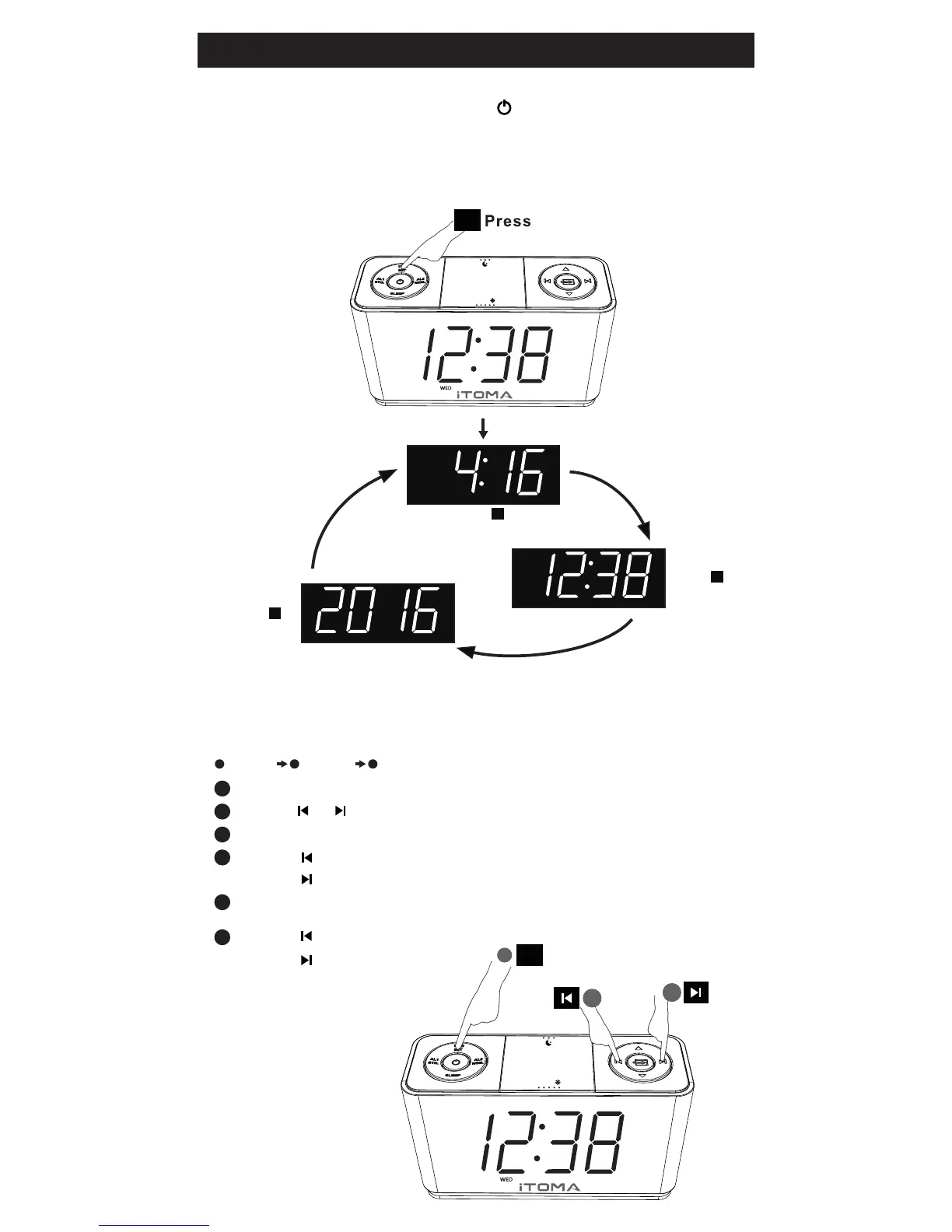
Press and Hold “TIME SET” until the Year Display blink
2
3
4
5
6
Press “TIME SET” and the Month/Date Display will blink
Press “TIME SET” and the Time Display
will blink
Press “ ” “ ” to adjust Year
Press “ ” to adjust Month
Press “ ” to adjust Date
Press “ ” to adjust Hour
Press “ ” to adjust Minutes
If you want to change the Time Zone, please refer to "SETTING
THE TIME ZONE”
VOL+
VOL-
TIME ZONE
Z
Z
Z
1
2
UP or DOWN
TIME
SET
Date and Year Display:
Year, Month/Date,Time
Check the current time:
Press st1
YEAR
MONTH/DATE
Press nd2
TIME
Press rd3
VOL+
VOL-
TIME ZONE
Z
Z
Z
TIME
SET
Setting the Time
Please press the Power button to turn OFF the unit
before operating
Press and hold
2


 To Next Page