You can also set the DST Time area by long press and hold the "▲"button
until the DST words(OFF/EU/US/En/AU/Co/JP) flashes, then press the "▼"
button again to switch to your local DST.(OFF is for Turn off DST; EU is for
Europe; US is for United States; En is for The United Kingdom; AU is for
Australia; Co is for Mexico; JP is for Japan)
RED
America/Canada
Europe
United Kingdom
Australia
Mexico
PRODUKTCODE ANZEIGE ANZEIGE BEREICH
NA
DE
UK
AU
CO
JP
Japan
AC
WEEK/MODE
ON/OFF
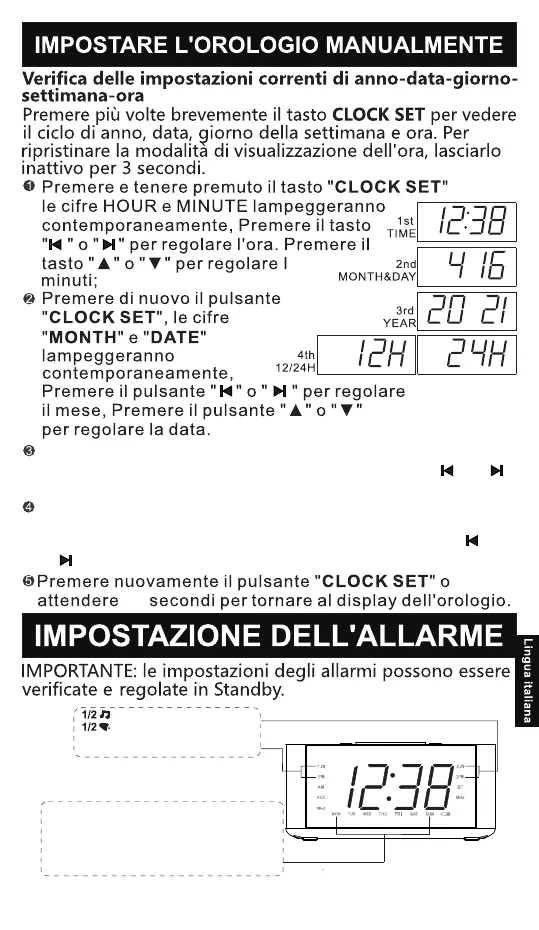
Premere di nuovo il pulsante "CLOCK SET", il numero
"YEAR"lampeggerà. Premere i tasti "▲" e "▼" o ""e ""
peraggiustare l'anno.
Premere nuovamente il tasto "CLOCK SET". "24H" o "12H"
lampeggiasul display (24H significa formato 24 ore, 12H
significa 12formato ora) Premere i tasti "▲" e "▼" o ""
e " "Regolazioneil formato dell'ora.
40
- 83 -
(Sono disponibili due suonerie
di allarme)
Sveglia con la Radio
Sveglia con la Soneria
Impostazione degli allarmi per i giorni
della settimana
OGNI GIORNO da Lunedì a Domenica
GIORNI FERIALI da Lunedì a Venerdì
FINE SETTIMANA Sabato e Domenica
SINGOLO GIORNO lunedì/martedì/mercoledì/giovedì/
venerdì/sabato/domenica


 To Next Page