Press PLATE CONTROL button red to measure again, if needed. If MODE⑤()
button is pressed, it returns to the manual mode Ma .()
6.3 Decay time measurement mode
Turn the power on by pressing POWER button blue . Press MODE button twice.①()
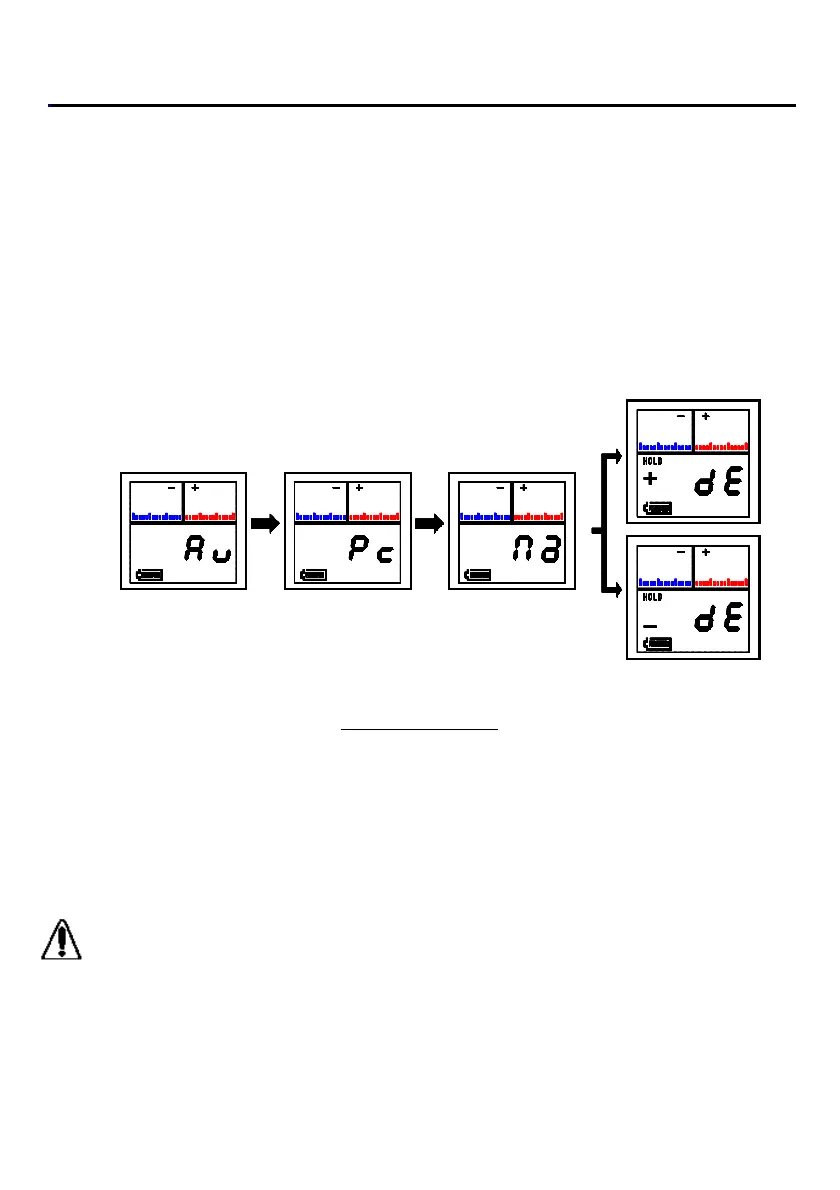
The LCD display shows manual mode Ma . Press + DECAY button red or() ()
-DECAY button green to enter the decay time measurement mode. The display()
shows +dE or -dE . Make sure an LED light in the button is illuminating.()()
+Decay time mode
()+DECAY
Auto mode PC mode Manual mode
() () ( )Au Pc Ma
-Decay time mode
()-DECAY
Flow of LCD display
Turn on the power of the ionizer. Press PLATE CONTROL button red . The②()
sensor plate is automatically grounded, GND lamp lights and digital zero operations
is activated.
DC high voltage is applied to the sensor plate. A red LED, HV OUT lights during③
high voltage is applied.
CAUTION
Normally, DC high voltage is applied in an instant. Therefore, the red LED, HV
OUT lights for a moment. It is not a Failure on the LED.
-page22-


 To Next Page