46
5.3.6.3 Remote diagnostic
The remote diagnostic function helps you in case of a possible problem with your Programat furnace and facilitates the
communication between users and the Ivoclar Vivadent After Sales Service.
If the diagnostic function is executed, the furnace generates a diagnostic file, which is automatically saved on the USB stick.
The file can be sent by e-mail or analyzed by means of PrograBase on a lap-top/PC.
The diagnostic file provides furnace information (e.g. installed software version, set modes, etc.), operating data (e.g.
operating hours, firing hours, etc.), calibration data (e.g. calibration values, date of the last calibration, etc.), test results
and saved error messages.
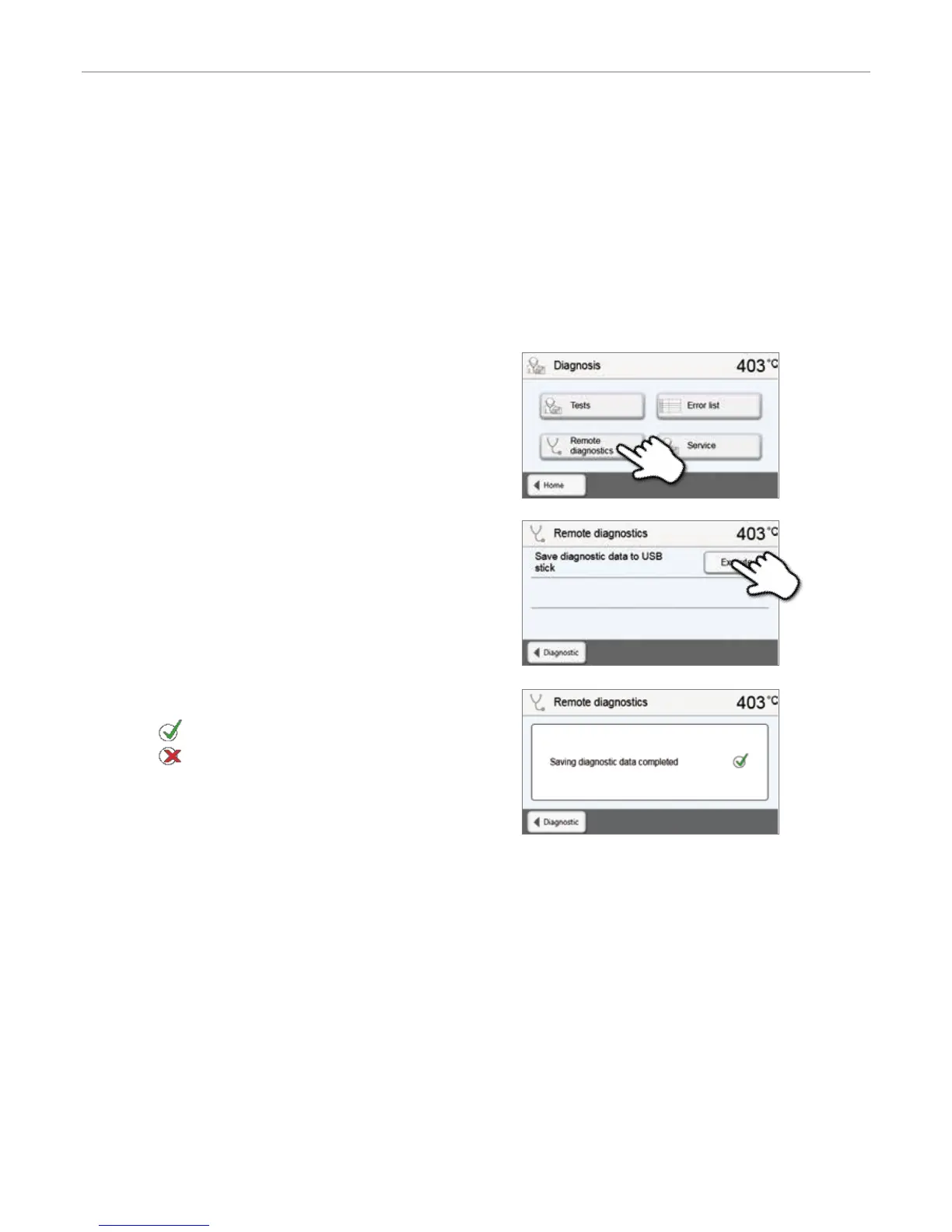
Generating a diagnostic file:
1. Open the diagnosis function
Press the [Remote diagnostic] button in the Diagnosis menu.
2. Generate a diagnostic file
Connect a USB stick with the furnace. Press the [Execute] button.
3. Once the diagnostic file has been generated, the following
message is displayed:
Diagnostic successful
Diagnostic failed
4. Forward or analyze the diagnostic file
Connect a USB stick with a laptop/PC. The file can only be analyzed
by means of the PrograBase software or sent to any e-mail address.
If the furnace is connected with a laptop/PC via Ethernet, the file can also be directly opened, forwarded or analyzed by the
PrograBase software.
5. Operation and Configuration


 To Next Page