4/6
Bluetooth Pairing
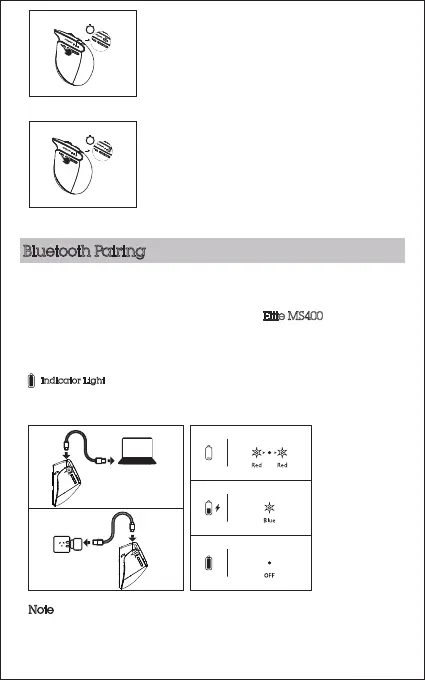
Press round button and select BT1 or BT2. When selected the white
indicator light will be on. Hold
mode
button for 3 seconds until the
white indicator light flashes. Find and pair Elite MS400
on Bluetooth
device list on your computer.
Indicator Light
Red LED light will flash when power is low.
Blue LED light will be on when charging.
LED light will be off when fully charged. Full charging time is approximately 4 hours.
Note
Fully charge your Elite MS400 before first use. Before charging, make
sure the wireless mouse is turned off.
3s
3s
2. Connect the first Bluetooth device
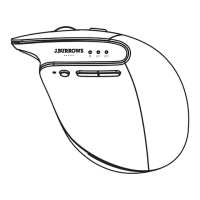
Press the mode button and select BT1(white
light in the middle on the top of the mouse).
The white light will flash once.
Then hold the round button for more than
three seconds until the white light flashes
quickly. It is now in Bluetooth pairing mode.
3. Connect the second Bluetooth device
Press the mode button and select BT2 (white
light in the right on the top of the mouse).
The white light will flash once.
Then hold the mode button for more than
three seconds until the white light flashes
quickly. It is now in Bluetooth pairing mode.


 To Next Page