Need help?
Do you have a question about the J.Burrows JBERGVERTM and is the answer not in the manual?
Open battery cover and insert 1xAA battery.
Insert the USB nano receiver into your computer's USB port.
Turn on the mouse for device connection.
Change DPI settings (800/1200/1600) and note button OS limitations.
Mouse enters sleep mode after inactivity; wake by pressing a key.
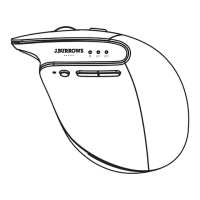
This document is an instruction manual for the J.Burrows 2.4GHz Optical Mouse, model JBERGVERTM. It provides details on the mouse's specifications, installation, usage, and warranty information.
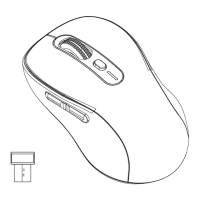
The J.Burrows JBERGVERTM is a 2.4GHz optical mouse designed for use with computers. It offers wireless connectivity via a USB nano receiver and features adjustable DPI settings for varying cursor sensitivity. The mouse is compatible with Windows® XP or later and Mac® OS X 10.7 or later operating systems. It includes standard mouse functions, as well as dedicated forward and backward buttons, though these additional buttons are noted to function only in Windows systems and not in Mac OS. The mouse is designed for energy efficiency, incorporating an automatic sleep mode to conserve battery life when not in use.
The mouse is designed for straightforward installation and use.
Installation:
DPI Adjustment: The mouse features a dedicated DPI button, allowing users to cycle through different sensitivity settings: 800, 1200, and 1600 DPI. The mouse defaults to 1200 DPI upon initial setup.
Forward and Backward Buttons: The mouse includes forward and backward navigation buttons, which are useful for web browsing or navigating folders. However, it is explicitly stated that these buttons are functional only within Windows operating systems and do not work when the mouse is used with Mac OS.
Sleep Mode: To conserve battery power, the mouse is equipped with an automatic sleep mode. If no keys are pressed on the mouse for a period of 8 minutes, it will automatically enter sleep mode. To wake the mouse from sleep mode, the user simply needs to press any key on the mouse. Moving the mouse itself will not wake it up; a button press is required.
The manual does not detail specific user-performed maintenance beyond battery replacement. However, it does provide comprehensive warranty information for Australian customers, which outlines the conditions under which the product can be repaired or replaced.
Product Warranty (for Australian customers only): Officeworks Ltd provides a warranty for this product, ensuring it will be free from defects and function as intended for 3 years from the original purchase date.
Warranty Claim Process: To make a warranty claim, customers must return the product along with their receipt or proof of purchase to their nearest Officeworks store or contact 1300 633 423.
Warranty Exclusions: The warranty does not cover:
Consumer Rights: This warranty is in addition to any rights customers may have under the Australian Competition & Consumer Act 2010. Under Australian Consumer Law, goods come with guarantees that cannot be excluded. Customers are entitled to a replacement or refund for a major failure and compensation for any other reasonably foreseeable loss or damage. They are also entitled to have the goods repaired or replaced if they fail to be of acceptable quality and the failure does not constitute a major failure.
Manufacturer/Distributor Information: OFFICEWORKS LTD 236-262 EAST BOUNDARY RD EAST BENTLEIGH VIC 3165 AUSTRALIA

 To Next Page
 General