- 34 -
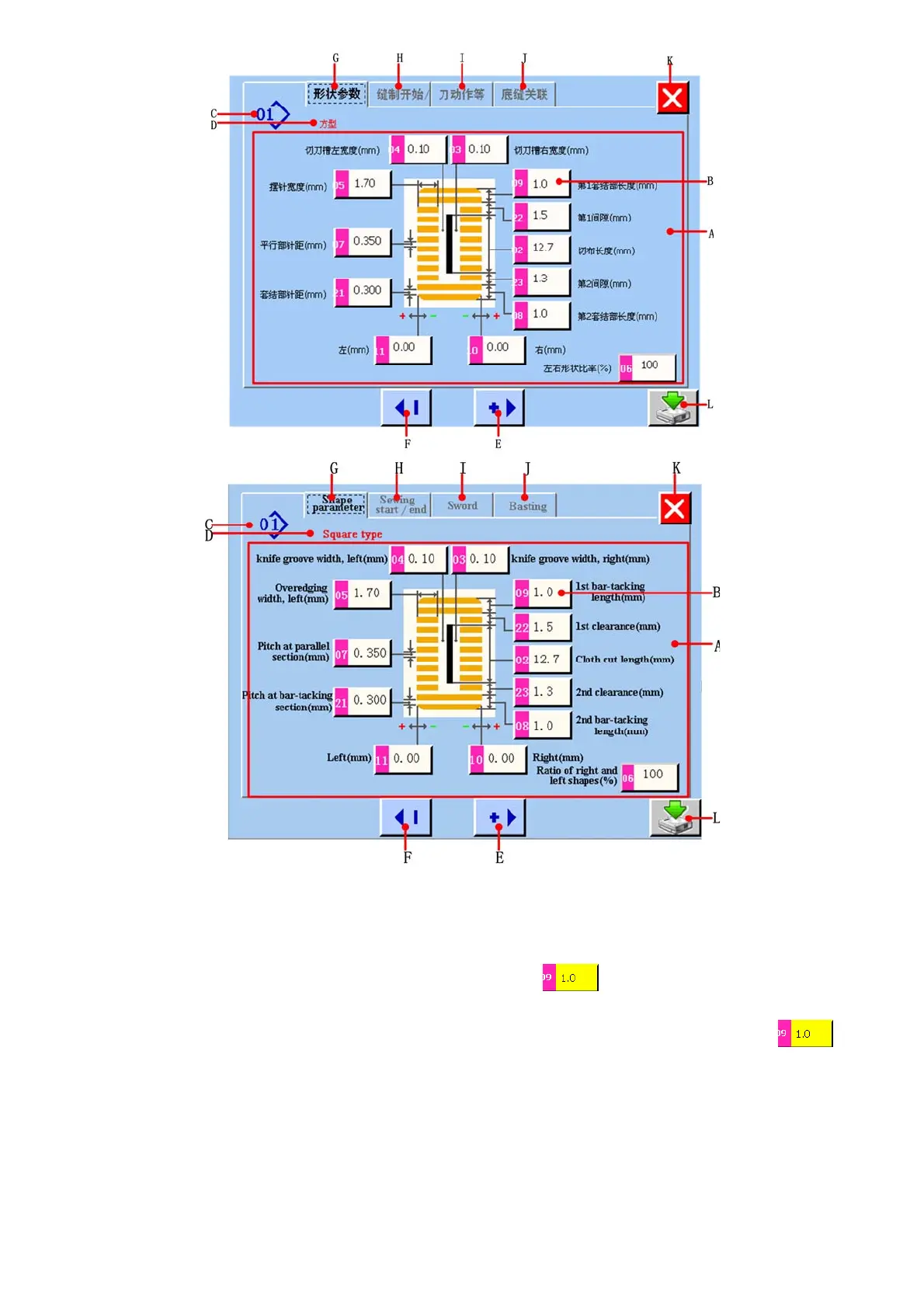
图/figure 5.3
A 缝制形状参数显示区域 Sewing shape parameter display area.
B 缝制形状参数显示和更改按键。当触摸该按键时,该按键显示为黄底 ,表示当前选中需要更改的参数,然后
通过 E、F 按键就可以进行该参数的更改。
Sewing shape parameter display and changing button. When you press this button, it will display yellow color ,
it shows the parameter which you select want to change. Then you can press E and F button to change this parameter.
C 缝制形状号。Sewing shape number.
D 缝制形状名称。Sewing shape name.
E 更改缝制形状参数,根据编辑单位进行数字递加。
Change sewing shape parameter. You can increase the value according to editor unit.
F 更改缝制形状参数,根据编辑单位进行数字递减。
Change sewing shape parameter. You can decrease the value according to editor unit.



 To Next Page