- 56 -
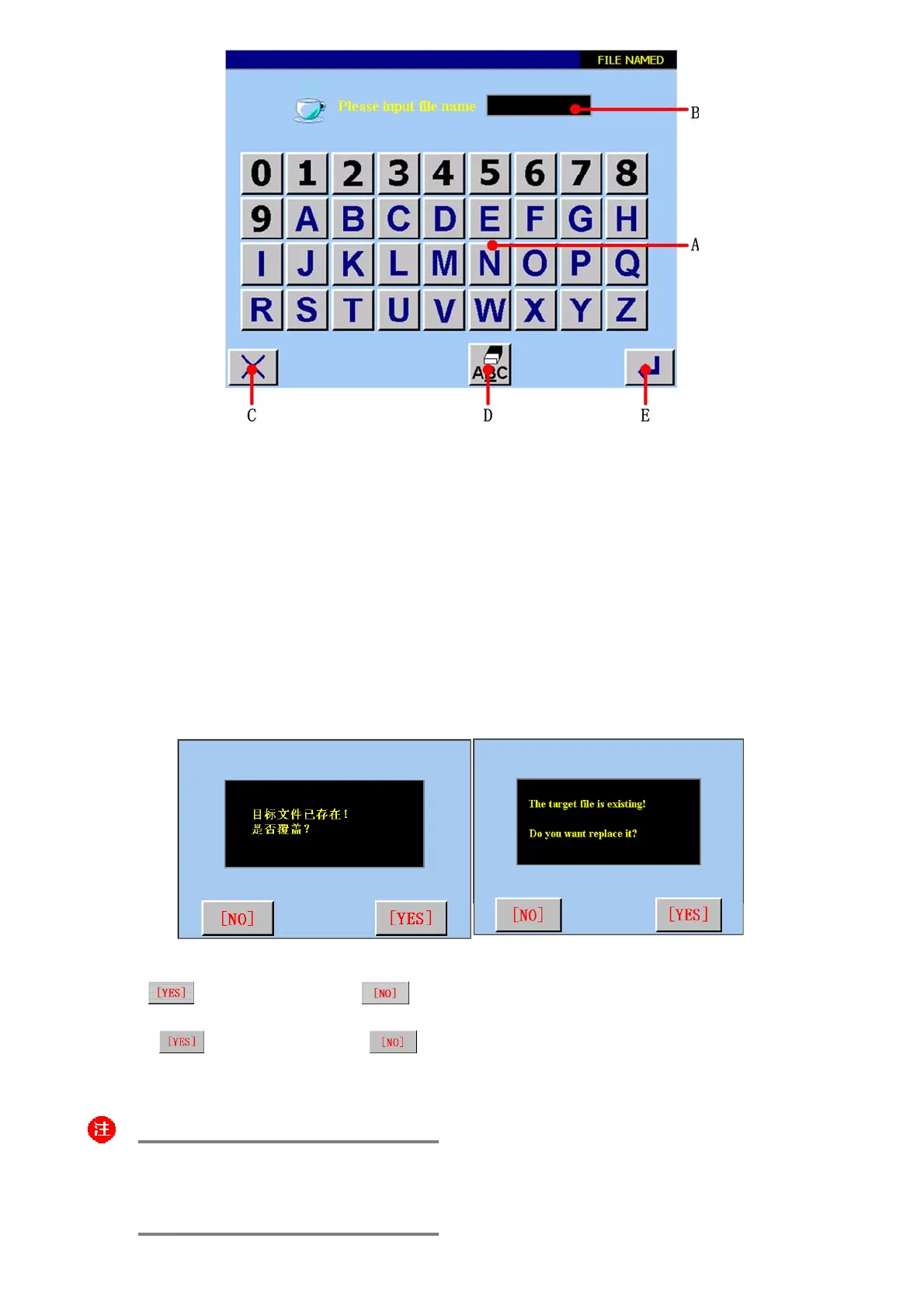
图/figure 5.12
A 数字、字母键盘。Numerical、alphabetic button board.
B 字符显示区域。Character display area.
C 返回主菜单。Return to main menu.
D 取消输入键。Cancel input button .
E 确认键。按确认键后,如果此文件名与已登记的文件名未重命,则命名成功,建立了新的登记文件,返回主菜单;如
果此文件名与已登记的文件名重命,则弹出<是否覆盖>的画面。
Confirm button . If the target file and register file have different name, the operation is successful. The new file is built.
If the target file and register file have same name, the screen will display as figure 5.13 shown.
图/figure 4.13
触摸
,则覆盖原登记文件。触摸 ,则返回主菜单画面。
Press
button to replace; Press button to return to main menu screen.
:
输入的文件名系统默认为最多 7 个字符!
You can only input less than eight characters!



 To Next Page