EasyManua.ls Logo

Jands StageCL - User Manual

Jands StageCL
16 pages
Print Icon
To Next Page IconTo Next Page
Loading...
Made for LEDs
Quick Start
Version 1.3 Software
Question and Answer IconNeed help?

Do you have a question about the Jands StageCL and is the answer not in the manual?

Summary

Getting Started

Patching Your Lights

The Console Controls

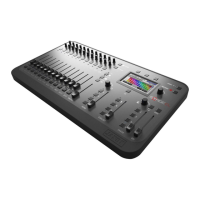
Console Layout Overview

Identifies the main sections: fixture controls, touch screen, and master controls.

Recording

Common Problems

No Mimic LEDs or Lights

Troubleshooting issues with LEDs not illuminating or lights not responding.

Incorrect Colours or Lights Off

Resolving problems with wrong fixture types, DMX addresses, or signal issues.

Unwanted Output Persists

Solutions for clearing active scenes, chases, cuelists, or snapshots.

Appendix 1: Specifications

Summary

Getting Started

Patching Your Lights

The Console Controls

Console Layout Overview

Identifies the main sections: fixture controls, touch screen, and master controls.

Recording

Common Problems

No Mimic LEDs or Lights

Troubleshooting issues with LEDs not illuminating or lights not responding.

Incorrect Colours or Lights Off

Resolving problems with wrong fixture types, DMX addresses, or signal issues.

Unwanted Output Persists

Solutions for clearing active scenes, chases, cuelists, or snapshots.

Appendix 1: Specifications

Jands StageCL Specifications

General IconGeneral
DMX Channels512
Submasters24
DMX Outputs1
MIDI Input/OutputYes
Ethernet PortNo
LCD DisplayYes
Faders24
Power SupplyExternal PSU