Prophi
®
6R
8
Section 4 Automatic operation - display of grid parameters
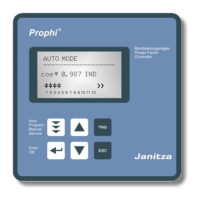
The device is set to automatic operation as standard (not AUTO-INIT). Capacitor stages
are then automatically connected in or out in order to reach the target power factor. This
happens when the required reactive power exceeds the value of the smallest capacitor
stage.
In automatic operation, various network parameters can be displayed by repeatedly
pressing the "ENTER” key:
Action Display
ENTER 1 LINE VOLTAGE in V /%
ENTER 2 APPARENT CURRENT in A /%
ENTER 3 REACTIVE POWER in kvar /%
ENTER 4 ACTIVE POWER in kW /%
ENTER 5 APPARENT POWER in kVA /%
ENTER 6 DIFF. kVAR TO TARGET COS
ENTER 7 FREQUENCY in Hz
ENTER 8 TEMPERATURE in °C / °F
ENTER 9 HARMONICS (3.-19) V / %, I / %
Selection via arrow-keys
ENTER 10 THD-V, THD-I in %
ENTER 12 ENERGY in kWh, kvarh, (+/-)
reset in: Service / max.value reset
ENTER Software version
ENTER Return to: 1
The power value specifies the total power (3-phase) assuming symmetrical load. If no
key is pressed for 60 seconds, the display automatically returns to the operating status!
Automatic oper.
to display operation to programming to manual operation to value buffer to special functions
Programming Manual operation Service Expert mode
Repeated pressing of the "Operating Mode” key takes the user to the various menus in
sequence: Automatic operation - Programming - Manual (manual operation)-
Service - Expert mode and back.
1 LINE VOLTAGE
230.1 V



 To Next Page