24
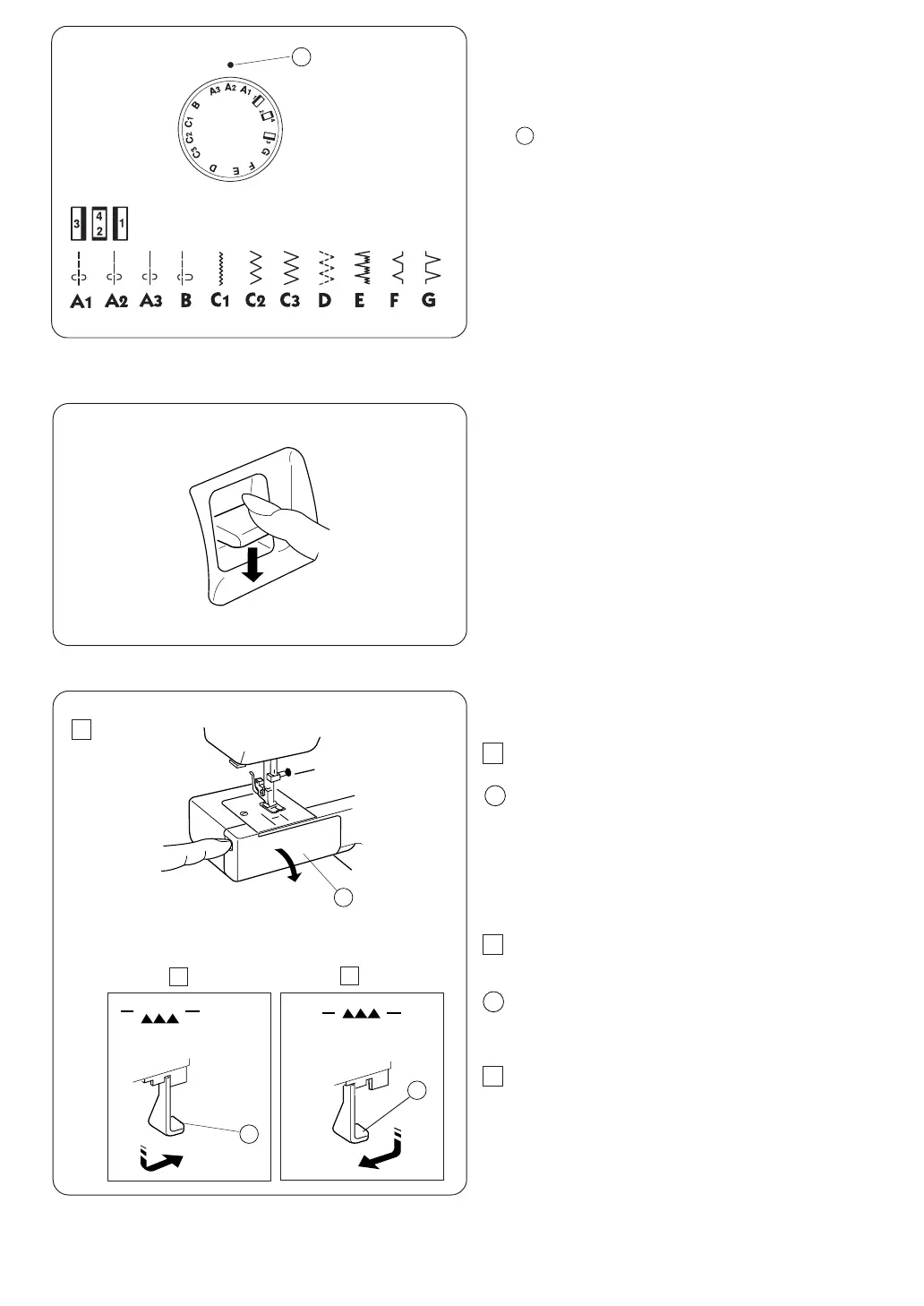
Pattern Selector Dial
Raise the needle and presser foot. Turn the pattern selector
dial to set the symbol corresponding to the desired pattern
at the setting mark.
Setting mark
CAUTION:
Do not turn the pattern selector dial while the
needle is in the fabric, otherwise the needle may
bend or break.
1
1
Reverse Stitch Button
As long as you keep the reverse stitch button depressed,
the machine will sew in reverse.
Dropping the Feed Dog
1 Open the hook cover.
1
2
2 To drop the feed dog, pull down the drop lever and
move it to the right, as illustrated.
3 To raise the feed dog, pull down the drop lever and
move it to the left, as illustrated.
* The feed dog must be up for normal sewing.
* The feed dog will return to the up position when the
machine starts running.
Hook cover
Drop lever
2
1
2
3
2
1
Janome 2206 Instruction Manual
2206 Owners Manual/ User Guide


 To Next Page