EasyManua.ls Logo

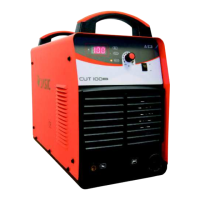
Jasic Plasma Cut 100 - User Manual

Jasic Plasma Cut 100
21 pages
Print Icon
To Next Page IconTo Next Page
Loading...
List Price €0000
**
Technical Data
Key Features
31.
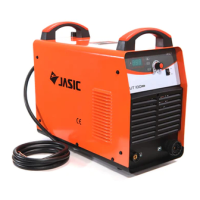
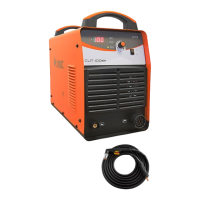
The Jasic Pro Plasma Cut 100 is professional high-end
cutting inverter equipped with the latest IGBT technology.
This technologically advanced plasma inverter is extremely
user-friendly and offers reliable cutting performance.
The machine provides variable cutting control that allows
the operator to produce precise smooth cuts.
Order Code: 14.13.01000000 Plasma Cut 100
• IGBT plasma cutting inverter
• Lightweight, portable modern design
Variable cutting control
• HF ignition
• LED display
• Smooth precise cutting
• Simple operation
• Suitable for automated cutting (optional)
• PI50LT hand plasma torch 6m
• Generator friendly
Ieff
AC 400V - 50/60 Hz 15.8
17A
Clean 30mm
Severance 35mm
220 Ltr/Min @ 5 bar
(73 psi)
Dimensions LxWxH
565 x 255 x 440
26.5
20 - 100 100A @ 60%
Power Factor 0.93 Class: IP21S/F
Accessories/Optional Items
Part Number Description € List Price
* 14.00.00203001 Earth Clamp and 3m Cable 19.00
* 14.00.01576000 P150 LT 6MT Torch 390.00
* 14.00.02001000 LT150 Torch Head 130.00
* 14.00.01376000 Electrode 2.50
* 14.00.01378000 Diuser 2.44
* 14.00.01377000 Swirl Ring 8.34
14.00.01371000 Cutting Tip 1.1 2.18
14.00.01372000 Cutting Tip 1.35 2.18
14.00.01373000 Cutting Tip 1.6 2.18
* 14.00.01374000 Cutting Tip 1.8 2.18
14.00.01375000 Gouging Tip 3.0 2.18
* 14.00.01389000 Nozzle Retaining Cap 23.32
14.00.01018000 Extended Diuser 8.76
14.00.01517000 Extended Electrode 4.28
14.00.01001000 Extended Tip 1.35 - 90amp 5.36
14.00.01002000 Extended Tip 1.60 - 120amp 5.36
14.00.01003000 Extended Tip 1.8 - 150amp 5.36
14.00.01386000 Spacer Spring 1.58
14.00.01408000 Double Pointed Spacer 11.00
14.09.01409000 Crown Spacer 15.60
* Comes as Standard
1
Digital Display
2
Warning Indicator
3
Amperage Control Dial
4
2T/4T Indicator
1
2
3
4
List Price €1562.00
Question and Answer IconNeed help?

Do you have a question about the Jasic Plasma Cut 100 and is the answer not in the manual?

Overview

The Jasic Pro Plasma Cut 100 (Order Code: 14.13.01000000) is a professional high-end cutting inverter equipped with the latest IGBT technology. This technologically advanced plasma inverter is designed for user-friendliness and reliable cutting performance, offering variable cutting control to produce precise, smooth cuts. It comes with a 5-year warranty.

Function Description:

The CUT series, including the Plasma Cut 100, are inverter cutting machines that utilize advanced inverter technology. They operate by inverting the DC voltage, rectified from a 50Hz/60Hz input AC voltage, to a high-frequency AC voltage (30K~100KHz). This voltage is then dropped and rectified to output the high-power DC supply required for cutting. This switching power supply inverter technology significantly reduces the machine's volume and weight while enhancing power conversion efficiency by 30%. The Plasma Cut 100 specifically uses HF ignition for arc starting. It is suitable for automated cutting (optional) and is generator-friendly.

Important Technical Specifications:

  • Rated Input Voltage: AC 400V ±15% (3 phases), 50/60Hz
  • Rated Output: 100A/120V
  • Rated Input Capacity (KVA): 14.3
  • Rated Input Current (A): 21.7
  • Cutting Current Range (A): 20-100
  • No-load Voltage (V): 315
  • Duty Cycle Imax (40°C): 60%
  • Efficiency (%): 90
  • Power Factor: 0.93
  • Protection Class: IP21S/F
  • Insulation Class: F
  • Clean Cut Thickness: 30mm
  • Severance Cut Thickness: 35mm
  • Air Pressure: 220 Ltr/Min @ 5 bar (73 psi)
  • Dimensions (LxWxH): 565 x 255 x 440 mm
  • Weight (kg): 26.5
  • Ignition Method: HF

Usage Features:

The Plasma Cut 100 is designed for economic and practical use, utilizing compressed air as the plasma gas source. It can cut thick steel plates conveniently and quickly, with an easy-to-ignite arc and a post-flow function. The machine is versatile, suitable for cutting various metals including carbon steel, alloy steel, stainless steel, galvanised steel, copper, and aluminium. Its simple operation and high cutting speed result in smooth cutting surfaces, often eliminating the need for further cleaning.

Control Panel (Front):

  1. Digital Display: Shows current settings.
  2. 2T/4T (Automation) Switch: Selects between 2-stroke and 4-stroke trigger modes.
  3. Purge - Run Switch: Controls air purge or cutting operation.
  4. Current Adjustment Dial: Adjusts the cutting current.
  5. Alarm Indicator: Illuminates to indicate an alarm condition (e.g., overload, overvoltage).
  6. Mains Indicator: Illuminates when the machine is powered on.

Rear Panel:

  1. Air Regulator: Adjusts and displays air pressure.
  2. Work Return Socket: Connection for the earth clamp.
  3. Torch Connection Socket: Connection for the plasma torch.
  4. Mains Switch: Powers the machine on/off.
  5. Mains Cable: Connects to the power supply.
  6. Fan: Provides cooling for the internal components.

Installation and Operation:

  • Unpacking: Check for damage and retain packaging.
  • Location: Place on a secure, level surface in a suitable environment, avoiding moisture, dust, steam, oil, or corrosive gases. Ensure at least 20cm clearance for airflow.
  • Input Connection: Connect to a suitable power supply, ensuring proper grounding. Never connect with panels removed.
  • Work Cable Connection: Insert the quick plug into the front panel socket and tighten clockwise. Clamp the workpiece with the earth clamp.
  • Cutting Torch Connection: Connect the central connection plug of the cutting torch to the central connection socket and tighten clockwise to prevent gas leakage. The Plasma Cut 100 uses the P150 plasma cutting torch as standard.
  • Air Supply Connection: Connect to a suitable, clean, and dry air supply. A three-stage filter is recommended if air quality is poor. Air supply pressure should not exceed 8 bar, with normal cutting pressure around 6 bar.
  • Torch Consumables Installation: Screw the electrode into the torch head, insert it into the distributor, connect the nozzle, and then the protective sleeve. Use an inner hexagon spanner to tighten the electrode to prevent burning the inner thread.
  • Operation Steps:
    1. Turn on the power switch on the back panel.
    2. Select the working mode and function.
    3. Set the cutting current according to workpiece thickness.
    4. Bring the copper nozzle of the torch to about 2mm from the workpiece and push the trigger to start cutting.
  • Cutting Recommendations:
    • Avoid touching the hot workpiece.
    • Ignite the arc from the edge of the workpiece unless penetration is needed.
    • Ensure spatter comes from the bottom of the workpiece for a full cut.
    • Pull the cutting torch while cutting.
    • Keep the nozzle upright and avoid bending or stepping on the cable.
    • Slow down cutting speed when the workpiece is nearly cut off and release the trigger to stop.
    • Maintain torch consumables frequently.

Maintenance Features:

Regular maintenance is crucial for efficient and safe operation.

  • Daily Examination:
    • Perform a full visual inspection for damage to the machine, leads, cables, and connections. Replace as necessary.
  • Monthly Examination:
    • Switch on and check for warning LEDs and general operation.
    • Use dry compressed air to clean the inside of the machine, focusing on intake grills, main voltage transformer, inductance, IGBT modules, fast recovery diode, and PCB. Be careful not to dislodge electronic components or wiring.
    • Check the security of output connections and plugs. Replace if signs of overheating.
  • Yearly Examination:
    • Carry out an annual service.
    • Check earth continuity and insulation resistance at relevant points.
    • This work should be carried out by a trained competent person.

Troubleshooting:

The manual provides a troubleshooting guide for common issues:

  • Machine powers on, but fan doesn't work, and control button doesn't function: Likely overvoltage protection. Shut down and restart.
  • Machine powers on, fan works, but no HF discharge rustling and red LED is off when pressing torch button: Indicates a failure in the arc ignition part, possibly due to electrode sticking, short circuit in the arc ignition transformer, leakage of HF capacitor, or damaged relay.
  • Arc cannot be ignited: Input voltage too low, or air pressure is overly high or low.

*Accessories/Optional Items (Standard items marked with ):

  • Earth Clamp and 3m Cable
  • P150 LT 6MT Torch
  • LT150 Torch Head
  • Electrode
  • Diffuser
  • Swirl Ring
  • Cutting Tip (various sizes: 1.1, 1.35, 1.6, 1.8)
  • Gouging Tip 3.0
  • Nozzle Retaining Cap
  • Extended Diffuser
  • Extended Electrode
  • Extended Tip (various sizes: 1.35-90amp, 1.60-120amp, 1.8-150amp)
  • Spacer Spring
  • Double Pointed Spacer
  • Crown Spacer

Jasic Plasma Cut 100 Specifications

General IconGeneral
BrandJasic
ModelPlasma Cut 100
CategoryWelding System
LanguageEnglish

Related product manuals