EasyManua.ls Logo

Jayco Redhawk 2017 - Radio

Jayco Redhawk 2017
98 pages
Print Icon
To Next Page IconTo Next Page
To Previous Page IconTo Previous Page
Loading...
P
R
E
P
A
R
ING
T
O
D
R
IV
E
R
a
d
i
o
You
r
c
oa
c
h
is
equ
i
pped
wi
th an A
M
/
FM
r
ad
i
o that
p
l
a
ys
th
r
oughout
the
c
oa
c
h
.
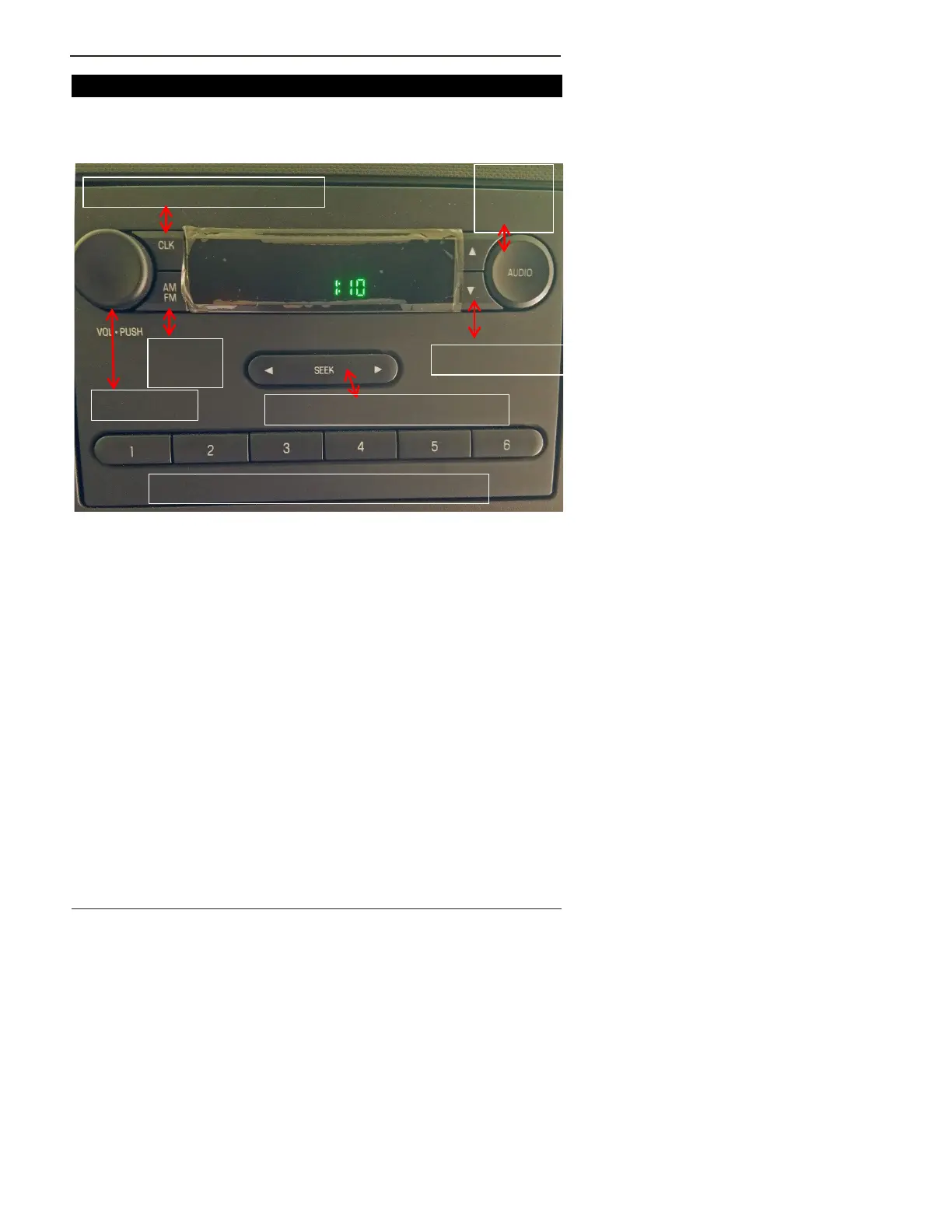
T
o tu
r
n on the
r
ad
i
o, pu
s
h the Vo
l-
P
U
S
H
button.
Pu
s
h the
C
LK button to
s
ee the
cl
o
ck
and
c
u
rr
ent
r
ad
i
o
s
tat
i
on.
Se
l
e
c
t A
M
o
r
FM
a
s
de
sir
ed b
y
pu
s
h
i
ng the A
M
FM
button.
P
r
e
ss
a
rr
o
ws
up o
r
do
w
n to
m
a
k
e
s
tat
i
on
s
e
l
e
c
t
i
on.
T
he Aud
i
o button
is
to
m
a
k
e ad
j
u
s
t
m
ent
s
to the
s
ound of the
r
ad
i
o.
B
y
pu
s
h
i
ng the button, the
m
enu
will
a
ll
o
w
y
ou to Ba
l
an
c
e the
s
ound of the
s
pea
k
e
rs
and ad
j
u
s
t the
Tr
eb
l
e o
r
Ba
ss
s
ound
s
.
Ea
c
h pu
s
h of the button
will
a
ll
o
w
y
ou to
m
a
k
e a d
i
ffe
r
ent
ad
j
u
s
t
m
ent.
T
he See
k
button enab
l
e
s
y
ou to
sc
an a
v
a
il
ab
l
e
r
ad
i
o
s
tat
i
on
s
.
T
he
ri
ght a
rr
o
w
l
oo
ks
fo
r
s
tat
i
on
s
abo
v
e
the
c
u
rr
ent
s
tat
i
on
w
h
il
e the
l
eft a
rr
o
w
l
oo
ks
fo
r
s
tat
i
on
s
be
l
o
w
the
c
u
rr
ent
s
tat
i
on.
T
he nu
m
be
rs
1
-
6 a
r
e u
s
ed to
s
to
r
e u
s
e
r
s
e
l
e
c
ted
s
tat
i
on
s
fo
r
qu
ick
a
cc
e
ss
.
T
o
s
a
v
e a tuned
-i
n
s
tat
i
on, p
r
e
ss
and ho
l
d one of the
six
button
s
to p
r
og
r
a
m
that
s
tat
i
on
i
nto
m
e
m
o
ry
.
R
epeat
i
ng the
p
r
o
c
e
ss
wi
th an a
lr
ead
y
a
ssi
gned button
will
r
ep
l
a
c
e the o
ri
g
i
na
l
s
tat
i
on
wi
th the ne
w
s
tat
i
on.
O
n-
V
o
l
u
me
C
l
o
ck
&
Cu
rre
nt
S
t
a
t
i
on
I
nfo
.
R
a
d
i
o
S
ound
Cont
r
o
l
Ch
a
nn
el Selec
t
Ch
a
nn
els Selec
t
e
d
a
nd
Pr
og
ramme
d
A
m/
FM
Selec
t
Seek
Ch
a
nn
els I
n
Y
ou
r
R
a
ng
e
B
ASI
C
O
PE
R
A
T
IO
N
S
39
©
J
a
yc
o, In
c
., 2016 ALL
R
IG
HT
S
R
ESE
R
VE
D

Table of Contents

Related product manuals