EasyManua.ls Logo

Jayco Redhawk 2017 - Battery Level; Monitoring Electricity and Tanks

Jayco Redhawk 2017
98 pages
Print Icon
To Next Page IconTo Next Page
To Previous Page IconTo Previous Page
Loading...
T
an
k
Le
v
e
ls
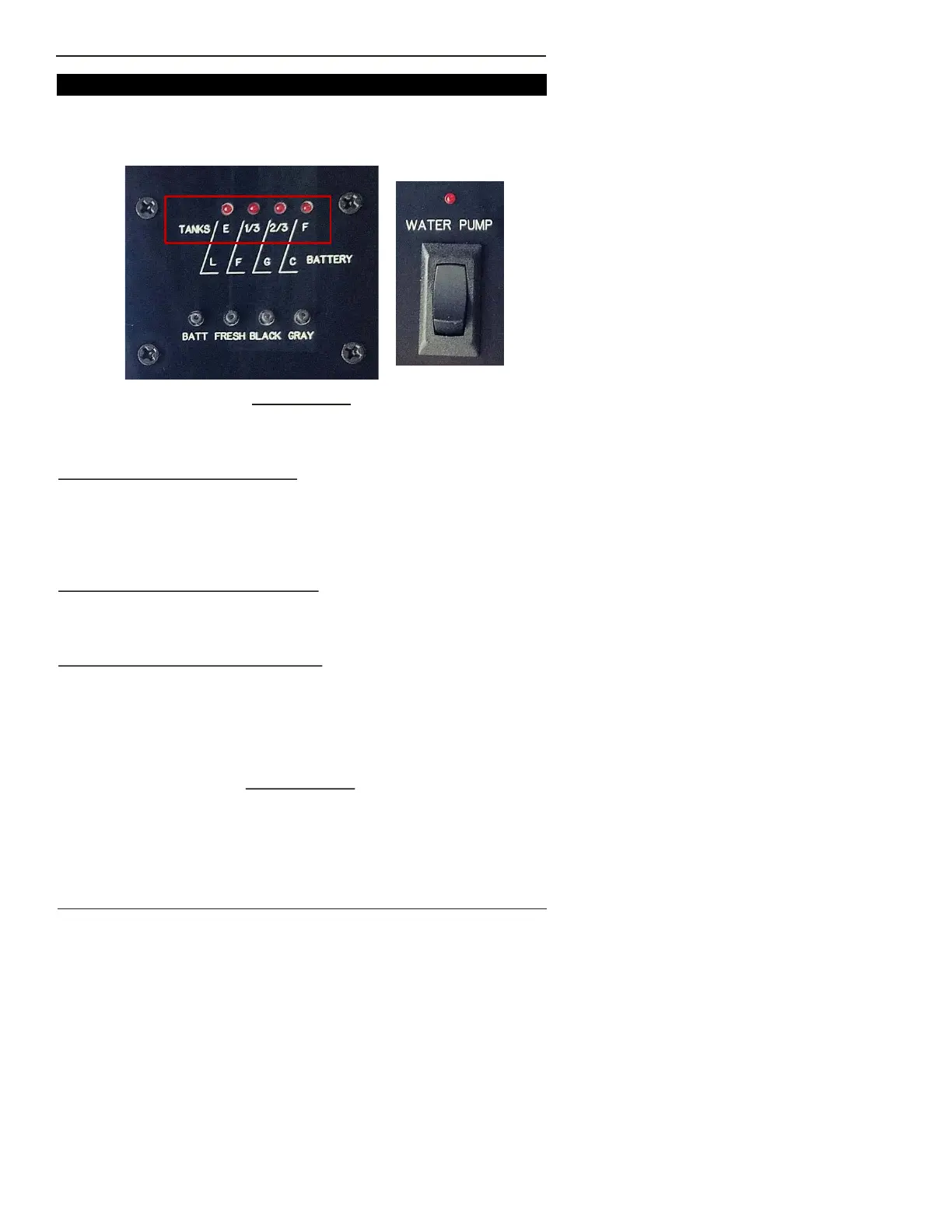
T
he tan
k
m
on
i
to
ri
ng
sys
te
m
is
l
o
c
ated on
y
ou
r
c
ont
r
o
l
pane
l
i
n
si
de the
c
oa
c
h and
is
out
li
ned
i
n
r
ed, abo
v
e.
G
r
a
y
W
ate
r
: P
r
e
ss
the G
r
a
y
button
If hoo
k
ed up to a
s
e
w
e
r
, th
is
s
hou
l
d
r
ead
0
si
n
c
e the g
r
a
y
w
ate
r
tan
k
gate
v
a
lv
e
s
hou
l
d ha
v
e been opened
w
hen hoo
ki
ng up the
s
e
w
e
r
li
ne.
If d
ry
c
a
m
p
i
ng, the tan
k
l
e
v
e
l
m
u
s
t be
c
he
ck
ed
si
n
c
e the gate
v
a
lv
e
will
be
i
n the
cl
o
s
ed po
si
t
i
on.
B
l
a
ck
W
ate
r
: P
r
e
ss
the BLA
C
K button
F
o
r
s
afet
y’s
s
a
k
e, the b
l
a
ck
w
ate
r
tan
k
s
hou
l
d be e
m
pt
i
ed and
cl
eaned
w
hen
i
t
is
bet
w
een 2/3 and ¾ fu
ll
.
T
he ne
x
t page e
x
p
l
a
i
n
s
ho
w
to do th
is
.
Fr
e
s
h
W
ate
r
: P
r
e
ss
the
FR
ES
H
button
If
y
ou a
r
e go
i
ng to be d
ry
c
a
m
p
i
ng, be
s
u
r
e to f
ill
y
ou
r
f
r
e
s
h
w
ate
r
tan
k
to a
v
o
i
d be
i
ng
wi
thout
w
ate
r
.
W
hen d
ry
c
a
m
p
i
ng,
y
ou
will
ha
v
e to
swi
t
c
h on the
w
ate
r
pu
m
p
s
o
that
w
ate
r
is
s
upp
li
ed to the
c
oa
c
h f
r
o
m
the f
r
e
s
h
w
ate
r
tan
k
.
T
he
swi
t
c
h
is
l
o
c
ated on the
c
ont
r
o
l
pane
l
and
s
ho
w
n abo
v
e.
Mon
i
to
ri
ng
T
a
n
ks a
nd
B
a
tt
ery V
o
l
t
a
g
e
SE
TT
ING
U
P
CAM
P
Batte
ry
Le
v
e
l
P
r
e
ssi
ng the BA
TT
button
will
d
is
p
l
a
y
the
s
tate of the hou
s
e
batte
ry
. L = Lo
w
;
F
=
F
a
ir
; G = Good; and,
C
=
C
ha
r
ged.
Gene
r
a
lly
s
pea
ki
ng, a
ll
fou
r
li
ght
s
will
li
ght on
ly
w
hen the
c
oa
c
h
is
p
l
ugged
i
nto
s
ho
r
e po
w
e
r
o
r
r
unn
i
ng the gene
r
ato
r
.
U
SI
N
G
Y
O
UR
C
OA
CH
56
©
J
a
yc
o, In
c
., 2016 ALL
R
IG
HT
S
R
ESE
R
VE
D

Table of Contents

Related product manuals