Need help?
Do you have a question about the JBL AVR 101IN and is the answer not in the manual?
Ensure correct voltage is used to prevent damage.
Avoid safety hazards by using only the supplied power cord.
Instructions for safely connecting and disconnecting the power cord.
Warns against opening the unit due to shock hazard and warranty voidance.
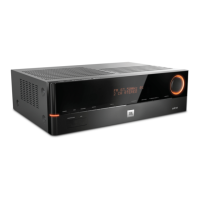
Details power modes, volume knob, and related buttons.
Details connections for HDMI, digital/analog audio, video, and network.
Covers power, mute, volume, source selection, and basic navigation buttons.
Instructions for inserting AAA batteries into the remote.
Guides on programming the remote to operate external components.
Explains how to change a remote button's function to control a different device type.
Details configuring speaker presence, crossover, and subwoofer mode.
Provides guidance on setting speaker levels for optimal audio.
Details connecting the AVR to a home network for streaming and internet radio.
Guides setting crossover frequencies, distances, and levels for speakers.
Explains how to set speaker distances for optimal sound timing.
Offers tips for adjusting subwoofer volume for music and films.
Guides on adjusting individual speaker levels using test tones or external sources.
Guides on assigning connections and configuring playback features for each source.
Details adjusting volume and muting the sound.
Discusses audio signal processing and selecting surround modes.
Lists technical specs for audio output and tuner sections.
 General
| Audio Outputs | 1 Headphone Output |
|---|---|
| HDMI Inputs | 4 HDMI Inputs |
| HDMI Outputs | 1 HDMI Output |
| Number of Channels | 5.1 |
| Channels | 5.1 |
| Outputs | 1 Headphone Output |
| Bluetooth | Yes |
| USB Port | Yes, for charging only |
| Supported Audio Formats | Dolby® Digital, DTS® |
| Dimensions | 121mm x 440mm x 300mm |
| Weight | 4.6kg |

 To Next Page