DSC260 Preliminary Owners Manual Revision 0.9
14
7.5 Delay Linking: This is used to maintain offsets between various channels. Typical uses include setting individual transducer delay
offsets for optimum performance and then linking them. If either linked channel’s delay is changed, the linked channel(s) will
follow and maintain the offset. Normally, the transducer delays are set, then any overall delay for cluster alignment or delay tower
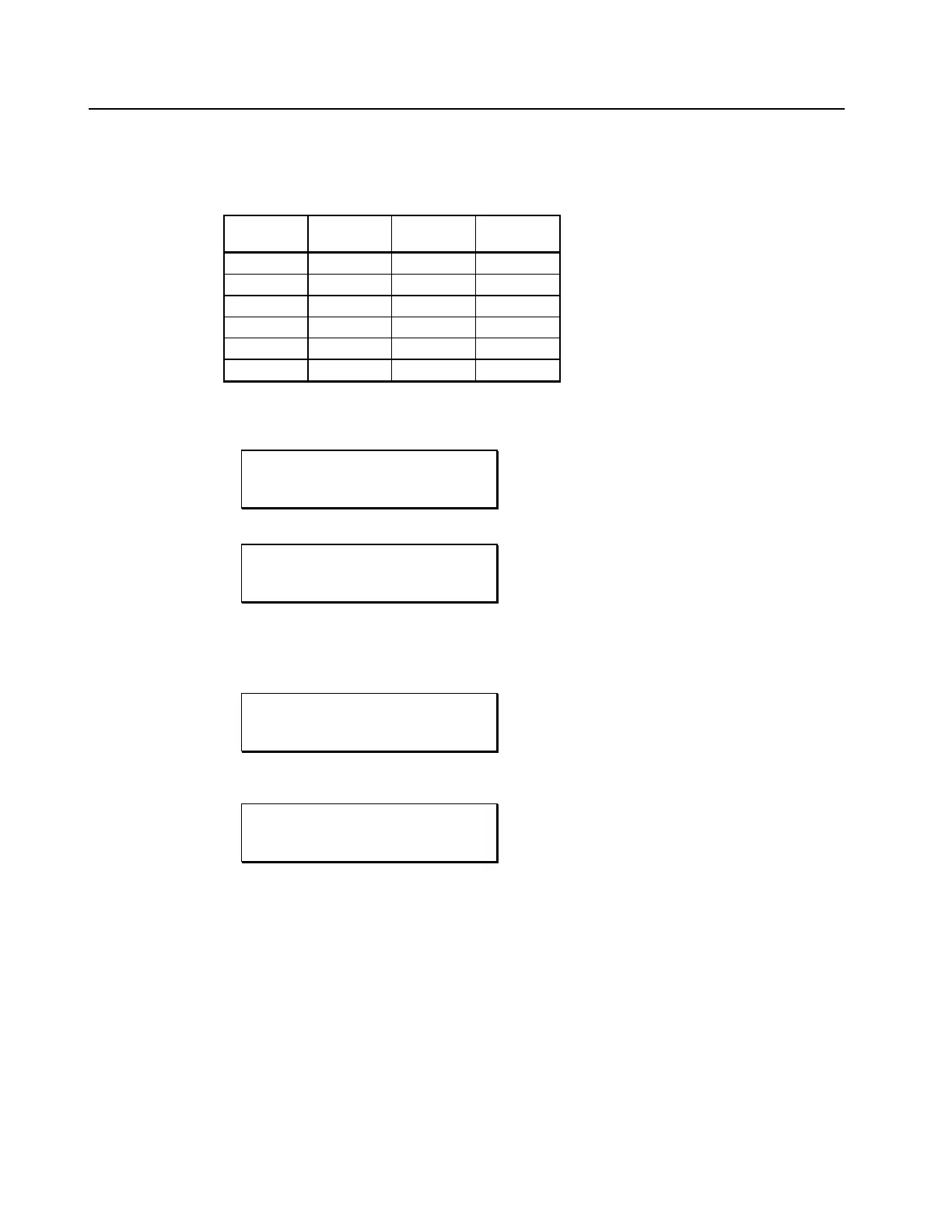
set-up. The following table shows the linkable channels in each mode.
Output Mono 2channel x
3 way
3 channel x
2 way
1 2 3 4
2 3 4 5
3 4 5 6
4 5 6 None
5 6 None None
6 None None None
Table 2 Delay Linking Relationships
Delay Linking:
OUT 1 Subs
Delay Link Off
OUT 1 Subs
Delay Link to 2
7.6 Switchable Polarity - Normal or Inverted. Using the Plus and Minus keys, the user can invert the polarity of the output signal. If the
polarity is changed on a linked output, both outputs will change to the same selection.
Output 1 polarity normal:
OUT 1 Subs
Polarity Normal
Output 1 polarity inverted:
OUT 1 Subs
Polarity Invert


 To Next Page