EasyManua.ls Logo

JBL EON 615 - User Manual

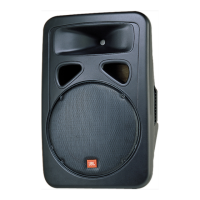
JBL EON 615
28 pages
Print Icon
To Next Page IconTo Next Page
Loading...

Questions and Answers

  • W
    wwhiteAug 4, 2025
    How to troubleshoot JBL Speaker that comes on but has no sound?
    • T
      Timothy SmithAug 4, 2025
      If your JBL Speaker comes on but produces no sound, the issue might be with the signal source (mixer, instrument, etc.) not sending a signal, or faulty cables and connections. You can check VU meters on the source mixer, verify that the tape or CD is playing, and use headphones to confirm the instrument is sending an audio signal. Also, disconnect and re-seat signal cables, and replace any suspected cable with a known-good cable.
  • N
    Nicole RiveraAug 8, 2025
    How to fix hum or buzz in JBL Speakers?
    • K
      Kathryn SilvaAug 8, 2025
      If you're experiencing hum or buzz with your JBL Speakers, it could be due to several reasons. It may be caused by improper A/C grounding or ground loops. Try these steps: * 'Lift' the audio ground by using an XLR/F to XLR/M adapter on one end. * Re-route audio cables away from AC power and lighting cables. It also can be caused by an excessively long unbalanced cable run. To fix it: * Use the balanced outputs (if available) of your mixer or source equipment to drive your EON speakers. * Use a “DI” (direct injection) box to convert your unbalanced equipment output to a balanced output. Another reason is improper system gain structure, so reduce the INPUT level controls and increase the output level of your source devices.
  • B
    bsmithAug 12, 2025
    What causes hum or buzz that changes with mixer levels in JBL EON 615?
    • A
      abbottjillianAug 12, 2025
      If you notice a hum or buzz that increases or decreases when the mixer level controls are moved with your JBL Speakers, it may be due to an improper A/C ground or faulty equipment connected to the mixer input, or a faulty cable between the source equipment and mixer. Disconnect or mute channels one at a time to isolate the problem. Substitute a known-good cable for the suspected faulty cable.
  • G
    garrett15Aug 17, 2025
    Why is my JBL Speakers signal distorted and very loud?
    • T
      Tanya FieldsAug 17, 2025
      If the signal from your JBL Speakers sounds distorted and very loud, and the PEAK light is frequently lit, it's likely due to an excessive input signal trying to exceed the speaker's capabilities. To resolve this: * Reduce the output level of the source. * Turn down the level controls on the speaker. * Consider using additional speakers.
  • T
    Travis LeonAug 21, 2025
    How to troubleshoot distorted sound at moderate volumes on JBL EON 615?
    • D
      dawnmeyerAug 21, 2025
      If you are getting a distorted sound from your JBL Speakers even at moderate volumes, and the LIMIT light is not lit, the mixer or another source might be overdriven. In this case, adjust controls as needed, including input sensitivity (gain), channel faders, and master faders.
  • T
    thomas40Aug 26, 2025
    How to eliminate hiss in JBL EON 615 sound?
    • P
      pooleedwardAug 26, 2025
      If there's a lot of hiss in the sound from your JBL Speakers, especially when the mixer controls are at very low settings, it might be due to an improper gain structure. First, make sure that the MIC/LINE switch is in the LINE (disengaged) position. Then, reduce the level settings at the speaker. Also, adjust controls as needed, including input sensitivity (gain), channel faders, and master faders.
  • J
    Jodi AcostaAug 30, 2025
    What to do if my JBL EON 615 Speakers have no sound with a microphone connected?
    • L
      Laura GutierrezAug 30, 2025
      If you're experiencing no sound with a microphone connected directly to the MIC/LINE input of your JBL Speakers, the microphone may require phantom power. The EON does not supply phantom power. Switch to a dynamic microphone, use a battery powered microphone (if possible), or use an external phantom power supply for condenser type microphones.

JBL EON 615 Specifications

General IconGeneral
Max SPL Output127 dB
Coverage Pattern90° x 60°
LF Driver15-inch
Dimensions707 x 439 x 365 mm (27.8 x 17.3 x 14.4 in)
Weight17.69 kg (39 lbs)
System TypeSelf-powered 15", two-way, bass-reflex
Crossover Frequency1.8 kHz
EnclosurePolypropylene
Frequency Response50Hz - 20kHz
Frequency Range55Hz - 20kHz
HF Driver1-inch
Input Impedance10 kΩ
LF Driver Details15" Woofer
HF Driver DetailsJBL 2414H-1 1" compression driver
Suspension / MountingM10 suspension points
Inputs2 x XLR-1/4" combo
OutputsXLR

Videos

How to repair JBL EON 615?

Related product manuals