8
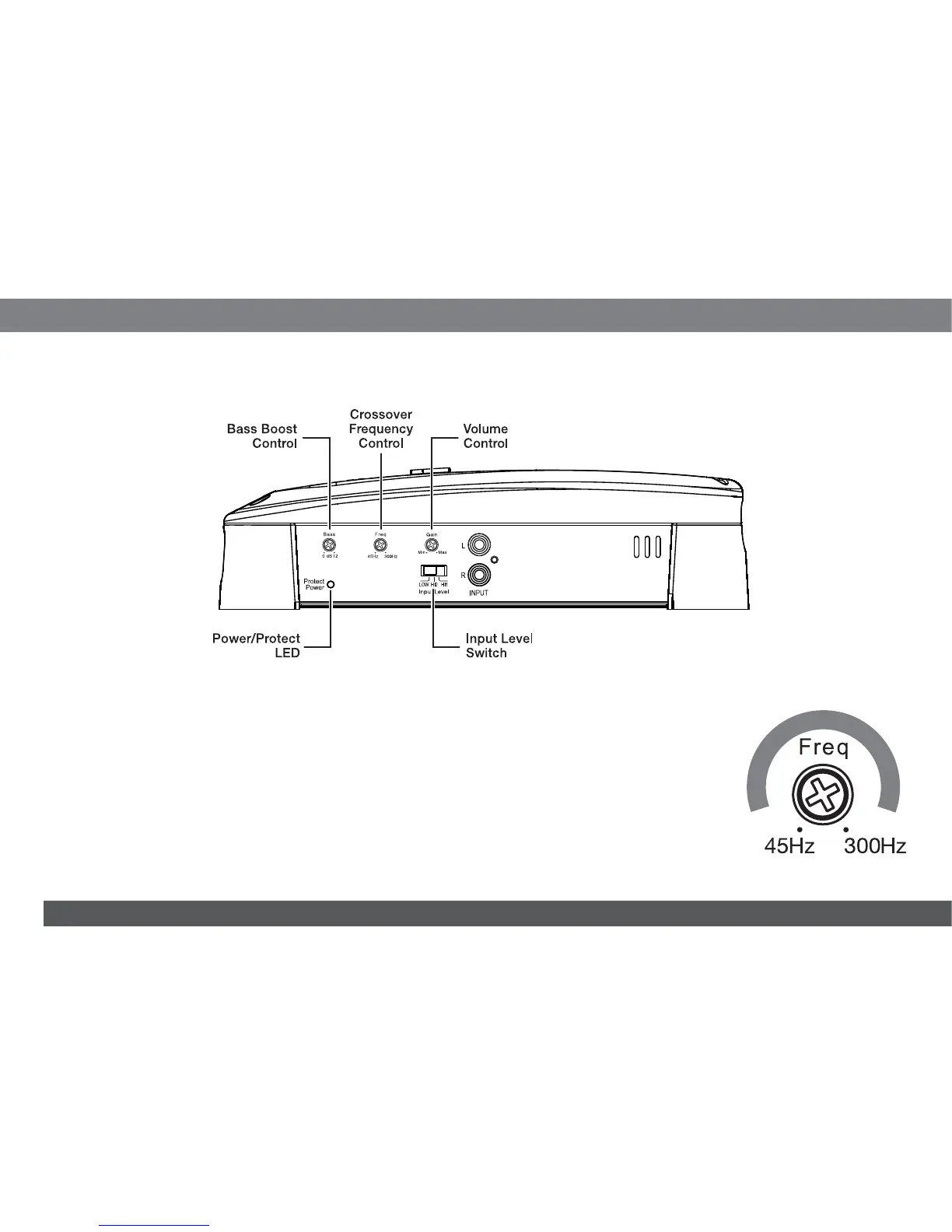
CONTROLS AND INDICATORS
SET THE GTX500'S CROSSOVER FREQUENCY CONTROL
NOTE: The GTX500's internal crossover is permanently set for low-pass operation.
The Crossover Frequency control limits the amount of high-frequency energy sent to the subwoofer. The setting you
use will depend on the type and location of your system’s subwoofer, and on the performance of your system's full-
range speakers. If you used a high-pass crossover on your system's other speakers, start by setting the GTX500's
Crossover Frequency control to a frequency somewhat lower than the high-pass crossover setting you used for
the system's other speakers. After listening to music on the system for a time, fine-tune the Crossover Frequency
control setting to achieve a smooth transition from the subwoofer to the rest of the system’s speakers while
avoiding a “hole,” where the sounds that occur between the subwoofer and other speakers seem to drop out. The
illustration to the right shows the recommended Crossover Frequency control frequency range for subwoofers.


 To Next Page