6
SPEAKER AND INPUT CONNECTIONS
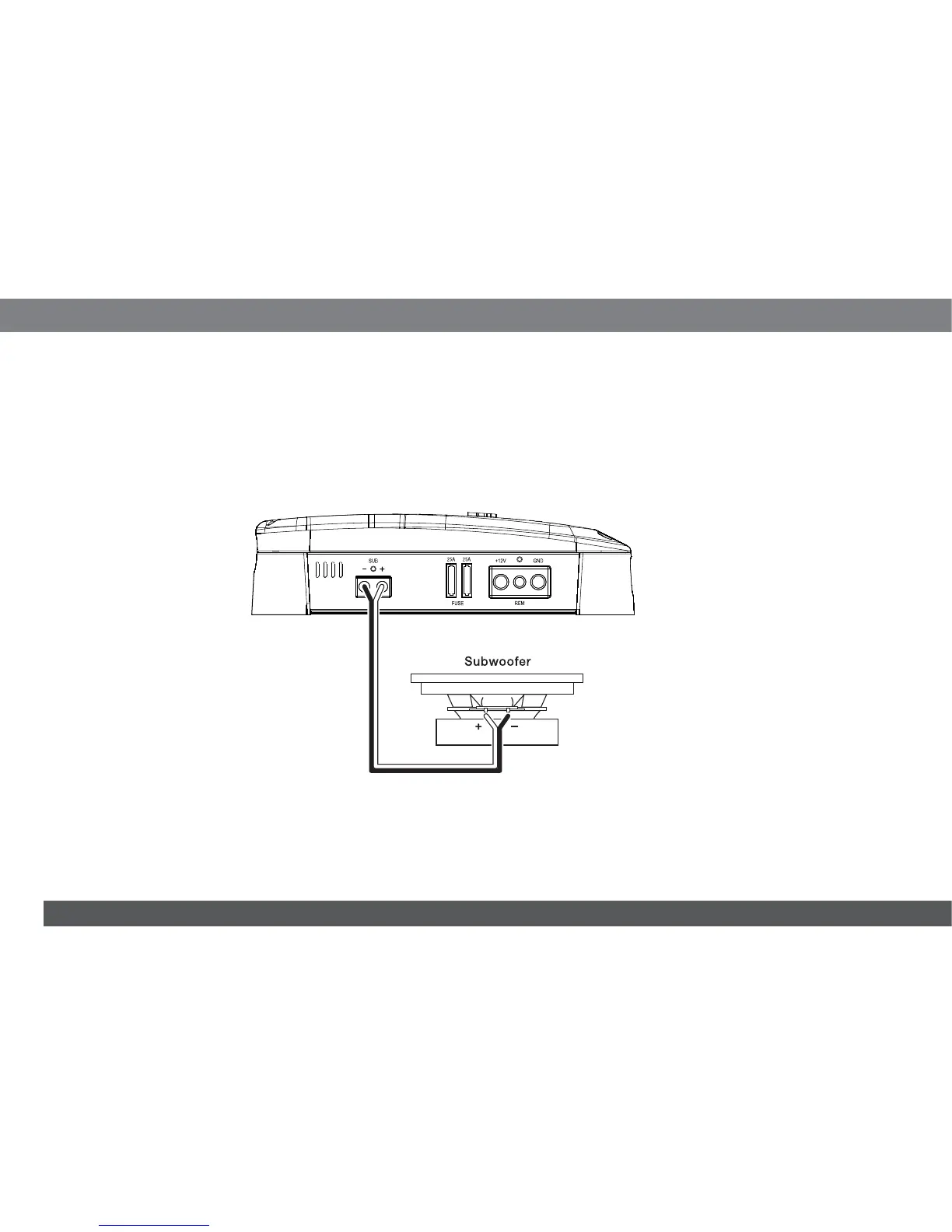
Always connect the (+) speaker terminal on the amplifi er to the (+) terminal on the speaker and the (–) speaker terminal on the amplifi er to the (–) terminal
on the speaker.
IMPORTANT: Make sure the (+) and (–) bare wires do not touch each other or the other terminal at both the amplifier terminals and speaker
terminals. Touching wires can cause a short circuit that can damage the amplifier.
SPEAKER CONNECTIONS
Connect the subwoofer to the amplifier’s Sub (+) and (–) terminals.
Always connect the (+) terminal on the amplifier to the (+) terminal on the subwoofer and the (–) terminal on the amplifier to the (–) terminal on the
subwoofer.
IMPORTANT: Make sure the (+) and (–) bare wires do not touch each other or the other terminal at both the amplifier terminals and subwoofer
terminals. Touching wires can cause a short circuit that can damage the amplifier.
NOTE: Minimum speaker impedance is 2 ohms.



 To Next Page