L75ms Owners Manual | Rev1.0 20220201 | Part No. 620-0595-001 | JBL.com/Specialty-Audio/
Pg 6
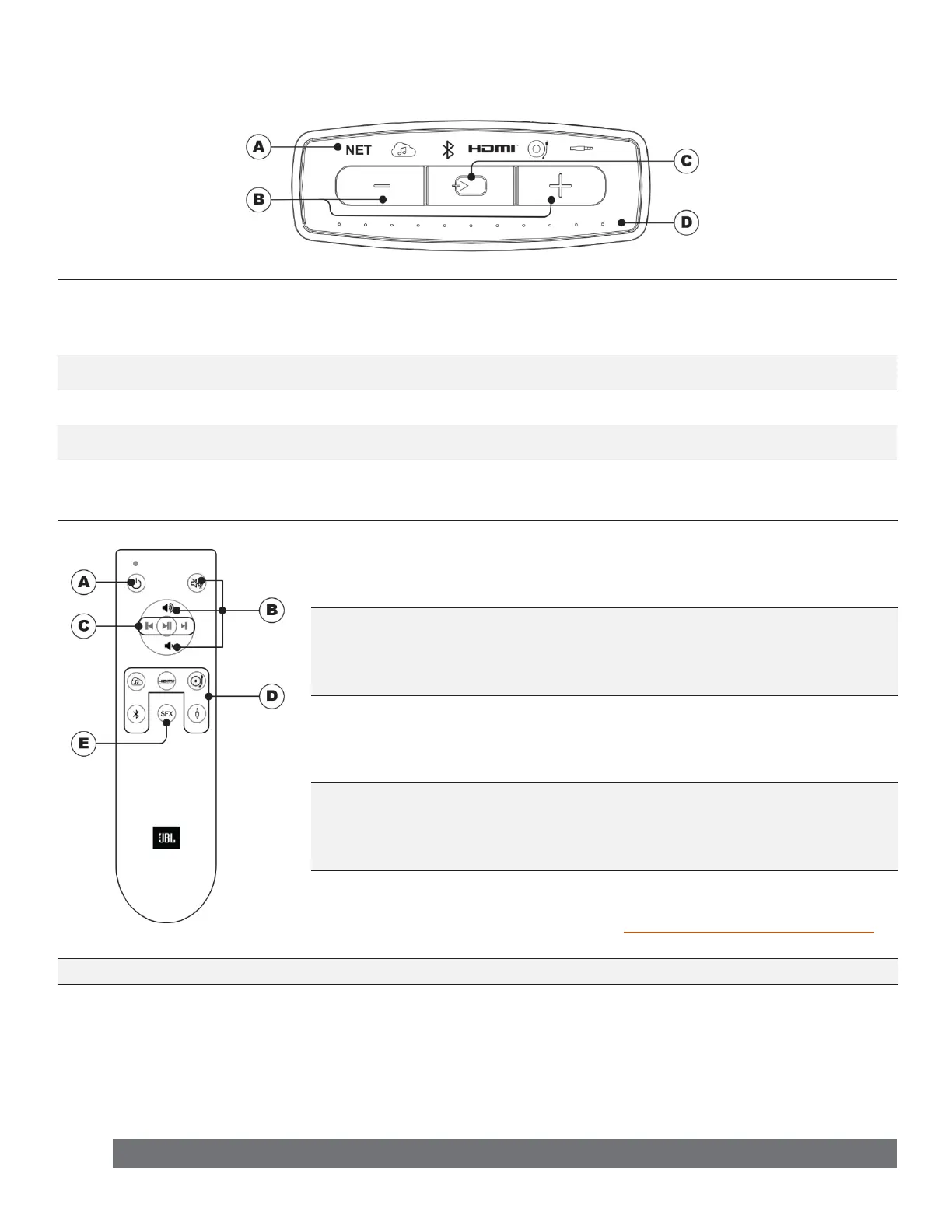
Top Panel Controls
A
Source Indicators
Indicates connection status.
NET – White=Connected | Blinking=Searching | Red=Network Disabled
Sources – White=Active | O=Not Active
B
Volume Controls Controls output volume of speaker
C
Source Selection Press to move to the next source.
D
Volume Indicator Dots illuminate from left to right as volume increases.
Remote Control Buttons
A
Power Toggles L75ms ON or OFF
B
Volume Controls Volume Up / Down and Mute
C
Playback Controls Previous / Next and Play / Pause
D
Direct Source Selection
Network Streaming / HDMI-ARC / Phono /
Bluetooth / 3.5mm TRS Stereo Analog
E
SFX (Sound Field
Enhancement)
Press to expand output to a more spacious
sound eld.
Refer to Sound Field Enhancement (SFX)
for more details.
Note:
Pressing any button on the remote will wake the L75ms from Standby.


 To Next Page