14
X If one of the two digital inputs is selected (see #10 below), the highpass fi lters in networked LSR4300 speakers
will only be activated if the rear-panel Bass Management / LFE DIP switch is set to “Bass Management.”
X If a second LSR4312SP is networked, changing the Bass Management X OVER frequency in either one will
cause both to be set identically.
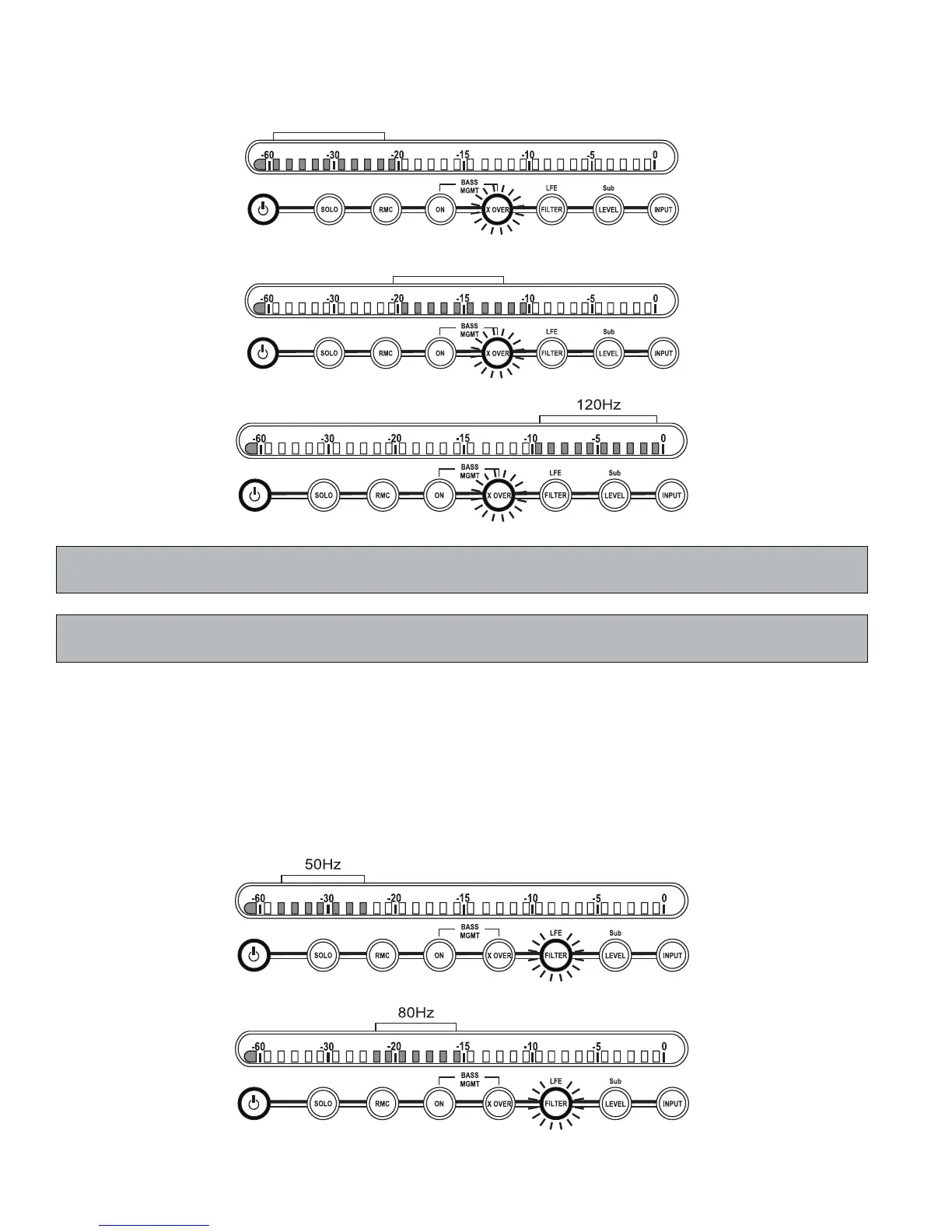
8. LFE FILTER – Determines whether the LSR4312SP’s internal lowpass fi lter will restrict the range of
frequencies reproduced when monitoring an LFE signal. Options are 50Hz, 80Hz, 120Hz, or NONE
(no fi ltering). To select one, press the FILTER button. It will fl ash and the meter display will confi rm the
currently selected fi lter setting. While the FILTER button is fl ashing (for approximately 3 seconds), you
can use the +/- buttons to change the fi lter setting. The new selection will then be displayed on the meter
display, as shown in the following illustrations, and will be stored in the LSR4312SP after 3 seconds
(or, immediately, by pressing the FILTER button a second time within that
3-second period). For more
information, see Appendix A on page 34 in this manual.
Reference - Front Panel


 To Next Page