Need help?
Do you have a question about the JBL LSR4312SP and is the answer not in the manual?
Explains the conventions used in the owner's manual, including special tips and cautions.
Details JBL's RMC technology for analyzing and correcting room acoustics for better sound.
Describes the Harman HiQnet protocol for networking up to eight monitors and two subwoofers.
Details how the subwoofer integrates into surround sound production and monitoring.
Lists and describes the various analog and digital input options available on the subwoofer.
Details Meter Display, Power Indicator, Power Button, and SOLO function.
Explains controls for Bass Management, Crossover, and LFE Filter settings.
Describes subwoofer level adjustment and input source selection.
Details analog/digital connectors and input sensitivity switch for audio signals.
Explains HiQnet connectors, USB port, and DIP switches for system configuration.
Covers remote control of Bass Management, X OVER, and LFE Filter settings.
Explains remote control of subwoofer level and soloing functions for individual speakers.
Provides guidance on optimal placement for stereo and surround sound setups.
Explains how to set the subwoofer polarity manually or automatically via RMC.
Details how to interconnect LSR4300 speakers and subwoofers using CAT5 cables.
Explains DIP switch settings for network operation, including speaker ID and channel assignment.
Explains connecting analog sources via XLR or 1/4" jacks and routing signals to speakers.
Details connecting digital sources via AES/EBU or S/PDIF and their configuration.
Explains peak limiting and thermal protection circuits within the subwoofer.
Explains how to use the Control Center Software for system control and configuration.
Explains the LFE channel's role in surround sound and its low-frequency effects.
Explains using the subwoofer to reproduce bass frequencies from all main channels.
Lists onboard features that remain functional when used with non-JBL LSR series speakers.
Highlights advanced features that are not functional with speakers other than the LSR4328P/LSR4326P.
Provides a diagram illustrating the signal flow and processing within the subwoofer.
Provides recommendations for optimal analog signal wiring using balanced and unbalanced sources.
Recommends high-quality cabling for AES/EBU and S/PDIF digital audio connections.
Details common error messages, their causes, and corrective actions for troubleshooting.
Provides a list of common operational issues and their remedies for quick problem-solving.
Explains how to check and update the firmware for compatible LSR4300 speakers.
Lists detailed technical specifications for the system, including frequency response and SPL.
Details amplifier power, distortion, input/output connector specs, and sensitivity.
Explains warranty coverage, exclusions, and how to obtain repair services.
Details customer service hours, contact numbers, and website resources for support.
 General
| Input Connectors | XLR, TRS |
|---|---|
| Outputs | XLR |
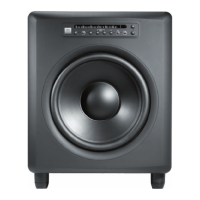
| Type | Powered Subwoofer |
| Driver Size | 12 inches |
| Amplifier Power | 300W |
| LF Driver | 12 inches |
| Power Output | 300 Watts |

 To Next Page