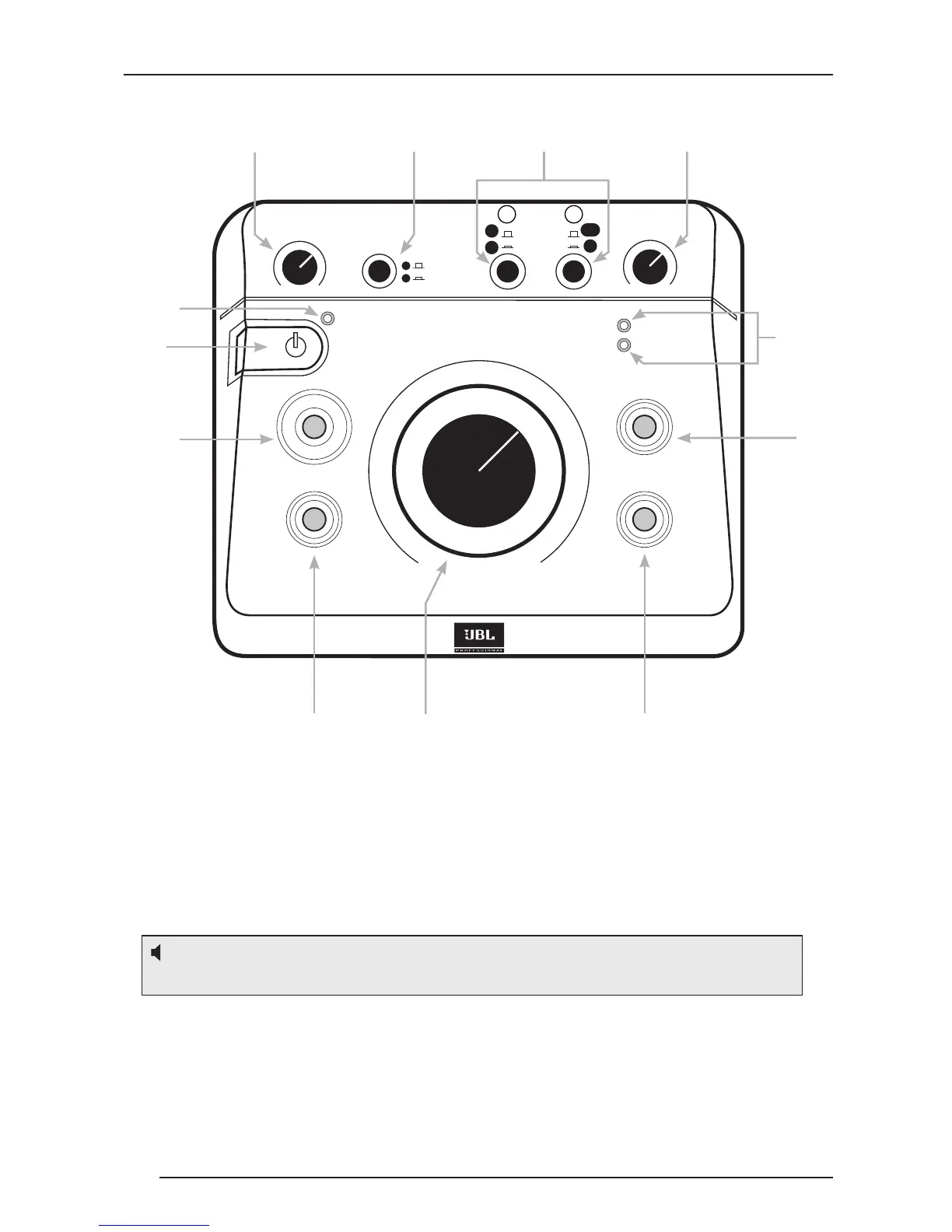
Front Panel Controls, Indicators, and Functions:
1. POWER LED – This LED (Light Emitting Diode) ashes twice when the MSC1
is rst connected to a power source and remains illuminated when the MSC1 is
powered ON.
2. POWER SWITCH - When the MSC1 is connected to an AC power source, press
this button to power-on the MSC1 (The front panel buttons will illuminate in a pattern).
To power off the MSC1, press the power button again. Once power down begins,
the sound is muted while a different light pattern is displayed. Do not disconnect the
power adaptor until all MSC1 front panel indicators are no longer illuminated.
3. MSC1 VOLUME – Sets the output level for the selected input signal (see #6),
from -∞ (full attenuation) to MAX (0 dB, or no attenuation). Note that this control
does NOT affect headphone output level (see #4).
4. HEADPHONE VOLUME Control – A dedicated volume control for connected
headphones. Other than this, the only MSC1 control that effects the headphone
signal is MUTE control (see #12).
Note: The power switch and all MSC1 features are disabled for 4 seconds immediately
following connection of MSC1 to a power source.


 To Next Page