5
6.1-Channel System
A 6.1-channel system will
consist of a 5.1-channel
configuration, as shown on
page 4, with the addition of a
rear center speaker placed
midway between the two
surround speakers, and
further to the rear than the
surrounds. The rear center
speaker will no more call
attention to itself than the
surround speakers.
7.1-Channel System
Some newer surround-sound
formats utilize left and right
surround channels that are
used for side fill, in addition
to the left and right rear
channels found in 5.1 systems.
Place the left and right
surround speakers on the
sides of the room, at or in
front of the listening position,
facing each other.
MOUNTING OPTIONS
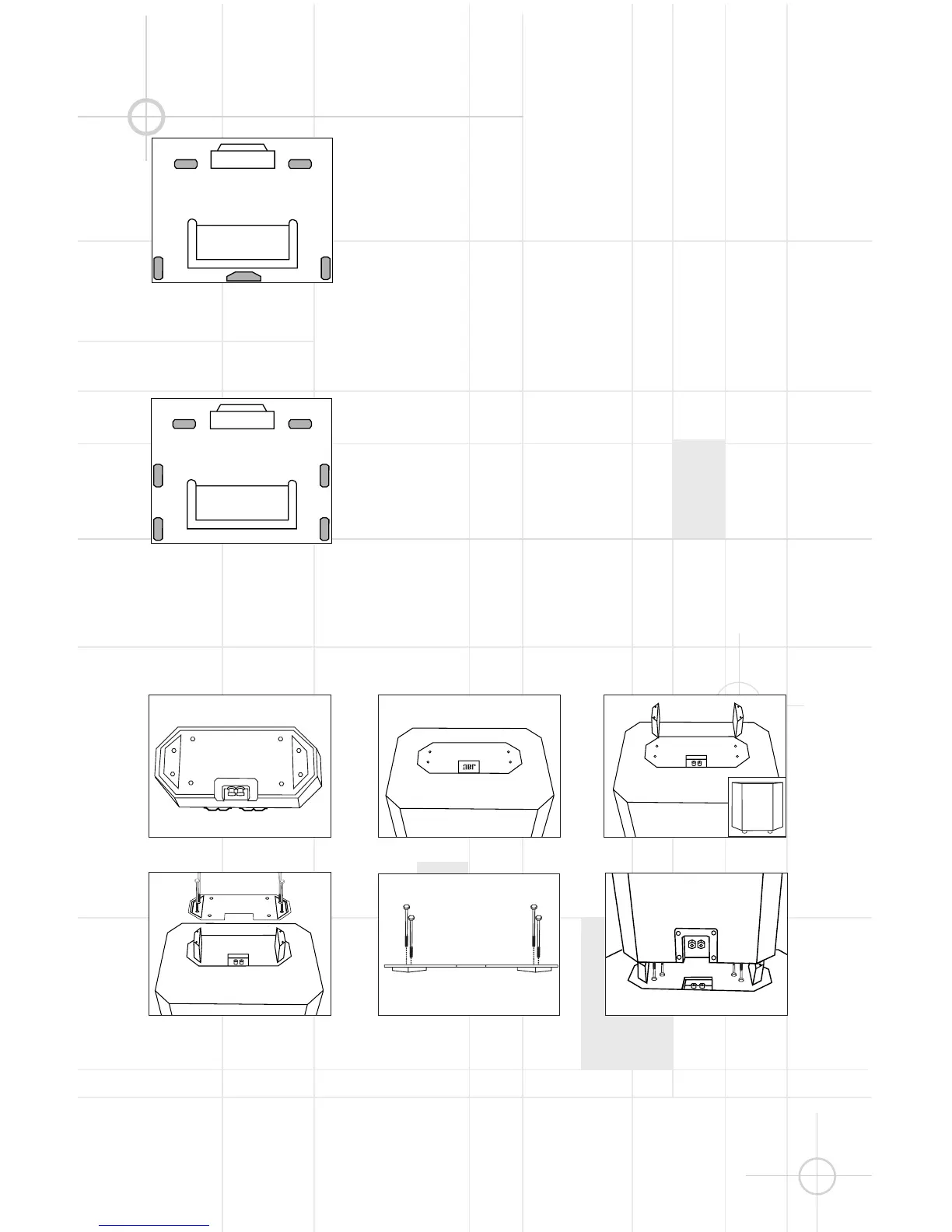
Stacking the PT800 Tower on Top of the PS1400 Subwoofer
Figure 1
Figure 2
Figure 4
Figure 5
Figure 3
1. Gently place the PT800 tower
upside down on a padded
surface, and remove the 4 bolts
holding the metal plate on the
bottom of the tower using the
included Allen wrench. (Figure 1)
2. Lift the metal plate off of
the speaker (you may need to
insert one end of the Allen
wrench into an empty screw
hole and pull the plate
upwards) and set it aside,
with the four bolts.
Figure 4a




 To Next Page