9
Ergo-Flex
Operating / Service Manual
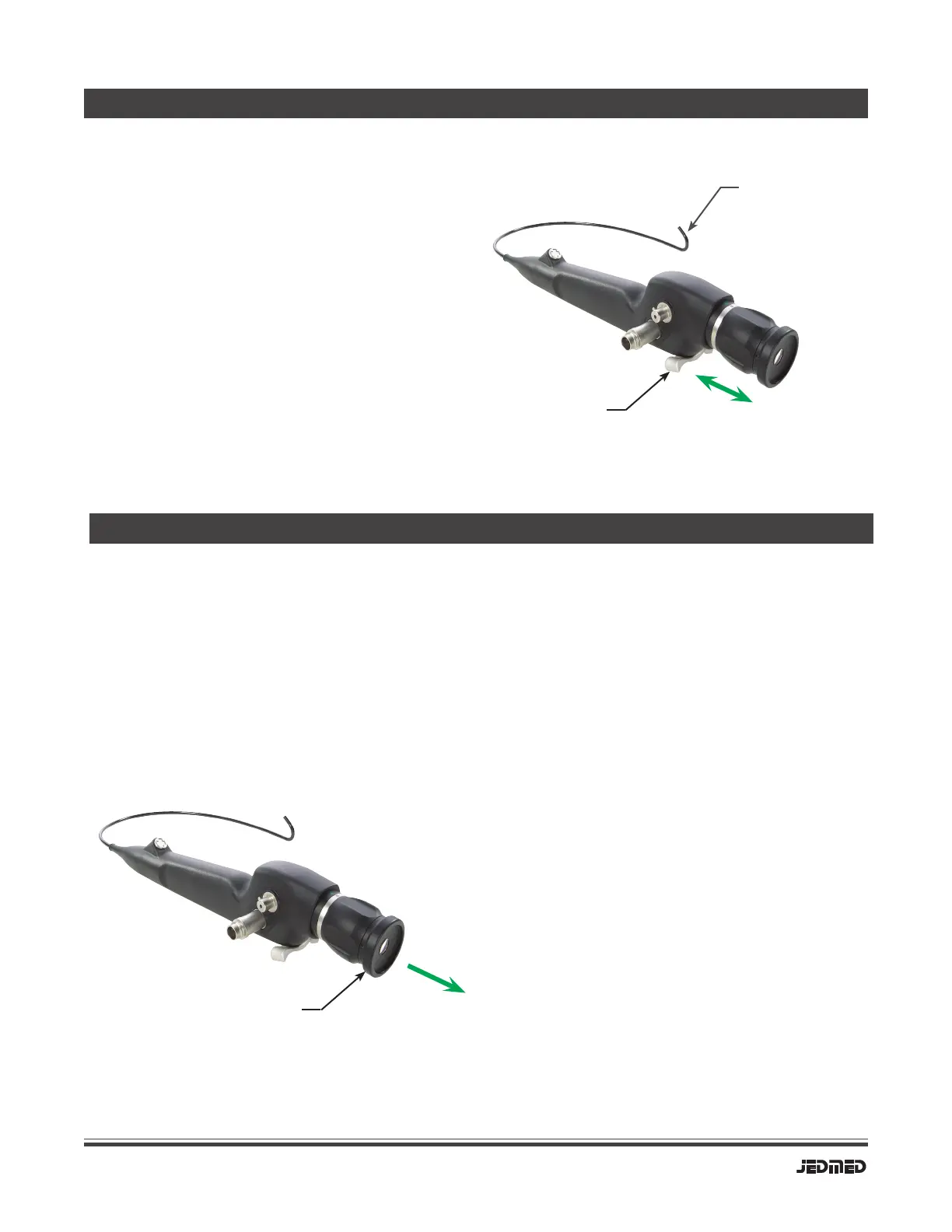
DEVICE OPERATION - Angulation
Hold scope comfortably in hand. Use thumb
to gently rock articulation lever forward and
backward. Observe corresponding angulation
of the scope distal end. Movement should be
smooth and symmetrical.
Articulation
Lever
Angulation at
distal end
DEVICE OPERATION - Video Cameras
Standard B-cup
eyepiece
Clip to endocoupler
with camera.
To connect scope to a video camera, rst
connect video camera to any standard
endocoupler. Next, connect the endocoupler
to the scope at the common B-cup eyepiece
interface. Rotate focus ring to align its dot to
dot on scope body. Focus as needed using
focus ring on endocoupler.
Connection
Moiré effects may occur whenever a ber
scope is viewed on a video camera. It displays
as an odd, interference pattern on the video
monitor. Moiré results from the pattern of the
image bers, aligning with the pattern of pixels
on the image chip of the camera.
To minimize moiré effects, rotate endocoupler
slightly on eyepiece of scope to un-align bers
with pixels. Slightly defocusing the image may
also be effective.
Moiré
All video cameras should be medical grade!


 To Next Page