B – 2 16025927 ©2005 Maytag Services
Use Information (Models JES8750AA*, JES8850A**)
OvENCOOKING
Keep Clock
Warm _y o_
Oven
Light
Brea d Timer 2
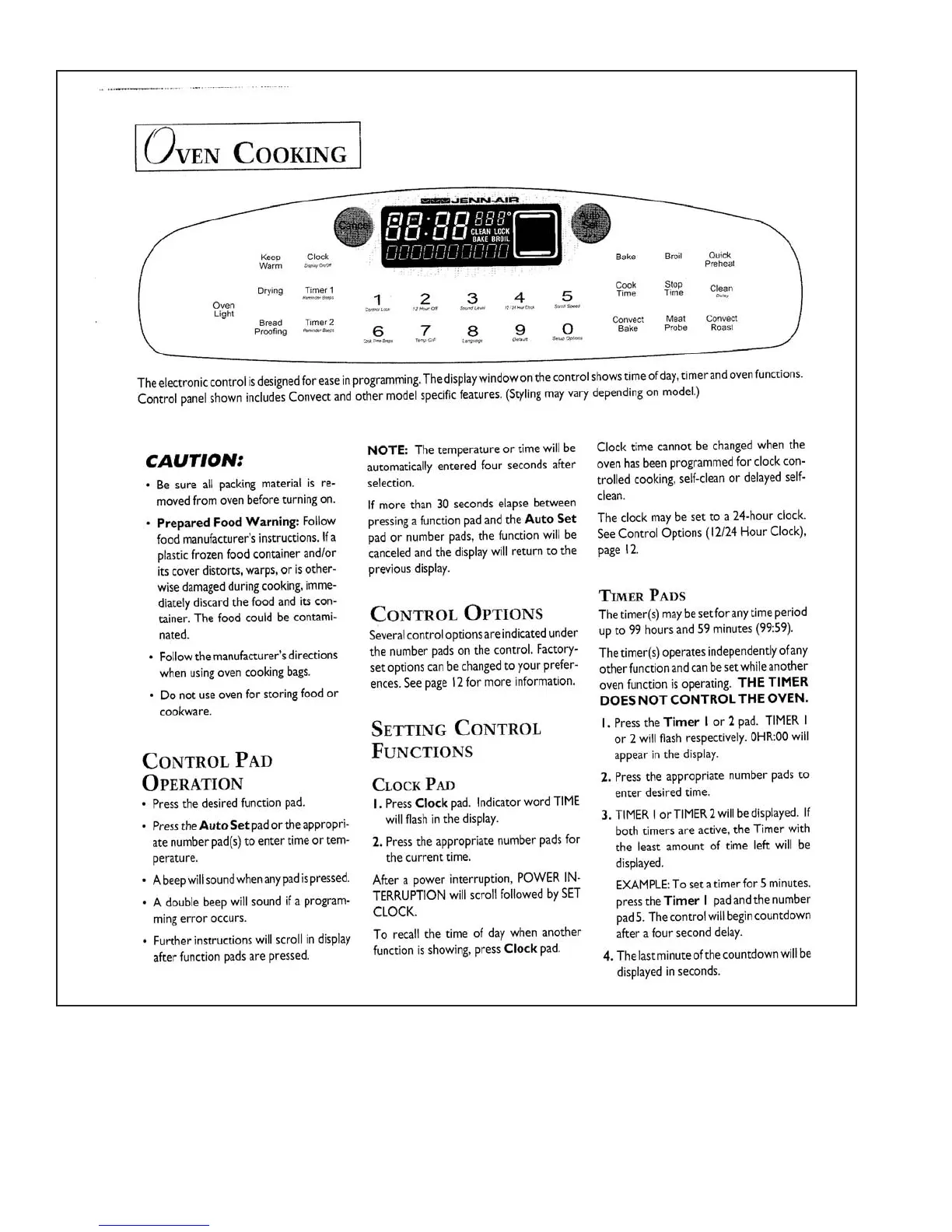
Theelectroniccontrolisdesignedforeaseinprogramming.Thedisplaywindowonthecontrolshowstimeofday,timerandovenfunctions.
ControlpanelshownincludesConvectandothermodelspecificfeatures.(Stylingmayvarydependingonmodel.)
NOT :
E
Thetemperatureortimewillbe Clocktimecannotbechangedwhenthe
CAUTION:
automaticallyenteredfoursecondsafter ovenhasbeenprogrammedforclockcon-
, Besureallpackingmaterialisre- se ection,
l
trolledcooking,self-cleanor delayedself-
movedfromovenbeforeturningon. Ifmorethan30secondselapsebetween clean.
•P epa edFood a ning:
r r W r Follow pressingafunctionpadandthe u
AtoSet
Theclockmaybesettoa24-hourclock.
foodmanufacturer'sinstructions.Ifa padornumberpads,thefunctionwillbe SeeControlOptions(12/24HourClock),
plasticfrozenfoodcontainerand or canceledandt edisplaywillreturntot e
hh
page12.
itscoverd storts,warps,orisother-
i
previousdisplay.
wisedamagedduringcooking,imme-
diately
discardthefoodanditscon- TI E
MR PA
DS
tainer.Thefoodcouldbec ntami-
o
CO TROL
N
OPTIONS Thetimer (s)maybesetforanytimeperiod
nated.
S
everalcontroloptionsareindicatedunder upto 99hoursand59minutes(99:59).
• Followthemanufa turer's
c
directions thenumberpadsonthecontrol.Factory- T etimer(s)operatesindependendyofany
b
whenusingovencookingbags. setoptionscanbechangedtoyourprefer- otherfunctionandcanbesetwhileanother
ences.Seepage12fo moreinformation.
r
, Donotuseovenforstoringfoodor ovenfunctionisoperating.T
HE
TIM
ER
cookware. DO
ES N C N R
OT O T OL T
HE
ON.
VE
SETTING CONTROL
I
.Pressthe r
Time I
or2pad. TIMERI
or2willf lashrespectively.0HR:00 ill
w
CONTRO
L
P
AD
F
UNCTIONS appea inthedisplay
r
.
OPERATION
COCK
L
P
AD 2.Pressth appropriatenumberpadsto
e
enterdesiredtime.
• Pressthedesiredfunctionpad. I.Press lockpad.IndicatorwordTIME
C
•Presstheuto
AS
etpadortheappropri- willflashinthedisplay.
3
.TIMERIorTIMER2willbedisplayed.If
bothtimersareactive,theTimerwith
atenumberpad(s)toentertimeortern- 2.Presstheappropriatenumberpadsfor
the leastamountoftimeleftwill be
perature, thecurrenttime.
displayed.
• Abeepwillsoundwhenanypadispressed.Afterapowerinterruption,POWERIN-
. Adoublebeepwillsoundifaprogram- TERRUPTIONwillscrollfollowedbySET EXAMPLE:Tosetatimerfor5minutes,
presstheTimer I padandthenumber
ruingerroroccurs. CLOCK. pad5.Thecontrolwillbegincountdown
• Furtherinstructionswillscrollindisplay Torecallthetimeofdaywhenanother afterafourseconddelay.
afterfunctionpadsarepressed, functionisshowing,pressClockpad. 4.Thelastminuteofthecountdownwillbe
displayedinseconds.






 To Next Page