Need help?
Do you have a question about the Jensen J1CA10FL and is the answer not in the manual?
Adjusting the display angle and screen orientation for optimal viewing.
Details how to operate the screen for brightness, contrast, and sound settings.
Instructions on how to pair a phone number with the device.
Information regarding the rear camera function and its operation.
Explains the functions and buttons on the radio's control display.
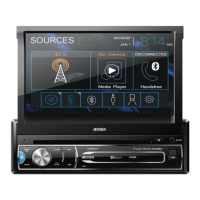
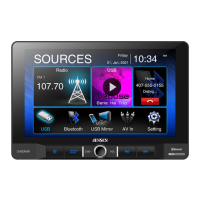
Overview of the main menu, its navigation, and available sources.
Details settings for local/distance reception and seek tuning.
Details of the limited two-year warranty coverage and terms.
Information regarding the device's compliance with FCC regulations.
This document describes a multimedia receiver designed for in-vehicle use, offering a range of entertainment, navigation, and connectivity features. The device aims to provide a comprehensive user experience through its intuitive interface and robust functionality.
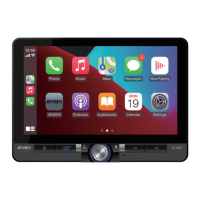
The receiver serves as a central hub for in-car entertainment and information. It supports various media formats, including AM/FM radio, USB playback, and Bluetooth streaming. A key feature is its compatibility with Apple CarPlay and Android Auto, which allows users to integrate their smartphones for navigation, communication, and app access directly through the receiver's display. This integration provides a familiar and safe way to use smartphone features while driving.
The device includes a built-in AM/FM tuner, enabling access to local radio stations. For digital media, it offers USB connectivity, allowing users to play audio and video files from USB storage devices. Bluetooth functionality extends to hands-free calling and audio streaming, enhancing safety and convenience by allowing drivers to make and receive calls and play music without physically interacting with their phones.
Navigation is facilitated through smartphone integration via Apple CarPlay and Android Auto, providing real-time maps, traffic updates, and turn-by-turn directions. The device also supports a rear camera input, which is crucial for parking assistance and improving visibility when reversing. This feature automatically displays the rear camera feed when the vehicle is shifted into reverse, enhancing safety.
The receiver's display is a touchscreen interface, allowing for easy navigation through menus and settings. It features a customizable screen, where users can adjust brightness, contrast, and color saturation to suit their preferences. The main menu provides quick access to core functions such as radio, USB, Bluetooth, Apple CarPlay/Android Auto, and system settings.
The device is designed for ease of use, with a focus on intuitive controls and a clear interface. The installation process involves connecting various inputs and outputs, including power, speaker wires, antenna, USB, and camera inputs. The wiring diagram provided in the manual guides users through the correct connections, ensuring proper functionality.
The control panel features physical buttons for essential functions like power, volume, home, and voice commands, complementing the touchscreen interface. These physical controls offer tactile feedback, which can be beneficial while driving. The voice command button, in particular, allows for hands-free operation of certain functions, further enhancing safety.
The touchscreen interface is central to interacting with the device. Users can tap, swipe, and drag to navigate menus, select options, and control media playback. The main menu is organized to provide quick access to all primary functions, reducing the need to delve into complex sub-menus. For example, selecting "Radio" immediately brings up the tuner interface, while "USB" allows browsing of media files on a connected USB device.
Apple CarPlay and Android Auto integration are seamless. Once a compatible smartphone is connected via USB, the receiver automatically launches the respective interface, mirroring the phone's essential apps on the receiver's display. This allows users to access navigation apps like Apple Maps or Google Maps, make calls, send messages, and play music from their phone's library or streaming services, all controlled through the receiver's screen or voice commands.
Audio operation includes basic controls such as play, pause, skip tracks, and volume adjustment. The device also offers audio settings to fine-tune the sound output, allowing users to adjust equalizer settings, balance, and fader to optimize their listening experience.
The rear camera function is automatic. When the vehicle is put into reverse, the display automatically switches to the rear camera view, providing a clear image of the area behind the vehicle. This feature is invaluable for parking in tight spaces and avoiding obstacles.
System settings allow users to customize various aspects of the device, including time and date, language, and display preferences. These settings ensure that the receiver can be tailored to individual user needs and preferences. The screen settings, for instance, allow adjustment of brightness and contrast, which can be important for visibility in different lighting conditions.
The device is designed for durability and reliable performance, but like all electronic devices, it benefits from proper care and attention. While the manual does not explicitly detail routine maintenance tasks, general best practices for in-car electronics apply.
The "Limited Two Year Warranty" provides coverage for defects in material and workmanship for two years from the date of purchase. This warranty is a crucial aspect of maintenance, as it ensures that any manufacturing defects or failures that occur within this period will be addressed by the manufacturer. It covers parts and labor for repairs or replacement of the product, provided the damage is not due to misuse, accident, or unauthorized modifications.
The warranty specifically excludes damage caused by improper installation, accidents, abuse, neglect, or unauthorized repair. This highlights the importance of professional installation and adherence to the wiring instructions provided in the manual. Incorrect wiring or installation can lead to malfunctions and potentially void the warranty.
For warranty service, users are instructed to contact the dealer where the product was purchased or call customer service. This process typically involves obtaining a Return Merchandise Authorization (RMA) number and shipping the product to an authorized service center. Keeping the original sales receipt is essential for validating the warranty claim.
The "FCC Compliance" section outlines regulatory requirements, indicating that the device complies with FCC rules regarding radio frequency interference. This ensures that the device operates within established guidelines and does not cause harmful interference to other electronic devices. Users are advised not to make unauthorized modifications to the device, as this could void their authority to operate it and potentially cause interference.
While not explicitly stated, general maintenance practices for in-car electronics include keeping the screen clean with a soft, lint-free cloth, avoiding harsh chemical cleaners, and ensuring that all connections remain secure. Regular checks of the wiring to ensure no loose connections or frayed wires can help prevent potential issues. Protecting the device from extreme temperatures and direct sunlight when not in use can also contribute to its longevity.
In summary, the device is a feature-rich multimedia receiver designed for modern vehicles, offering extensive connectivity, entertainment, and navigation capabilities, backed by a warranty that covers manufacturing defects and emphasizes proper installation and usage.
 General
| Tuner | AM/FM |
|---|---|
| Bluetooth | Yes |
| Backup Camera Input | Yes |
| Steering Wheel Control Compatible | Yes |
| USB Port | Yes |
| Aux Input | Yes |
| Type | Digital Media Receiver |
| Screen Size | 10.1 inch |
| Digital Media Compatibility | MP3, WMA |
| Apple CarPlay | Yes |
| Android Auto | Yes |

 To Next Page