EasyManua.ls Logo

Jensen CM901MIR - User Manual

Jensen CM901MIR
25 pages
Print Icon
To Next Page IconTo Next Page
Loading...
INSTALLATION &
OWNER’S MANUAL
CM901MIR
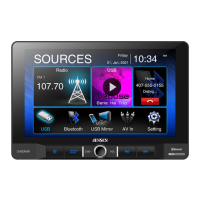
Multimedia Receiver with USB Mirror
featuring a 9" Digital TFT Display
AM-FM
USB Media Player
Rear Camera Input
Question and Answer IconNeed help?

Do you have a question about the Jensen CM901MIR and is the answer not in the manual?

Summary

Safety Notes

Driving Distraction and Safety

Emphasizes safety features and legal restrictions on video use while driving.

Driving Safety Warnings

Video Operation and Distraction

Details legal and safety rules for video playback.

Parking Brake Interlock

Explains the parking brake lock-out feature and its installation.

Auditory Awareness

Advises maintaining low volume for external sounds.

Preparation and Mounting

Installation Pre-checks and Guidance

Covers battery disconnection and referring to the installation guide.

Screen Adjustment Features

Screen Viewing Angle and Position

Describes side-to-side pivoting, height, depth, and tilt adjustments.

Control Locations

On-Screen and Front Panel Controls

Identifies key buttons and ports on the unit and screen.

General Operation

Power, Volume, and Mute

Basic controls for unit operation.

Mode Selection and Main Menu

Accessing different sources and the main menu.

External Input and Reset

Connecting A/V devices and resetting the unit.

Setup Menu Configuration

General Setup Options

Date, time, beep, region settings.

Audio Setup and EQ

Equalizer, time alignment, loudness, subwoofer.

Display Settings

Brightness and dimmer controls.

System and Reset Options

Factory reset and software version.

Audio Operation Details

Equalizer and Balance Adjustments

Fader, balance, and EQ settings.

Time Delay and Speaker Setup

Time alignment for optimal sound staging.

AM;FM Tuner Operation

Radio Tuning and Presets

Storing and recalling stations.

Tuner Mode and Signal Strength

Local/Distance tuning and band switching.

Seek and Scan Functions

Automatic tuning and preset scanning.

USB Operation

File Navigation and Playback

Accessing and playing USB media.

Playback Control Features

Repeat, random, track skipping, play/pause.

Media Compatibility

File System and Extension Support

Supported file systems and extensions.

MPEG Format and Bitrate

Compatible MPEG versions and bitrates.

Sampling Frequency and ID3 Tags

Supported sampling rates and ID3 tag info.

Media Compatibility Details

Incompatible Media Formats

Lists unsupported audio/video file types.

Folder Structure and Naming

Guidelines for nested folders and file naming.

Optimal MP3 Ripping Settings

Recommendations for ripping MP3 files for best results.

Bluetooth Operation

Bluetooth Pairing and Connection

Steps for pairing and auto-connecting devices.

Phone Book and Call Log Access

Accessing contacts and call history.

Bluetooth Status Indicators

Understanding connection status lights.

Bluetooth Audio and Call Management

Music Streaming and Transfer

Transferring audio between phone and unit.

Dialing and Call Handling

Using keypad, making/ending calls.

Microphone and Audio Controls

Managing microphone and audio source.

USB Mirroring Functionality

Setting Up USB Mirroring

Connecting Android or iPhone for mirroring.

Mirroring Control Options

Accessing Home, Rotation, Audio Mix, and Reconnect.

Rear RCA A;V Input

Connecting External Audio;Video

Connecting sources to the rear RCA input.

Rear Camera Operation

Rear Camera Connection

Connecting a rear view camera.

Automatic Camera Mode Switching

How the unit activates camera view.

Steering Wheel Control (SWC) Integration

SWC Compatibility and Adapters

Module compatibility and required adapters.

SWC Control Mapping

List of supported steering wheel functions.

SWC Installation Hints

Guidance for Axxess ASWC-1 and PAC SWI-RC.

Troubleshooting Common Issues

Unit Power and Sound Problems

Diagnosing no power or no sound.

Fuse Issues and Video Display

Addressing blown fuses and lack of video.

Technical Specifications

Tuner and USB Specifications

FM/AM tuner and front USB details.

Monitor Display Characteristics

Panel size, resolution, brightness, contrast.

General Unit and Output Specs

Impedances, voltage, dimensions, power output.

Limited Warranty Information

Warranty Coverage and Exclusions

What is and isn't covered, and excluded damages.

Warranty Service Procedures

How to obtain warranty service and contact info.

Warranty Eligibility

Who is covered by the warranty.

Customer Support

Summary

Safety Notes

Driving Distraction and Safety

Emphasizes safety features and legal restrictions on video use while driving.

Driving Safety Warnings

Video Operation and Distraction

Details legal and safety rules for video playback.

Parking Brake Interlock

Explains the parking brake lock-out feature and its installation.

Auditory Awareness

Advises maintaining low volume for external sounds.

Preparation and Mounting

Installation Pre-checks and Guidance

Covers battery disconnection and referring to the installation guide.

Screen Adjustment Features

Screen Viewing Angle and Position

Describes side-to-side pivoting, height, depth, and tilt adjustments.

Control Locations

On-Screen and Front Panel Controls

Identifies key buttons and ports on the unit and screen.

General Operation

Power, Volume, and Mute

Basic controls for unit operation.

Mode Selection and Main Menu

Accessing different sources and the main menu.

External Input and Reset

Connecting A/V devices and resetting the unit.

Setup Menu Configuration

General Setup Options

Date, time, beep, region settings.

Audio Setup and EQ

Equalizer, time alignment, loudness, subwoofer.

Display Settings

Brightness and dimmer controls.

System and Reset Options

Factory reset and software version.

Audio Operation Details

Equalizer and Balance Adjustments

Fader, balance, and EQ settings.

Time Delay and Speaker Setup

Time alignment for optimal sound staging.

AM;FM Tuner Operation

Radio Tuning and Presets

Storing and recalling stations.

Tuner Mode and Signal Strength

Local/Distance tuning and band switching.

Seek and Scan Functions

Automatic tuning and preset scanning.

USB Operation

File Navigation and Playback

Accessing and playing USB media.

Playback Control Features

Repeat, random, track skipping, play/pause.

Media Compatibility

File System and Extension Support

Supported file systems and extensions.

MPEG Format and Bitrate

Compatible MPEG versions and bitrates.

Sampling Frequency and ID3 Tags

Supported sampling rates and ID3 tag info.

Media Compatibility Details

Incompatible Media Formats

Lists unsupported audio/video file types.

Folder Structure and Naming

Guidelines for nested folders and file naming.

Optimal MP3 Ripping Settings

Recommendations for ripping MP3 files for best results.

Bluetooth Operation

Bluetooth Pairing and Connection

Steps for pairing and auto-connecting devices.

Phone Book and Call Log Access

Accessing contacts and call history.

Bluetooth Status Indicators

Understanding connection status lights.

Bluetooth Audio and Call Management

Music Streaming and Transfer

Transferring audio between phone and unit.

Dialing and Call Handling

Using keypad, making/ending calls.

Microphone and Audio Controls

Managing microphone and audio source.

USB Mirroring Functionality

Setting Up USB Mirroring

Connecting Android or iPhone for mirroring.

Mirroring Control Options

Accessing Home, Rotation, Audio Mix, and Reconnect.

Rear RCA A;V Input

Connecting External Audio;Video

Connecting sources to the rear RCA input.

Rear Camera Operation

Rear Camera Connection

Connecting a rear view camera.

Automatic Camera Mode Switching

How the unit activates camera view.

Steering Wheel Control (SWC) Integration

SWC Compatibility and Adapters

Module compatibility and required adapters.

SWC Control Mapping

List of supported steering wheel functions.

SWC Installation Hints

Guidance for Axxess ASWC-1 and PAC SWI-RC.

Troubleshooting Common Issues

Unit Power and Sound Problems

Diagnosing no power or no sound.

Fuse Issues and Video Display

Addressing blown fuses and lack of video.

Technical Specifications

Tuner and USB Specifications

FM/AM tuner and front USB details.

Monitor Display Characteristics

Panel size, resolution, brightness, contrast.

General Unit and Output Specs

Impedances, voltage, dimensions, power output.

Limited Warranty Information

Warranty Coverage and Exclusions

What is and isn't covered, and excluded damages.

Warranty Service Procedures

How to obtain warranty service and contact info.

Warranty Eligibility

Who is covered by the warranty.

Customer Support

Overview

The Jensen CM901MIR is a multimedia receiver designed for in-vehicle use, featuring a 9-inch digital TFT display. This device offers a range of entertainment and connectivity options, making it a versatile addition to any car. Its primary function is to provide audio and video playback, along with smartphone integration, all controlled through a user-friendly interface.

Function Description:

The CM901MIR operates as a central hub for in-car media. It includes an AM/FM tuner for radio reception, allowing users to access a wide range of stations. For digital media, it features a USB media player that supports MP3, FLAC, MP4, and Xvid files, enabling playback from USB flash drives. A key feature is its USB Mirror™ capability, which allows users to mirror their Android or iPhone display directly onto the unit's screen. This is particularly useful for navigation, app access, and other smartphone functions, though video playback is restricted while the vehicle is in motion for safety reasons. Bluetooth connectivity is also integrated, facilitating hands-free calling and audio streaming from compatible mobile devices. The unit also supports auxiliary inputs for connecting external audio/video devices and has a dedicated input for a rear camera, enhancing safety during reversing maneuvers.

Usage Features:

The device's 9-inch digital TFT display serves as the main interface, offering touch screen control for most functions. The screen itself is highly adjustable, allowing for side-to-side pivoting (12 degrees), height adjustment (up to 1.5 inches down), depth adjustment (0 to 1 inch forward), and forward/back tilting (25 degrees). This flexibility ensures optimal viewing angles for different vehicle interiors and user preferences.

Physical controls on the unit include a voice activation button, a source/home button, a power/volume/mute knob, and previous/next buttons for track or station selection. A reset button is discreetly located behind the front panel, under the USB port, for troubleshooting.

General Operation:

  • Power On/Off: A momentary press of the power button turns the unit on, while a press and hold turns it off.
  • Volume Control: The volume knob allows for easy adjustment of audio levels.
  • Mute: A momentary press of the mute button silences the audio, and another press restores it. Rotating the volume knob also cancels mute.
  • Mode Selection: The MODE button on the screen's top left corner displays the main menu, offering access to Radio, USB, Bluetooth, USB Mirror, AV In, and Settings. These modes can also be selected via their respective icons on the main menu.
  • Settings Menu: The settings menu, accessed from the main menu, is categorized into General, Audio, Display, and Others.
    • General Settings: Includes date and time adjustments (12-hour or 24-hour format), beep tone control, and radio region selection.
    • Audio Settings: Offers an equalizer with various presets (Default, User, Classic, Rock, Jazz, Electric, Pop, Soft) and custom EQ settings. Time alignment can be adjusted for optimal sound staging, and loudness control and subwoofer control (including gain adjustment from -6 to 6) are available.
    • Display Settings: Allows adjustment of screen brightness (0-20, with default values for day and night), dimmer mode (Auto/Day/Night), and automatic dimmer switching based on vehicle headlights.
    • Other Settings: Provides options for factory default reset (Bluetooth settings or system reboot) and displays the system software version.

Audio Operation:

  • Fader and Balance: These controls are accessible from the equalizer menu to fine-tune sound distribution within the vehicle.
  • Time Alignment: Users can measure distances from each speaker to a "center stage" position (e.g., the driver's seat) and adjust settings accordingly to optimize sound delivery.

AM/FM Tuner Operation:

  • Mode Selection: Accessed via the Radio icon on the main menu.
  • Presets: Stations can be stored as presets by tuning to the desired frequency and pressing a preset number. Holding a preset button down for a few seconds switches between auto-store (AS) and preset scan (PS) functions.
  • Local/Distance: Toggles between local and distance reception modes.
  • Seek Tune: Buttons for automatically tuning to higher or lower frequencies.
  • Band Selection: Toggles between AM1/AM2 and FM1/FM2/FM3 bands.

USB Operation:

  • File Playback: Supports MP3/FLAC/MP4/Xvid files from USB flash drives.
  • List View: An icon provides access to a list of all files and folders on the USB device, with options to navigate directories and return to previous screens.
  • Repeat and Random Play: Icons for repeating the current track or all tracks in a folder, and for shuffling tracks.
  • Track Navigation: Buttons for skipping to the next track or returning to the beginning of the current track.
  • Play/Pause: Controls for pausing and resuming playback.

Bluetooth Operation:

  • Pairing: The unit constantly broadcasts a pairing signal when not connected. Users pair their Bluetooth device (named "CM901MIR") through their phone's Bluetooth settings.
  • Connection: The head unit can automatically connect to the last connected device if "Auto connect On" is enabled.
  • Phone Functions: Access to phone book, call log (dialed, missed, received calls), and a keypad for dialing.
  • Audio Transfer: A button to transfer audio between the unit and the mobile phone.
  • Microphone Control: Toggles the microphone voice on or off.
  • Call Management: Icons for ending calls or rejecting incoming calls.
  • Bluetooth Music: Allows streaming audio from the mobile phone, with track navigation, play/pause, and equalizer settings available.

USB Mirror™ Operation:

  • Setup: Follow on-screen directions to connect Android or iPhone devices. This involves pairing via Bluetooth for Android, installing a mirroring app (for Android), and connecting via USB.
  • Display Mirroring: Mirrors the phone's display onto the unit's screen.
  • Screen Rotation: An icon allows rotation of the mirrored screen from horizontal to vertical.
  • Audio Mix: When enabled, the previous source (e.g., radio) plays in the background while mirroring.
  • Reconnect: An icon to re-establish the USB Mirroring connection if it fails.

Rear Camera Operation:

  • Auto Selection: The unit automatically switches to camera mode when connected to the reverse lamp circuitry, displaying the rear camera feed.

SWC Input Operation:

  • Steering Wheel Control (SWC): Compatible with 3rd party steering wheel control modules (e.g., PAC SWI series or Axxess ASWC-1) to allow control of the unit from the steering wheel. Functions include reset, mode, seek/track up/down, mute, volume up/down, band, BT talk, and BT end.

Maintenance Features:

  • Fuse Replacement: When replacing a fuse, it is crucial to use a new one with the correct rating to prevent malfunction. The wiring harness should be disconnected first to prevent short circuits.
  • Cleaning: The monitor should be wiped with a dry silicone cloth or soft cloth. Stiff cloths or solvents like paint thinner and alcohol should be avoided as they can scratch the surface or remove printing.
  • Reset Button: In case of abnormal operation or if the unit becomes inoperable, the reset button (accessed with the tip of a pen) can be used to reset the main processor to default settings. This can also restore factory default software settings.
  • Software/Firmware Updates: For optimal performance and compatibility with evolving smartphone operating systems, users are advised to check for and apply software/firmware updates. Customer service can provide information on the latest firmware.

Safety Notes:

  • Video Playback Restriction: Video playback is disabled while the vehicle is in motion to prevent driver distraction. In-dash video functions only operate when the vehicle is in Park and the parking brake is engaged.
  • Installation: Professional installation by an authorized dealer is highly recommended. The unit is designed for 12VDC negative ground vehicles only.
  • Parking Brake Lock-Out: The unit includes a parking brake lock-out feature that prevents operation if the vehicle is not in Park and the parking brake is not fully engaged. The parking brake detect wire must be properly connected to the parking brake mechanism.
  • Volume Level: Users are advised to keep the volume low enough to hear traffic-related sounds.
  • Installation Environment: Avoid installing the unit in areas exposed to direct sunlight, excessive heat, water splashes, dust, dirt, or excessive vibration.
  • Liquid Crystal Fluid: In case of LCD damage, avoid contact with liquid crystal fluid as it can be hazardous. If contact occurs, wash immediately with soap.

Jensen CM901MIR Specifications

General IconGeneral
BluetoothYes
AM/FM TunerYes
USB PortYes
Aux InputYes
Dimensions7.01 x 6.30 x 4.09 in
Screen Size7 inches
Apple CarPlayYes
Android AutoYes
Backup Camera InputYes
Steering Wheel Control CompatibleYes
Remote ControlYes
Power Output200 Watts (50 Watts x 4 Channels)
Display TypeLCD

Related product manuals