EasyManua.ls Logo

Jensen JTA-475 - User Manual

Jensen JTA-475
18 pages
Print Icon
To Next Page IconTo Next Page
Loading...
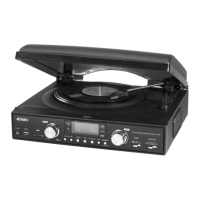
3-SPEED STEREO TURNTABLE WITH CD
AND CASSETTE MUSIC SYSTEM
USER MANUAL
JTA-475
DEAR JENSEN® CUSTOMER
Selecting fine audio equipment such as the unit you've just purchased is only the start of your
musical enjoyment. Now it's time to consider how you can maximize the fun and excitement
your equipment offers. This manufacturer and the Electronic Industries Association's
Consumer Electronics Group want you to get the most out of your equipment by playing it at a
safe level. One that lets the sound come through loud and clear without annoying blaring or
distortion and, most importantly, without affecting your sensitive hearing.
Sound can be deceiving. Over time your hearing "comfort level" adapts to higher volumes of
sound. So what sounds "normal" can actually be loud and harmful to your hearing. Guard
against this by setting your equipment at a safe level BEFORE your hearing adapts.
To establish a safe level:
PLEASE READ THIS USER MANUAL COMPLETELY BEFORE OPERATING THIS
UNIT AND RETAIN THIS BOOKLET FOR FUTURE REFERENCE.

Questions and Answers

  • K
    Kaylee JohnsonAug 17, 2025
    What to do if my Jensen JTA-475 does not turn on?
    • S
      Sherry RosarioAug 17, 2025
      If your Jensen Turntable isn't responding, first, make sure the AC cord is properly plugged into a functioning wall outlet. Try plugging another device into the same outlet to verify it's working.
  • S
    Seth SullivanAug 19, 2025
    Why is the sound distorted on my Jensen JTA-475 Turntable?
    • A
      Amanda WilliamsAug 19, 2025
      If the sound from your Jensen Turntable is distorted, try decreasing the volume. If that doesn't solve the problem, the audio source itself may be distorted, so try using a different audio source like a music CD to check.
  • L
    Louis JonesAug 22, 2025
    How to fix a Jensen JTA-475 Turntable CD player that won't play?
    • S
      Susan HarringtonAug 22, 2025
      If your Jensen Turntable CD player isn't playing, ensure that the FUNCTION switch is set to CD mode. Also, check that the CD is correctly placed on the spindle with the printed side facing up.
  • D
    Derek FernandezAug 25, 2025
    What to do if my Jensen JTA-475 Turntable CD skips?
    • L
      Lisa VelazquezAug 25, 2025
      If your Jensen Turntable CD skips while playing, it might be due to a dirty or scratched disc. Try wiping the disc with a cloth or using another disc to see if that resolves the issue.
  • J
    Jennifer SmithAug 27, 2025
    Why is the AM band so noisy on my Jensen JTA-475?
    • M
      Michael RogersAug 28, 2025
      If the AM band on your Jensen Turntable is too noisy, it might be due to poor reception at your current location. Try slightly rotating the unit to find the best reception.
  • C
    Craig RamirezAug 30, 2025
    Why does my Jensen JTA-475 Turntable get warm?
    • T
      Tamara StewartAug 30, 2025
      It is normal for the Jensen Turntable unit to get warm after playing at high volume for an extended period. You can turn the unit off for a while or lower the volume.
  • C
    Caleb WhiteSep 1, 2025
    What to do if my Jensen Turntable does not respond (no power)?
    • K
      Katrina WilsonSep 2, 2025
      If your Jensen Turntable isn't turning on, first, make sure the AC cord is properly plugged into a functioning wall outlet. If it is, try plugging another device into the same outlet to ensure the outlet is working correctly.
  • S
    Sara HullSep 4, 2025
    Why won't my Jensen JTA-475 CD player play?
    • M
      mariastoneSep 5, 2025
      If the CD player on your Jensen Turntable isn't playing, ensure that the FUNCTION switch is set to CD mode. Also, check that the CD is correctly placed on the spindle with the printed side facing up.
  • M
    Mary HaleSep 7, 2025
    What to do if Jensen JTA-475 Turntable CD skips while playing?
    • A
      Andrea DeckerSep 7, 2025
      If your Jensen Turntable's CD skips while playing, the disc may be dirty or scratched. Try wiping the disc with a cloth or using another disc to see if that resolves the issue.
  • B
    Brad HaneySep 10, 2025
    How to fix a noisy AM band on Jensen JTA-475?
    • S
      Sara GuerreroSep 10, 2025
      If the AM band on your Jensen Turntable is too noisy, the reception at your current location might be poor. Try slightly rotating the unit to find the best reception.

Summary

Jensen JTA-475 User Manual Introduction

Safe Listening Level Guidance

Guidance on setting safe audio volumes to prevent hearing damage and ensure enjoyment.

Jensen JTA-475 Safety Warnings

Important Safety Instructions

Electrical Safety and Unit Protection

Getting Started: Speaker Connection

Connecting the Main Unit Speakers

Step-by-step guide for connecting the left and right speaker wires.

Initial Setup: Power and Controls

AC Power Connection and Control Locations

Connecting the power cord and identifying the location of unit controls and indicators.

Jensen JTA-475 Control Identification

Main Unit Controls, Ports, and Remote Buttons

Labeled diagrams of unit controls, ports, and remote control buttons.

Remote Control and Battery Installation

CD Playback Operations and Features

Phonograph and Cassette Tape Playback

Troubleshooting Guide and Specifications

Common Problems, Solutions, and Technical Details

Guide to common issues, their solutions, and key technical specifications.

Warranty and Service Information

Jensen JTA-475 Specifications

General IconGeneral
TypeBelt-drive audio turntable
CD playerYes
Product colorBlack
Nominal speeds33, 45, 78 RPM
Supported radio bandsAM, FM
Headphone outputs1
Line outputs (RCA)-
USB ports quantity0
Power supply typeAC
AC adapter frequency60 Hz
AC adapter input voltage120 V
Package weight5987 g
Weight and Dimensions IconWeight and Dimensions
Product dimensions when closed (WxDxH)317.5 x 152.4 x 228.6 mm

Related product manuals