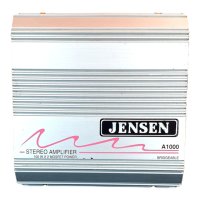
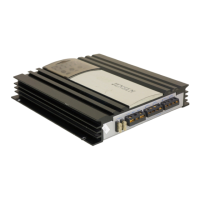
The JENSEN PA500 is a universal public address (PA) system designed for mobile applications. It can function as a standalone PA system when connected directly to speakers, or it can integrate with an existing vehicle's radio and speaker setup. This flexibility makes it suitable for various installations where public address capabilities are required.
Function Description:
The core function of the PA500 is to amplify voice for public address. When integrated with a vehicle's audio system, the PA500 connects in-line between the radio and the installed speakers. Under normal operation, the vehicle's radio functions as usual. However, when the "Push to Talk" (PTT) switch on the connected microphone is activated, the speakers are electrically disconnected from the radio and engaged with the PA system. This action mutes or overrides the radio source, allowing the microphone input to be broadcast through the vehicle's speakers.
The PA500 features a dedicated volume/gain control, allowing the user or installer to set the PA volume independently of the radio's volume. This is particularly useful for installations where the PA500 unit might be mounted in an enclosure, enabling the installer to pre-set the volume level for optimal performance.
Important Technical Specifications:
- Channels: 4 Channels
- Power Output: 25 Watts per channel, 4 ohm load
- Current Draw: 7 Amp Max.
- Frequency Response: 100-10,000 Hz
- Size (W x H x D): 3.08" x 1.85" x 4.0"
- Weight: 15 oz.
- Speaker Impedance: The system is designed for 4-ohm speaker loads. Wiring diagrams are provided for 3-pair (6 Ohm total impedance per side), 4-pair (4 Ohm total impedance per side), and 5-pair (4.8 Ohm total impedance per side) speaker configurations, ensuring compatibility with various speaker setups.
- Input/Output Wiring: The unit provides clear wiring charts for connecting to a radio (input) and speakers (output), specifying wire colors for Right Front (+/-), Left Front (+/-), Right Rear (+/-), and Left Rear (+/-) channels. The input can accept up to 4 channels from the radio, and the output supports up to 4 speakers.
- Fusing: An 8A in-line fuse is included in the power wiring to protect the unit.
Usage Features:
- Universal Compatibility: The PA500 is designed to be a universal PA system, capable of operating independently or integrating with existing radio/speaker setups.
- Microphone Activation: The system is activated via a "Push to Talk" (PTT) switch on the connected microphone, providing immediate access to the public address function.
- Independent Volume Control: A dedicated volume knob on the PA500 allows for precise adjustment of the PA volume, separate from the vehicle's radio volume. This is particularly useful for installations where the PA500 is mounted in a location that allows for easy access to the control, or for pre-setting the volume in concealed installations.
- Mounting Options:
- Panel Cutout (Optional Installation): The PA500 can be mounted through a panel, allowing the volume control and microphone input to be accessible on the dashboard or a custom panel. Dimensions for the panel cutout are provided (3.00" x 1.54" with specific corner radii and screw hole placements).
- Optional Flange Mount Installation: For "blind" locations where the unit is hidden, the PA500 can be mounted using its flanges. In such cases, the microphone volume must be pre-set by the installer.
- Microphone Compatibility: The PA500 is compatible with several JENSEN microphones, including:
- JMICHND (Hand held Microphone)
- JMICBOM (Boom Microphone)
- JMICHST (Hostess Microphone)
- JMICBOMFP (Boom Microphone with foot pedal)
- The manual also notes compatibility with older VOYAGER and JENSEN Microphones like BVMH01 and BVMH01M.
- Extension Cables: For remote microphone mounting, JENSEN offers 3 ft (P/N 1401020) and 20 ft (P/N 1401003) extension/adapter cables.
- Flexible Speaker Configurations: Detailed wiring diagrams illustrate how to connect speakers for 3-pair, 4-pair, and 5-pair configurations, ensuring proper impedance matching and sound distribution. The diagrams emphasize aligning speakers with "+" on top and "-" on bottom for correct polarity.
- Input Flexibility: The PA500 can accept input from radios with up to 4 channels, making it adaptable to various vehicle audio systems. The manual provides examples for 4-wire input to 2-speaker output configurations.
Maintenance Features:
- Troubleshooting Guide: The manual includes a troubleshooting section to assist users in diagnosing common issues:
- No audio from PA500: Possible causes include the PA not being turned on, volume set too low, a blown in-line fuse, or input/output wired backward. Solutions involve checking power, adjusting volume, replacing the fuse, or reversing wiring.
- High pitched squeal (feedback): This typically indicates the PA volume is set too high. The solution is to turn down the PA volume.
- Hand held MIC keyed and gets feedback: Similar to the above, this suggests the PA volume or MIC volume is too high. Solutions involve turning down PA or MIC volume.
- PA500 will not turn on (does not have power): The most likely cause is a blown in-line fuse on the PA. The solution is to check and replace the fuse.
- User Serviceability: The device is designed with safety in mind. A warning explicitly states, "NO USER SERVICEABLE PARTS INSIDE. REFER SERVICING TO QUALIFIED SERVICE PERSONNEL." This indicates that internal components are not meant for user access, and professional service is required for internal repairs.
- Fuse Protection: The inclusion of an in-line 8A fuse provides protection against electrical overloads, which is a key maintenance feature for preventing damage to the unit.
- Clear Wiring Diagrams: Comprehensive wiring charts and diagrams facilitate correct installation and troubleshooting of connections, reducing the likelihood of wiring errors that could lead to system malfunction.
In summary, the JENSEN PA500 is a robust and versatile public address system designed for mobile environments, offering flexible installation options, clear audio amplification, and user-friendly controls, all while emphasizing safety and ease of troubleshooting.

 Need help?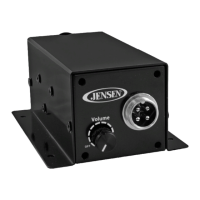

 To Next Page
 General