EasyManua.ls Logo

Jensen XA2100 - User Manual

Jensen XA2100
12 pages
Print Icon
To Next Page IconTo Next Page
Loading...
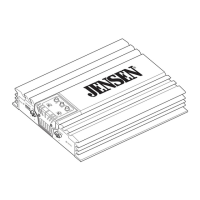
How to Install and Operate
the XA2100 Amplifier
®
Contents
Technical Assistance
For technical assistance with the operation or installation
of the XA2100, call 1-800-323-0221.
Welcome!
What you're holding in your hands is no ordinary
owner's manual. We've tried to make the instructions
in this book clear and easy to follow.
For your Jensen amplifier to work right, it must be
installed correctly. This manual will show you how to
install your new amplifier like a pro. It's a good idea to
read all of these instructions before you begin the
installation. Most installations are straightforward and
can be handled by a do-it-yourselfer with the right
tools, patience, and the ability to follow instructions.
But, do-it-yourself installation isn't for everyone. If you
still don't feel confident after reading this book,
consider turning the installation job over to someone
better suited to it.
Warranty Service
If your Jensen amplifier should ever require service,
you will need to have the original dated receipt. If you
ever need to return the unit for any reason, always
include the receipt with the product.
Features........................................ 2
Installation................................... 2
Before You Begin
Installation .....................................2
Amplifier Location ..........................2
Disconnect Battery ........................2
Amplifier Installation Kit .............2
Supplies and Tools
Needed ..........................................3
Routing Wires ................................3
Bigger is Better ..........................3
Wiring............................................. 4
Power and Outputs ........................4
Power Terminal (BATT +12V) ........4
Ground Terminal (GND).................4
Remote Terminal (RMT +12V).......4
Fuses .............................................4
Inputs and Controls .......................5
Input Wiring....................................5
Pass Output ...................................5
Power Light....................................5
Protect Light ..................................5
Input Level Control ........................6
Bass Boost.....................................6
Crossover ......................................6
Speaker Wiring ..............................7
Testing .......................................... 9
Reconnect Battery .........................9
Test Power Wiring..........................9
Test Speaker Connections ............9
Dealing with Alternator
Noise..........................................9
Installing in Trunk.....................10
Crimp Connections ..................10
Securing Wires ........................10
Speaker and
Power Wires ............................10
Troubleshooting ....................... 11
Specifications
and Warranty............................. 12
50 250
HPF
ON
OFF
BASS
-BOOST
POWER
PROTECT
HIGH INPUT
LOW
PASS OUTPUT
LR
LR
LEVEL
MIN MAX
LPF
50 250
®
HPF
LPF
FULL
X-OVER
5310_Eamp.p65 4/10/99, 7:20 PM1


Questions and Answers

  • W
    waltersmichelleAug 13, 2025
    What to do if the protect light comes on and my Jensen Amplifier shuts down?
    • J
      John ElliottAug 13, 2025
      If the Jensen Amplifier shuts down and the protect light is on, it could be due to several reasons: * The amp might be overheating. Allow it to cool down before turning it back on. Some setups, especially those with subwoofers, might need a cooling fan. * There could be a faulty speaker connection or crossover. Inspect these for loose or bad connections. * The battery voltage might be low. Ensure the amplifier is receiving between 10.8-15.6 volts, measured with a digital multimeter at the amplifier. * The speaker impedance might be too low. If using 4-ohm speakers, ensure no more than two are wired in parallel per channel. The amp cannot operate into 2 ohms bridged.
  • B
    Brett GarrettAug 16, 2025
    Why is my Jensen XA2100 Amplifier not working when the car and radio are on?
    • J
      jnelsonAug 17, 2025
      If your Jensen Amplifier does not operate and the power LED is not on when the vehicle and radio are on, it could be due to: * No power to the +12V terminal. Repair the wire or connections. * No power to the remote wire with the radio on. Check the connections to the radio with a test light. * A blown fuse. Check the fuse.
  • D
    Donna KempAug 20, 2025
    Why is there alternator whine in my Jensen XA2100 outputs?
    • J
      Joseph SmallAug 20, 2025
      If you are experiencing alternator whine in the outputs of your Jensen Amplifier (vehicle ignition noise), it could be due to: * The radio having poor noise immunity. Disconnect the audio inputs to the amplifier. If the noise disappears, the radio is at fault. * Improper ground connections. Ensure the radio and amplifier are grounded to the same point.
  • A
    April HuffAug 25, 2025
    Why does my Jensen XA2100 Amplifier keep blowing fuses?
    • G
      Gloria JohnsonAug 25, 2025
      If your Jensen Amplifier is blowing fuses, it could be due to: * Speaker wires shorting together. Separate the speaker wires and insulate them. * Power wires hooked up incorrectly. Check the power wire connections. * Speakers being blown or defective. Check the speakers.
  • A
    Adam JohnsonAug 28, 2025
    How to fix distorted sound from Jensen XA2100 Amplifier?
    • Z
      Zachary JohnsonAug 28, 2025
      If the sound from your Jensen Amplifier is distorted, the input level control might be adjusted too high. Try adjusting the input level control.
  • J
    Jessica CaldwellAug 31, 2025
    Why do I have to turn the radio volume up so high for my Jensen XA2100 to work?
    • F
      felicia87Sep 1, 2025
      If the radio volume needs to be turned up too high for the Jensen Amplifier to work, the input level control (gain control) might be adjusted too low. Try adjusting the input level control (gain control).
  • L
    lawrencemichelleSep 4, 2025
    What to do if the radio volume is too sensitive on Jensen XA2100?
    • J
      Jason RodriguezSep 4, 2025
      If the radio volume is too sensitive with your Jensen Amplifier, it means that the input level control is adjusted too high. Adjust the input level control to a lower setting.
  • S
    Shane MitchellSep 8, 2025
    Why is sound coming from only one speaker with my Jensen XA2100 Amplifier?
    • P
      Philip StanleySep 9, 2025
      If you only hear sound from one speaker with your Jensen Amplifier, it could be due to: * A defective speaker. Replace the speaker. * Poor connections to the speaker wire. Check the connections. * Speaker wires shorting together. Separate the speaker wires and insulate them. * A defective RCA input cable. Replace the cable.

Summary

Installation

Disconnect Battery

Emphasizes the critical safety step of disconnecting the battery before installation.

Supplies and Tools Needed

Routing and Securing Wires

Wiring Connections

Power and Outputs Connections

Explains how to connect the main power, remote, and speaker outputs.

Power Terminal (BATT +12 V)

Details the connection to the vehicle's battery positive terminal.

Ground Terminal (GND)

Describes how to establish a secure ground connection to the vehicle chassis.

Remote Terminal (RMT +12 V)

Explains connecting the remote turn-on wire from the receiver.

Fuses

Specifies the type and rating of the fuse required for the amplifier.

Inputs and Controls

Speaker Wiring Configurations

Testing and Troubleshooting

Test Power Wiring

Outlines steps to verify correct power and remote turn-on connections.

Test Speaker Connections

Provides methods to check if speakers are wired correctly and functioning.

Troubleshooting Common Problems

Lists common issues, their possible causes, and corrective actions for the amplifier.

Specifications

Jensen XA2100 Specifications

Power IconPower
power output at 14.4 VDC (4 ohms)50 Watts per channel RMS
power output at 14.4 VDC (2 ohms)83 Watts per channel RMS
power output at 14.4 VDC (4 ohms bridged)150 Watts per channel RMS
power requirement14.4 VDC (10.8-15.6 VDC allowable)
fuse requirements15 amp blade-type fuse
Audio Specifications IconAudio Specifications
frequency response20 Hz-20 kHz ± 3 dB
signal to noise ratio at rated power>100 dB
channel separation at reference power>65 dB, 1 kHz
THD & IMD at reference power into 2 ohms<0.1%
Input and Output Impedance IconInput and Output Impedance
speaker impedance2-8 ohms
input impedance20 k ohms
crossover frequencies50-250 Hz
Weight and Dimensions IconWeight and Dimensions
dimensions2.25" x 11.125" x 7.5" (56.5mm x 282mm x 190mm)

Related product manuals