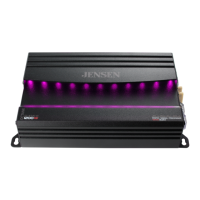
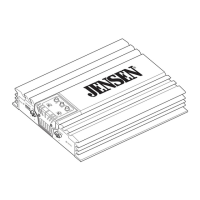
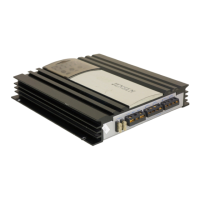
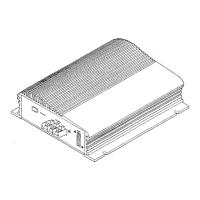
The Jensen Octane Power Amplifier, available in models XDA91RB, XDA92RB, and XDA94RB, is a Class-D amplifier designed to enhance a vehicle's audio system. This series of amplifiers is engineered for high performance and offers various configurations to suit different audio setups, from mono subwoofer applications to multi-channel speaker systems. The installation and owner's manual provides comprehensive guidance for setup, operation, and troubleshooting.
Function Description:
The Octane Power Amplifier serves as a central component in a car audio system, boosting the low-level audio signals from a head unit to drive speakers or subwoofers with increased power and clarity. It features a Digital Signal Processor (DSP) that allows for advanced audio customization and control via a dedicated smartphone or tablet application. The amplifier is designed to operate with both low-level (RCA) and high-level (speaker wire) input signals, offering flexibility for integration with various head units, including factory-installed systems.
Key functions include:
- Power Amplification: Delivers significant power output to speakers or subwoofers, improving sound quality and volume.
- DSP Control: Enables precise adjustment of audio settings such as crossovers, equalization (EQ), and RGB lighting directly from a mobile device.
- Crossover Functionality: Allows users to filter out unwanted frequencies, directing specific frequency ranges to appropriate speakers (e.g., Low-Pass Filter for subwoofers, High-Pass Filter for midrange/tweeters).
- Bass Boost: Provides an adjustable boost at 45Hz for enhanced low-frequency response, particularly beneficial for subwoofers.
- EQ Presets and Customization: Offers pre-defined EQ settings (Classic, Pop, Rock, Jazz) and the ability to create custom EQ profiles.
- RGB Color Control: Manages the amplifier's illumination, allowing users to turn it on/off or select single/multiple colors.
- Protection Circuitry: Features a "PROTECT" indicator (red LED) that illuminates when the amplifier detects a fault, safeguarding against damage.
Important Technical Specifications:
XDA91RB (Mono Power Amplifier):
- Power Output (RMS):
- 240 Watts x 1 channel @ 4 Ohms
- 400 Watts x 1 channel @ 2 Ohms
- 600 Watts x 1 channel @ 1 Ohm
- Peak Music Power Output: 1200 Watts
- Signal to Noise Ratio: 68dBA (reference: 1 Watt into 4 Ohms)
- Frequency Response: 20Hz-250Hz
- Amplifier Dimensions: 2.16" (H) x 9.56" (W) x 5.59" (D)
- Crossover Mode: LPF only
XDA92RB (2-Channel Power Amplifier):
- Power Output (RMS):
- 80 Watts x 2 channels @ 4 Ohms
- 120 Watts x 2 channels @ 2 Ohms
- 240 Watts x 1 channel @ 4 Ohms (bridged)
- Peak Music Power Output: 600 Watts
- Signal to Noise Ratio: 68dBA (reference: 1 Watt into 4 Ohms)
- Frequency Response: 20Hz-20kHz
- Amplifier Dimensions: 2.16" (H) x 6.57" (W) x 5.59" (D)
- Crossover Modes: LPF, HPF, FULL
XDA94RB (4-Channel Power Amplifier):
- Power Output (RMS):
- 80 Watts x 4 channels @ 4 Ohms
- 120 Watts x 4 channels @ 2 Ohms
- 240 Watts x 2 channels @ 4 Ohms (bridged)
- Peak Music Power Output: 1000 Watts
- Signal to Noise Ratio: 68dBA (reference: 1 Watt into 4 Ohms)
- Frequency Response: 20Hz-20kHz
- Amplifier Dimensions: 2.16" (H) x 8.38" (W) x 5.59" (D)
- Crossover Modes: LPF, HPF, FULL
General Specifications:
- Minimum Impedance Load: 2 ohms stereo, 4 ohms bridged.
- Power/Protect LED: Blue for normal operation (POWER), Red for fault detection (PROTECT).
- Fuses: Dual 25A fuses for power protection.
- Input Signal: Low-level (RCA) or High-level (speaker wire).
- Bluetooth Connectivity: For app control only; does not support audio streaming or hands-free calls.
Usage Features:
- Flexible Mounting: Can be mounted horizontally or vertically, with a recommendation for at least 1" of space around all sides for optimal airflow.
- App Control: The Jensen Octane DSP Amplifier Controller app (available on Apple App Store and Google Play Store) provides a user-friendly interface for adjusting all amplifier settings, including X-Over, EQ, RGB Light Customization, and Volume.
- Bluetooth Pairing: Simple pairing process via the app to connect and control the amplifier.
- Input Level Control (Gain): Allows matching the amplifier's input sensitivity to the head unit's output for optimal sound without distortion.
- Multiple Wiring Configurations: Supports stereo, bridged, or stereo/bridged simultaneous operation, depending on the amplifier model and speaker setup.
- Clear Indicators: Power/Protect LEDs provide visual feedback on the amplifier's operational status.
Maintenance Features:
- Troubleshooting Guide: The manual includes a comprehensive troubleshooting section to help diagnose and resolve common issues such as no power, no sound, blown fuses, engine noise, distorted audio, and low audio output.
- Protection Circuitry: The amplifier's built-in protection system (indicated by the red PROTECT LED) helps prevent damage from faults like shorted speaker wires, defective speakers, or incorrect impedance loads.
- Fuse Protection: Equipped with replaceable fuses to protect the vehicle's electrical system and the amplifier itself from overcurrents.
- Installation Guidelines: Detailed instructions for proper wiring (power, ground, remote turn-on, speaker, and input signals) are provided to ensure safe and optimal performance, minimizing potential issues like noise or damage.
- Warranty: A one-year limited warranty covers defects in material and workmanship, with clear instructions on how to obtain service if needed.
- Customer Support: Contact information for customer support (toll-free number and email) is provided for assistance with installation or troubleshooting.



 To Next Page
 General