7
UV9
EJECT 23 Ejects disc Ejects disc Ejects disc Ejects disc
24 Decreases monitor tilt
angle
Decreases monitor tilt
angle
Decreases monitor tilt
angle
Decreases monitor tilt
angle
25 Increases monitor tilt angle Increases monitor tilt angle Increases monitor tilt angle Increases monitor tilt angle
DISP 26 Selects display mode:
FULL or NORMAL
Selects display mode:
FULL or NORMAL
1, 2, 3, 4, 5,
6, 7, 8, 9, 0
(Numeric
Keypad)
27 Directly accesses chapter 1-6 selects preset for cur-
rent band
Directly accesses track
CLEAR 28 Delete entry or move back-
wards to correct error in
Direct Access mode
Delete entry or move back-
wards to correct error in
Direct Access mode
Delete entry or move back-
wards to correct error in
Direct Access mode
Delete entry or move back-
wards to correct error in
Direct Access mode
SETUP 29 Displays Setup menu Displays Setup menu Displays Setup menu Displays Setup menu
SCAN 30 Plays the first ten seconds
of each track
OPEN/
CLOSE
31 Opens/closes the TFT
monitor
Opens/closes the TFT
monitor
Opens/closes the TFT
monitor
Opens/closes the TFT
monitor
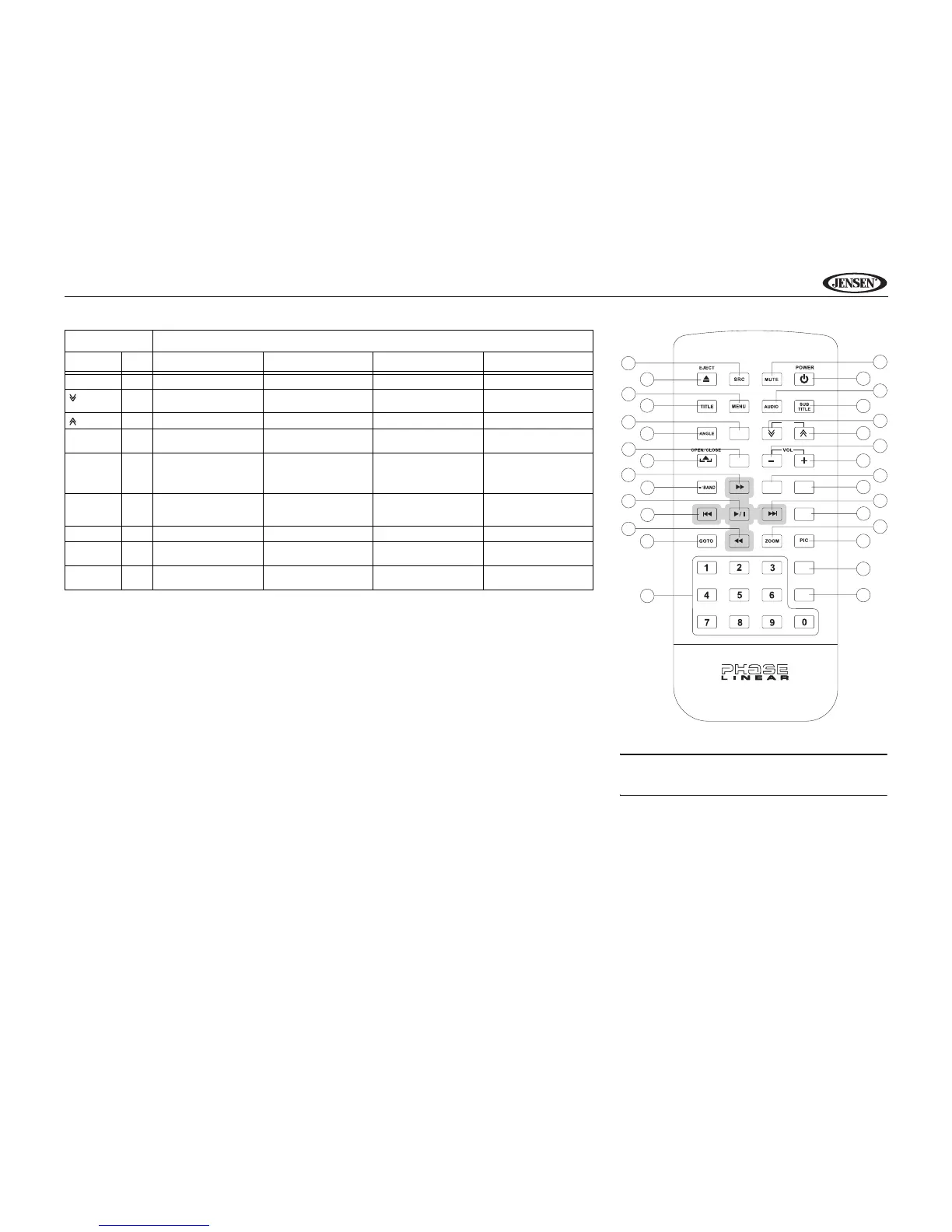
Table 1: Remote Control Functions
Button Function
Name Ref# DVD VCD TUNER CD/MP3/USB
30
8
23
1
2
10
11
31
12
18
16
15
20
19
27
DISP
SLOW
REPT
A-B
CLEAR
SETUP
TILT
3
4
5
9
24
25
13
14
17
21
22
29
28
26
WIDE
6
7
REPT
SERIES
NOTE: Your remote control may differ slightly from the
one pictured here. The above diagram is for illustrative
purposes only.



 To Next Page