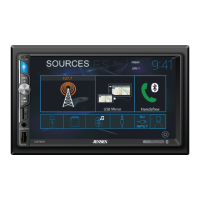
The Jensen VM9212 is a mobile multimedia receiver designed for in-car entertainment and navigation. It features a motorized flip-out/flip-up 7-inch TFT active matrix LCD screen with anti-glare coating, offering a clear visual interface for various media functions. The unit is a 1.0 DIN chassis, making it suitable for import or ISO-DIN mounting.
Function Description:
The VM9212 serves as a central hub for multimedia in a vehicle, supporting a wide range of audio and video formats. It includes a DVD/CD player compatible with DVD, VCD, CD-DA, MP3, and WMA discs, allowing users to enjoy movies, music, and digital audio files. The DVD player supports various aspect ratios (Full and Normal) and offers features like fast forward (2X, 4X, 8X, 32X), slow motion (1/2, 1/4, 1/6, 1/7), and chapter/track navigation. For CD/MP3/WMA playback, it supports CD-Text and ID3 Tag display, directory search, direct track access via remote control, audible forward/reverse track search, random play, repeat, and intro scan.
The integrated tuner provides access to AM/FM radio with USA and Europe frequency spacing, 30 station presets (18 FM / 12 AM), auto stereo/mono selection, and an auto store function for strong stations.
Connectivity options are extensive, with two composite video outputs for additional screens, and two audio/video auxiliary inputs for connecting external devices like game consoles, camcorders, or navigation systems. It also features a rear camera input, which can display normal or mirror image views, enhancing safety during parking or reversing.
Audio control is comprehensive, offering a three-band tone control (Bass, Mid, Treble) with eight preset EQ curves, front, rear, and subwoofer line outputs, and a subwoofer phase control (0-180 degrees). A programmable volume control allows for customized audio levels.
Usage Features:
The device is operated through a combination of front panel buttons, a rotary encoder, a 5-way joystick, and a 44-key infrared remote control.
TFT Monitor Operation: The motorized TFT monitor can be opened and closed using dedicated buttons on the front panel or remote control. It also features an "Auto Open" function, which can be configured to automatically open the monitor when the unit is turned on. The tilt angle of the screen can be adjusted in steps or continuously using the joystick or remote control buttons, allowing users to optimize viewing based on their seating position. The display aspect ratio can be toggled between Full, Normal, and Standby modes.
Parking Brake Safety Feature: For safety, video display on the front TFT monitor is inhibited unless the parking brake sequence is correctly engaged. This sequence involves engaging and disengaging the parking brake within a specific time window to activate video playback, adhering to federal law.
Audio Control: The audio control menu, accessed via the AUDIO button, allows users to fine-tune sound settings. This includes adjusting Bass, Mid, Treble, Subwoofer levels, and Fader/Balance. Preset EQ curves like Rock, Hip Hop, Dance, Latin, Rave, Urban, and Acoustic are available, or users can customize settings in "User" mode.
System Reset: In case of a system halt or illegal operation, a reset button on the front panel can restore factory default settings, except for password and parental lock settings.
Source Selection: The SRC button on the front panel or remote control allows users to switch between various playing modes, including AM/FM, DISC, AUX IN1, AUX IN2, SAT, and CAMERA.
Tuner Operation: Radio stations can be selected through seek tuning (auto-search), manual tuning (step-by-step frequency adjustment), or direct tuning by entering the frequency using the on-screen number pad or remote control. Up to 30 stations can be stored as presets.
DVD/VCD Video Playback: Users can navigate through chapters/tracks, fast forward or slow motion, and access the DVD menu. The "Goto Search" feature allows direct access to specific titles, chapters, or time frames. For DVDs with multiple angles, the ANGLE button toggles between available camera views. The ZOOM function allows enlarging and panning through video images. Multi-language discs support changing audio and subtitle languages. VCDs with Play Back Control (PBC) offer additional navigation options.
CD/MP3/WMA Audio Playback: The unit supports various playback modes like repeat (single, folder, or off) and random play. Tracks can be skipped forward or backward, and fast forward/rewind functions are available. Direct track entry is possible using the on-screen number pad or remote control.
Hardware Sub-menu: This menu allows configuration of features like "Camera In" (Normal/Mirror) and "TFT Auto Open" (On/Off/Manual). If a rear-view camera is connected, the monitor can automatically switch to camera mode when reverse gear is engaged.
Rating Sub-menu: A parental lock feature for DVDs allows restricting content based on rating levels, requiring a 4-digit password for access.
TS Cal (Screen Calibration): A touch screen calibration function is available to ensure accurate touch response.
Maintenance Features:
The manual provides guidelines for care and maintenance to ensure the longevity and optimal performance of the VM9212.
Cleaning: Only a clean silicone cloth and neutral detergent should be used to clean the front panel or monitor to prevent scratching or discoloration. Water or cleaning fluids should not get into the unit.
Temperature Considerations: If the internal temperature of the player becomes too hot, a protective circuit will stop disc play. The unit should be allowed to cool before resuming operation. In cold or damp conditions, condensation may appear on the LCD panel, affecting operation until the moisture evaporates.
Disc Handling: Users are advised to only insert 5-inch (12 cm) compact discs into the player. 3-inch (8 cm) CD-Single discs, even with an adapter, should not be used to prevent damage to the player and disc. The manual also recommends using a cleaning disc more frequently than with home units due to the environmental conditions in a vehicle.
Disc Compatibility: For CD-RW discs, it is recommended to format them using the full method, not the quick method, to prevent illegal disc operation. When burning MP3/WMA files onto a DVD disc, using slower burning speeds (2X or 4X) is advised to minimize buffer errors and improve disc reading reliability. Using folders for large numbers of songs/files is also recommended for easier navigation. The "Disc at Once" option should be selected when closing the disc.
Troubleshooting: The manual includes a comprehensive troubleshooting section to help users diagnose and resolve common issues related to power, remote control, audio output, TFT monitor operation, tuner performance, and disc playback errors. This includes advice on checking fuses, wiring connections, battery status, speaker integrity, and system settings.



 To Next Page
 General