3 PROGRAMMING OF THE BUS SENSORS
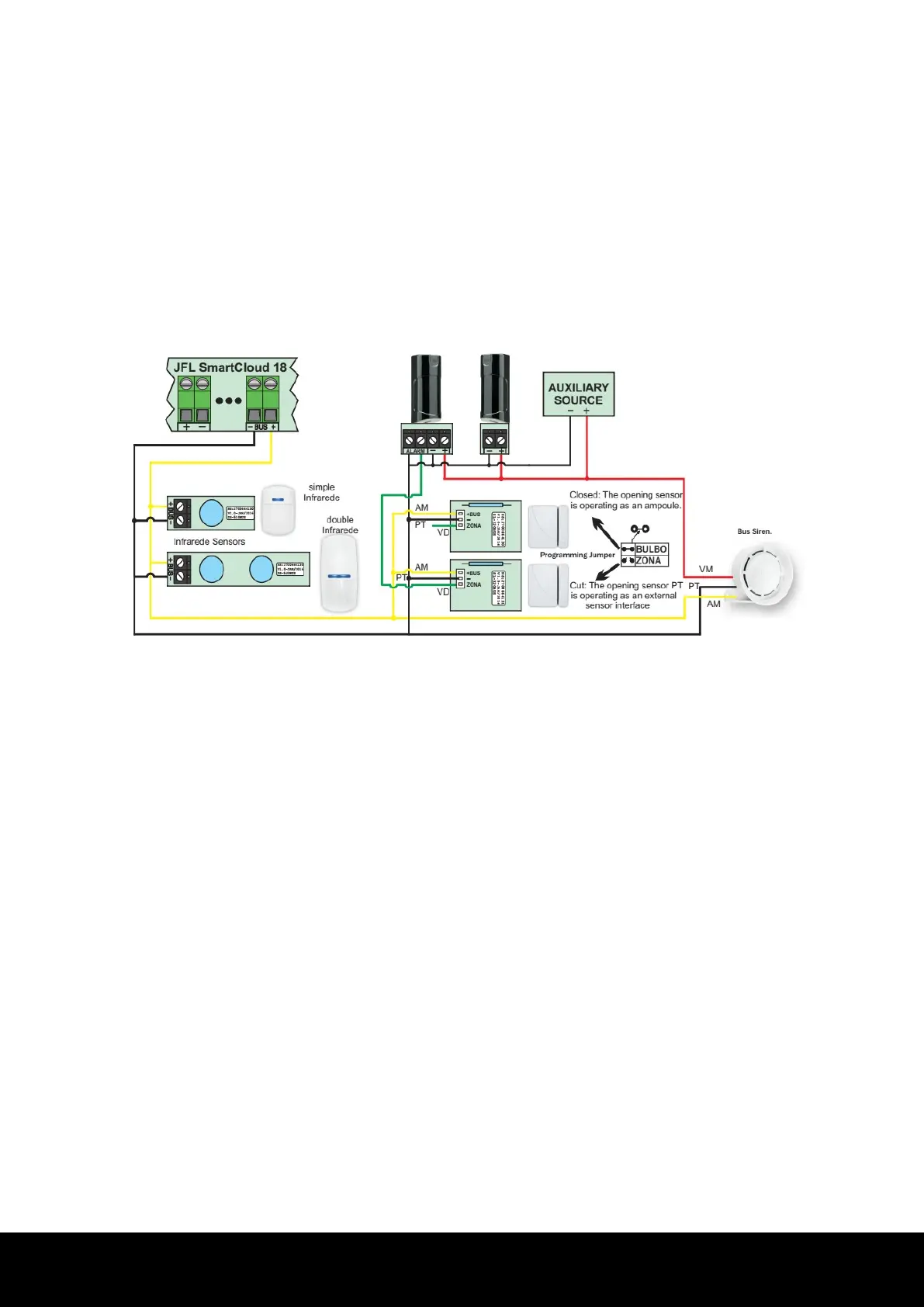
The JFL SmartCloud 18 central unit offers the bus technology, which allows increasing the
sector capacity using only one pair of wires. It is possible to add 18 bus devices, with 16 being
sensors and 2, sirens. The operation zones of the sensors may be sequential or random,
allowing the recording of 16 sensors in one zone or one sensor per zone. To program them, it
is necessary to connect the device to the bus, interconnecting them on the - BUS + terminals.
Infrared and opening sensors are powered by the bus itself. In the case of the siren, it is
necessary also to use an auxiliary source (figure below).
After connecting the devices to the bus, their LEDs remain flashing while they are not learned
and recognized by the central unit. When recognized, the LEDs turn off and only turn on in
case of motion detection (sensors) or when there is a triggering of the central unit (siren).
Each device has a serial number engraved on a tag, used to register the device on the central
unit. There are two ways of programming these devices: conventional method or serial
method. The conventional method uses resources of the central unit itself (remote control
and programar button), while the serial method uses the Cloud line programmer software.
Below, we have the procedure for each one.
-Conventional method:
1-With the devices connected, turn on the central unit and await its initialization;
2-Once the bus is initialized, the recorded devices flash the LED waiting to be recognized by
the central unit, while the non-registered sensors flash the LED waiting to be learned;
3-Press and release the programar button, then trigger the tamper for the infrared sensor or
move away the magnet for an opening sensor. At this moment, the sensor sends a
communication to the central unit, informing its serial number. The central unit detects the
serial number and issues a beep of the siren (SIR out);
4-At this moment, the central unit waits for the user to define the type of zone and the area
of operation (see item 5). With a recorded remote control, press and release one of the
buttons to define the operation area. Next, with the same button, chose the zone type by
following the signaling of the barramento LED (table below). For each transmission of the
remote control, the central unit issues a beep of the siren (SIR out) and alters the signaling of
the barramento LED.
4


 To Next Page