5-To finalize the recording of the bus sensor, press and release the programar button (the
central unit issues 2 beeps of the siren).
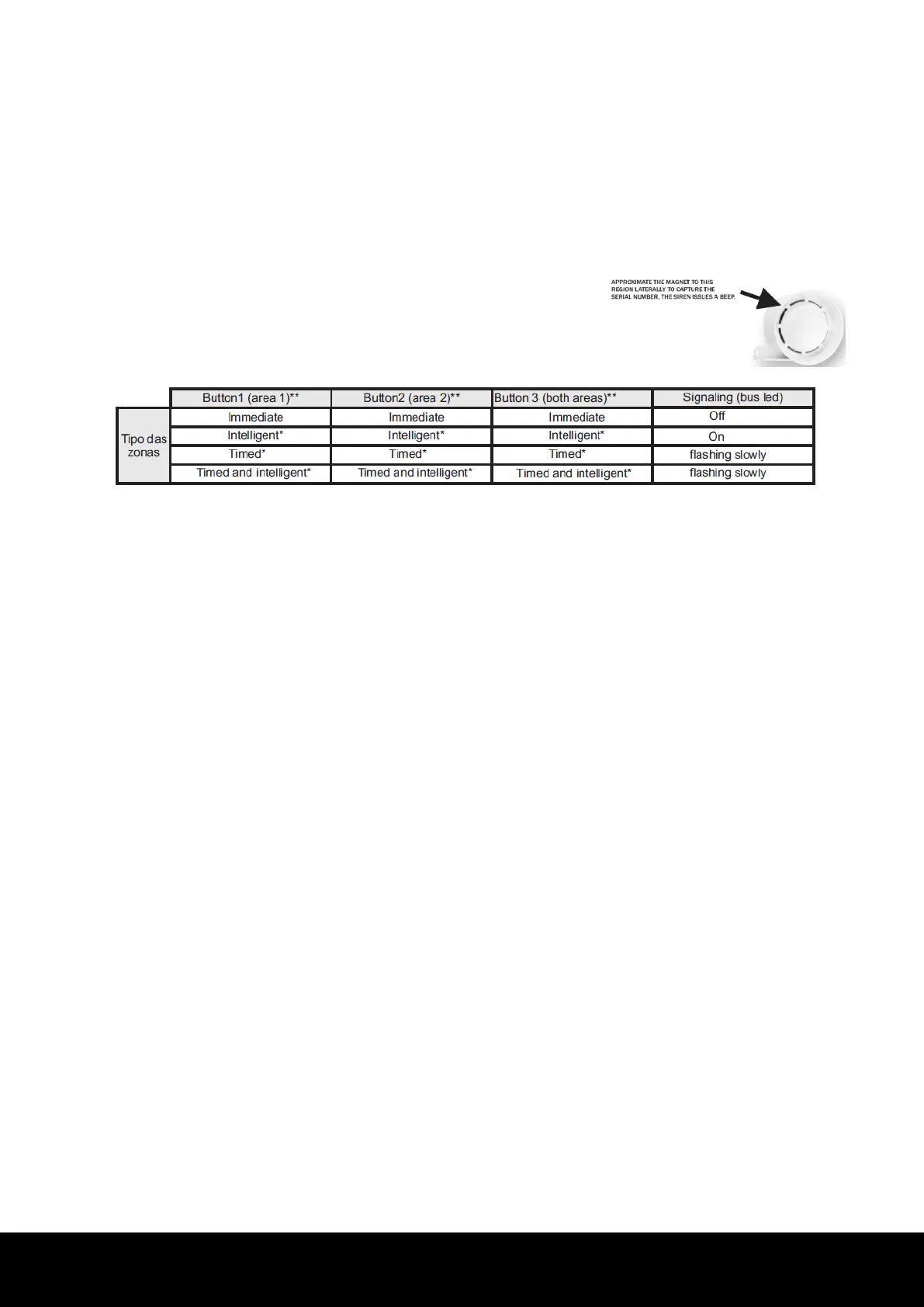
6-To program the bus siren, press and release the programar button. Next, approximate a
magnet to the siren according to the image on the side. The bus siren issues a beep, and the
central unit detects the serial number of the device and confirms with 2 beeps of the siren (SIR
out).
7-To erase the devices, enter the programming mode (item 8). Press and hold the aprender
button for 7 seconds until the LED turns off. Release the aprender key; the central unit issues 2
beeps of the siren (SIR out) and erases all devices recorded on the memory.
See item 13.
** To enable the divided mode, see item 5.
Obs.:
• The sensitivity of the bus sensors in the conventional mode is medium (02). To change it,
it is necessary to access the central unit through the Cloud line programmer software
(serial method).
The operation zone of each bus device in the conventional mode is sequential, i.e., the 1st
sensor recorded represents zone 3, the 2nd sensor recorded, zone 4, successively, with the
same for the bus siren.
-Serial method:
1-Download the Cloud line programmer software and the driver of the programmer cable from
the website www.jfl.com.br and install them on the computer.
2-Open the Cloud line programmer and follow the instructions of the HELP field to connect the
central unit.
3-When the bus is initialized, the recorded devices flash the LEDs waiting to be recognized by
the central unit, while the non-registered sensors flash the LED waiting to be learned.
4-Access the "bus devices" field and register them by typing the serial number of each sensor
or siren and send the programming.
5-Verify the initialization of the devices.
4 ARMING AND DISARMING OF THE CENTRAL UNIT
There are three ways to arm and disarm the central unit: by remote control, through the on inlet,
and through the application.
Remote Control: Press and release a programmed button of the remote control; with this, the
armado LED turns on, and the siren* issues 2 beeps indicating that the central unit is armed.
After the armed central unit signaling, two more short beeps may occur. This signaling indicates
a problem has been detected: either the low battery of a wireless device (sensor or remote
control), lack of electric power (BATTERY LED), or a bus sensor supervision issue. Tovisualize
5


 To Next Page